

In this article we will be seeing how to retrieve the crawl log values for a
content source from search service application in SharePoint 2010.
If you go to Central Administration => Application Management => Manage
service applications => Search Service Application => Crawling => Crawl Log
you could see all the content sources.

C# code:
- Open Visual Studio 2010.
- Go to File => New => Project.
- Select Console Application from the installed templates.
- Enter the Name and click Ok.
- Add the following references.
o Microsoft.SharePoint.dll
o Microsoft.Office.Server.dll
o Microsoft.Office.Server.Search.dll
- Add the following namespaces.
o using Microsoft.Office.Server.Search.Administration;
o using Microsoft.Office.Server;
o using Microsoft.SharePoint;
- Replace the code with the following.
// search service application name
string ssaName = "Search Service Application";
SearchContext context = SearchContext.GetContext(ssaName);
Content ssaContent = new Content(context);
ContentSourceCollection ssaContentSources = ssaContent.ContentSources;
ContentSource cs = ssaContentSources["Local SharePoint Sites"];
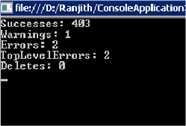
Console.WriteLine("Successes: " + cs.SuccessCount.ToString());
Console.WriteLine("Warnings: " + cs.WarningCount.ToString());
Console.WriteLine("Errors: "+cs.ErrorCount.ToString());
Console.WriteLine("TopLevelErrors: " + cs.LevelHighErrorCount.ToString());
Console.WriteLine("Deletes: " + cs.DeleteCount.ToString());
Console.ReadLine();
- Build the solution.
- Hit F5.
Join the conversation! Your thoughts help the community grow.