

Introduction:
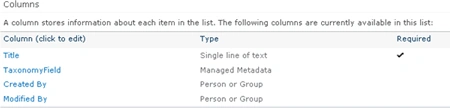
I have created a custom list which contains the following columns
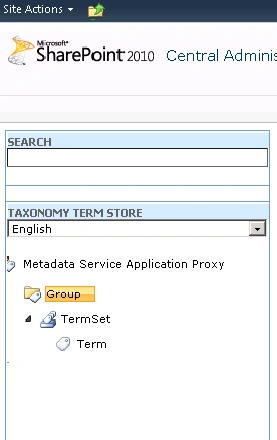
I have the following Group, Term Set and Terms in the term store
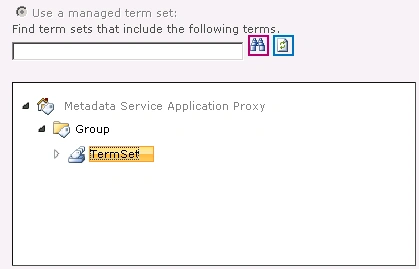
Term Set Settings for TaxonomyField:
Steps Involved:
- Open Visual Studio 2010.
- On the File Menu, click on New and then click on Project.
- Select Console Application template from Installed templates.
- Check whether the project is targeted to .Net Framework 3.5.
- Enter the Name for the project and then click on Ok.
- Right click on the project and then click on Properties.
- Click on Build tab, and check whether the Platform Target is selected as Any CPU.
- Add the following references.
- Microsoft.SharePoint.dll
- Microsoft.SharePoint.Taxonomy.dll
- Add the following namespaces.
- Using Microsoft.SharePoint;
- Using Microsoft.SharePoint.Taxonomy;
- Replace Program.cs with the following
code.
using System;
using System.Collections.Generic;
using System.Linq;
using System.Text;
using Microsoft.SharePoint;
using Microsoft.SharePoint.Taxonomy;namespace ConsoleApplication4
{
class Program
{
static void Main(string[] args)
{
using (SPSite site = new SPSite("http://serverName:25374/sites/TeamEng02/"))
{
using (SPWeb web = site.OpenWeb())
{
TaxonomySession taxonomySession=new TaxonomySession (site);
TermStore termStore=taxonomySession.TermStores["Metadata Service Application Proxy"];
Group group=termStore.Groups["Group"];
TermSet termSet=group.TermSets["TermSet"];
Term term=termSet.Terms["Term"];
SPList list = web.Lists.TryGetList("Test");
if (list != null)
{
TaxonomyField taxonomyField = list.Fields["TaxonomyField"] as TaxonomyField;
TaxonomyFieldValue taxonomyFieldValue = new TaxonomyFieldValue(taxonomyField);
taxonomyFieldValue.TermGuid = term.Id.ToString();
taxonomyFieldValue.Label = term.Name;
SPListItem item = list.Items.Add();
item["Title"] = "Sample";
item["TaxonomyField"] = taxonomyFieldValue;
item.Update();
list.Update();
}
else
{
Console.WriteLine(list.Title + " does not exists in the list");
}
Console.ReadLine();
}
}
}
}
- Build the solution.
- Hit F5.
- Go to the custom list, a new item will be
created successfully.

Conclusion:
Thus value is successfully added to the taxonomy field using SharePoint Object
Model.
Perla NavaPosted Sep 11, 2018, 6:51 PM
Im trying to set value to my KeyWord and my code is just adding the keyword to the termset but does not show up in my SPList,
Kumaresh RajalingamPosted Mar 24, 2016, 9:59 AM
Nice one sir
Gowtham RajamanickamPosted May 2, 2015, 4:50 AM
good
Raja SekarPosted May 10, 2012, 6:29 AM
thank you...
DavidPosted Aug 25, 2011, 2:47 PM
This article is great. Unfortunately, our company is using heirarchical metadata, and your app above only covers the first level of heirarchy. I have been searching the net for days with no luck on how to add heirarchical metadata programmatically. Do you have any suggestions?