

Here is Part 1
Introduction:
In SharePoint 2010, we can get the list data using SharePoint object model,
client object model or LINQ to SharePoint, we can also get the list data from
listdata.svc. We can get the list data from listdata.svc using REST
(Representational State Transfer). We can construct URLs in various manners to
get specific records, do joins, or perform simple queries. ListData.svc web
service will be available in _vti_bin folder of the SharePoint site.
In this article we will be seeing how to create, read, update and delete the
list data using REST API.
- Read the list data.
- Create a new list data.
- Update the list data.
- Delete the list data.
I have a team site "VJ Testing" which has the
"Tasks" list. I am going to read, update, create and delete the data from the
"Tasks" list.
Read the list data:
- Open Visual Studio 2010.
- Go to File => New => Project.
- Select the Console Application template from the installed templates and enter the name
- Click on Ok.
- Add the Service Reference:
- Right click on References folder.
- Click on "Add Service Reference".

- Enter the listdata.svc url and click on Go.
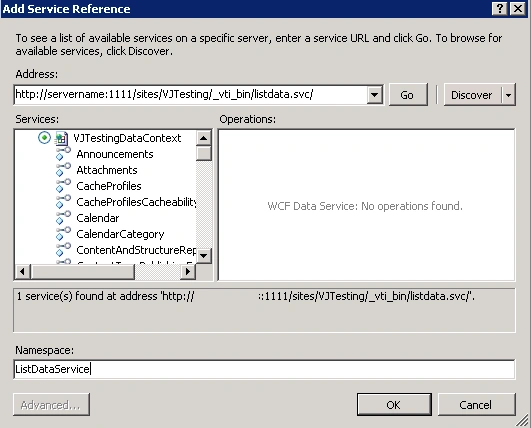
- Enter the namespace and click on Ok.
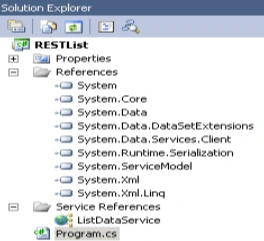
- Service Reference will be added successfully.
- Solution explorer looks like the following.
- Add the following namespace
using RESTList.ListDataService;
- Replace Program.cs with the following
code.
using System;
using System.Collections.Generic;
using System.Linq;
using System.Text;
using RESTList.ListDataService;
using System.Net;namespace RESTList
{
class Program
{
static void Main(string[] args)
{
VJTestingDataContext dataContext = new VJTestingDataContext(new Uri("http://servername:1111/sites/VJTesting/_vti_bin/listdata.svc/"));
dataContext.Credentials = CredentialCache.DefaultNetworkCredentials;
var result = from items in dataContext.Tasks select new { Title = items.Title, };
foreach (var item in result)
Console.WriteLine(item);
Console.ReadLine();
}
}
}
- Build the solution.
- Hit F5.
Create a new list data:
- Replace Program.cs with the following
code.
using System;
using System.Collections.Generic;
using System.Linq;
using System.Text;
using RESTList.ListDataService;
using System.Net;namespace RESTList
{
class Program
{
static void Main(string[] args)
{
VJTestingDataContext dataContext = new VJTestingDataContext(new Uri("http://ctsinmbpmoss:1111/sites/VJTesting/_vti_bin/listdata.svc/"));
dataContext.Credentials = CredentialCache.DefaultNetworkCredentials;
TasksItem taskItem = new TasksItem();
taskItem.Title = "Task3";
dataContext.AddToTasks(taskItem);
dataContext.SaveChanges();
}
}
}
Update the list data:
- Replace Program.cs with the following
code.
using System;
using System.Collections.Generic;
using System.Linq;
using System.Text;
using RESTList.ListDataService;
using System.Net;namespace RESTList
{
class Program
{
static void Main(string[] args)
{
VJTestingDataContext dataContext = new VJTestingDataContext(new Uri("http://servername:1111/sites/VJTesting/_vti_bin/listdata.svc/"));
dataContext.Credentials = CredentialCache.DefaultNetworkCredentials;
TasksItem taskItem = dataContext.Tasks.Where(i => i.Title == "Task1").FirstOrDefault();
taskItem.Title = "NewTask";
dataContext.UpdateObject(taskItem);
dataContext.SaveChanges();
}
}
}
Delete the list data:
- Replace Program.cs with the following
code.
using System;
using System.Collections.Generic;
using System.Linq;
using System.Text;
using RESTList.ListDataService;
using System.Net;namespace RESTList
{
class Program
{
static void Main(string[] args)
{
VJTestingDataContext dataContext = new VJTestingDataContext(new Uri("http://servername:1111/sites/VJTesting/_vti_bin/listdata.svc/"));
dataContext.Credentials = CredentialCache.DefaultNetworkCredentials;
TasksItem taskItem = dataContext.Tasks.Where(i => i.Title == "NewTask").FirstOrDefault();
dataContext.DeleteObject(taskItem);
dataContext.SaveChanges();
}
}
}
Venkatesh RPosted Sep 19, 2018, 4:42 PM
"VJTestingDataContext" Where this class is defined?
George MasielloPosted Sep 20, 2016, 3:31 PM
Dear Sir, This is a excellent and helpful article. I get an error without detail on savechanges() . Do you have any suggestion?
SayanPosted Jul 2, 2014, 5:45 AM
when i want to add service references, and perss go button it found for me. but after second show me this error: "the custom tool 'dataserviceclientgenerator' failed. data service client code-generation failed, schema specified is not valid. error 0017"