

In this article we will be seeing about search scopes in SharePoint 2010.|
In this article:
- Get all the search scopes
- Modify a search scope
- Delete a scope
- Get all the rule types of a particular scope
- Create a custom scope
- Create All content rule
Get all the search scopes:
using
System;
using
System.Collections.Generic;
using
System.Linq;
using
System.Text;
using
Microsoft.SharePoint;
using
Microsoft.Office.Server;
using
Microsoft.Office.Server.Search.Administration;
namespace
SearchScopes
{
class Program
{
static void
Main(string[] args)
{
string ssa =
"Search Service Application";|
SearchContext searchContext =
SearchContext.GetContext(ssa);
Scopes scopes =
new Scopes(searchContext);
foreach (Scope
scope in scopes.GetSharedScopes())
{
Console.WriteLine(scope.Name);
}
Console.ReadLine();
}
}
}
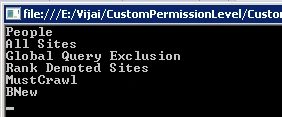
Modify a search scope:
using
System;
using
System.Collections.Generic;
using
System.Linq;
using
System.Text;
using
Microsoft.SharePoint;
using
Microsoft.Office.Server;
using
Microsoft.Office.Server.Search.Administration;
namespace
SearchScopes
{
class Program
{
static void
Main(string[] args)
{
string ssa =
"Search Service Application";
SearchContext searchContext =
SearchContext.GetContext(ssa);
Scopes scopes =
new Scopes(searchContext);
Scope scope =
scopes.GetSharedScope("B");
scope.Name = "BNew";
scope.Description = "Modified scope";
scopes.Update();
}
}
}

Delete a scope:
using
System;
using
System.Collections.Generic;
using
System.Linq;
using
System.Text;
using
Microsoft.SharePoint;
using
Microsoft.Office.Server;
using
Microsoft.Office.Server.Search.Administration;
namespace
SearchScopes
{
class Program
{
static void
Main(string[] args)
{
string ssa =
"Search Service Application";
SearchContext searchContext =
SearchContext.GetContext(ssa);
Scopes scopes =
new Scopes(searchContext);|
Scope scope =
scopes.GetSharedScope("A");
scope.Delete();
}
}
}
Get all the rule types of a particular scope:
using
System;
using
System.Collections.Generic;
using
System.Linq;
using
System.Text;
using
Microsoft.SharePoint;
using
Microsoft.Office.Server;
using
Microsoft.Office.Server.Search.Administration;
namespace
SearchScopes
{
class Program
{
static void
Main(string[] args)
{
string ssa =
"Search Service Application";
SearchContext searchContext =
SearchContext.GetContext(ssa);
Scopes scopes =
new Scopes(searchContext);
Scope scope =
scopes.GetSharedScope("BNew");
foreach (ScopeRule
rule in scope.Rules)
{
Console.WriteLine(rule.RuleType.ToString());
}
Console.ReadLine();
}
}
}
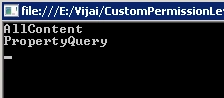
Create a custom scope:
using
System;
using
System.Collections.Generic;
using
System.Linq;
using
System.Text;
using
Microsoft.SharePoint;
using
Microsoft.Office.Server;
using
Microsoft.Office.Server.Search.Administration;
namespace
SearchScopes
{
class Program
{
static void
Main(string[] args)
{
string ssa =
"Search Service Application";
SearchContext searchContext =
SearchContext.GetContext(ssa);
Scopes scopes =
new Scopes(searchContext);
Scope newScope =
scopes.AllScopes.Create("CustomScope",
"Custom Scope", null,
true, null,
ScopeCompilationType.AlwaysCompile)
scopes.Update();
}
}
}
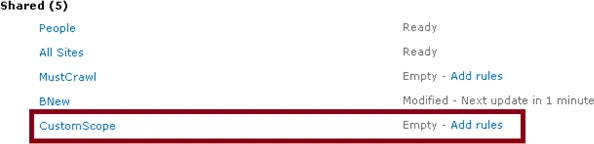
Create All content rule:
using
System;
using
System.Collections.Generic;
using
System.Linq;
using
System.Text;
using
Microsoft.SharePoint;
using
Microsoft.Office.Server;
using
Microsoft.Office.Server.Search.Administration;
namespace
SearchScopes
{
class Program
{
static void
Main(string[] args)
{
string ssa =
"Search Service Application";
SearchContext searchContext =
SearchContext.GetContext(ssa);
Scopes scopes =
new Scopes(searchContext);
Scope scope =
scopes.GetSharedScope("BNew");
scope.Rules.CreateAllContentRule();
scope.Update();
}
}
}

Adalto JotaPosted Apr 13, 2011, 12:13 PM
Hi Anand. Really nice post, but I'm unable to do by myself. My Visual Studio 2010 gives me the following warnings: Warning 1 Assembly generation -- Referenced assembly 'Microsoft.Office.Server.Search.dll' targets a different processor ScopeCopy Warning 2 'Microsoft.Office.Server.Search.Administration.SearchContext' is obsolete: 'This class is obsolete now. Please use SearchServiceApplication and SearchServiceApplicationProxy instead.' Warning 3 'Microsoft.Office.Server.Search.Administration.SearchContext' is obsolete: 'This class is obsolete now. Please use SearchServiceApplication and SearchServiceApplicationProxy instead.' Warning 4 'Microsoft.Office.Server.Search.Administration.Scopes.Scopes(Microsoft.Office.Server.Search.Administration.SearchContext)' is obsolete: 'This constructor is deprecated now.' When I try to run the program, I got the following exception: Could not load type 'Microsoft.Office.Server.Search.Administration.SearchContext' from assembly 'Microsoft.Office.Server.Search, Version=14.0.0.0, Culture=neutral, PublicKeyToken=71e9bce111e9429c'. Could you help me?