

In this article we will be seeing how to manage SharePoint Workflow settings for
SharePoint 2010 web application using object model and powershell.
Go to Central Administration => Web Applications => Manage Web Applications
=>Select the Web Application.
In the ribbon interface go to Manage => General Settings => Workflow.
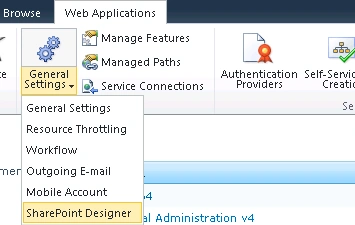
You can modify the SharePoint Workflow Settings.
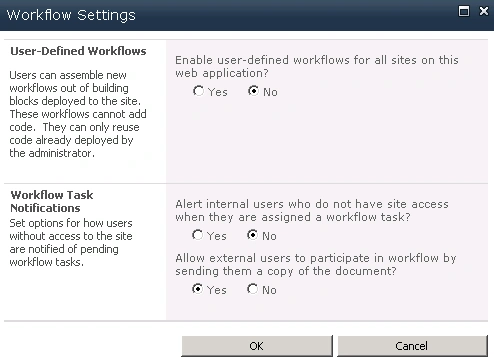
The same can be achieved using SharePoint object model and powershell.
Using SharePoint object model:
- Open Visual Studio 2010.
- Go to File => New => Project.
- Select the Console Application template from the installed templates.
- Enter the Name and click on Ok.
- Add the following assembly.
- Microsoft.SharePoint.dll
- Add the following namespaces.
- using Microsoft.SharePoint.Administration;
- using Microsoft.SharePoint;
- Program.cs:
using System;
using System.Collections.Generic;
using System.Linq;
using System.Text;
using Microsoft.SharePoint.Administration;
using Microsoft.SharePoint;namespace WorkflowSettings
{
class Program
{
static void Main(string[] args)
{
SPWebApplication webApp = SPWebApplication.Lookup(new Uri("https://anavijai.com/"));// -------------SharePoint Workflow Settings-------------------------------------
}
}
}
Workflow Settings:
//Enable
user-defined workflows for all sites on this web application
webApp.UserDefinedWorkflowsEnabled = false;
//Alert internal users who do not have site access when they are assigned a
workflow task
webApp.EmailToNoPermissionWorkflowParticipantsEnabled =
false;
//Allow external users to participate in workflow by sending them a copy of the
document
webApp.ExternalWorkflowParticipantsEnabled = true;
Update the changes:
//Update the changes
webApp.Update();
Using powershell:
$webApp
= get-spwebapplication "https://anavijai.com/"
# -------------SharePoint Workflow Settings-------------------------------------
#--------------Enable user-defined workflows for all sites on this web
application
$webApp.UserDefinedWorkflowsEnabled
= $false
#--------------Alert internal users who do not have site access when they are
assigned a workflow task
$webApp.EmailToNoPermissionWorkflowParticipantsEnabled
= $false
#--------------Allow external users to participate in workflow by sending them a
copy of the document
$webApp.ExternalWorkflowParticipantsEnabled
= $true
#--------------Update the changes
$webApp.Update()
Join the conversation! Your thoughts help the community grow.