

In this article we will be seeing how to resolve "UnauthorizedAccessException
was unhandled by user code" in SharePoint event receiver.
I had one custom list "MyList" which contains two columns "Title" and "Service
Account".

I had one group with Full control "Service Team". In the "Service Account"
column I need to add all the users from the "Service Team" group.
I have written ItemAdded event receiver for adding the users from the "Service
Team" group to the "Service Account" column.
public
override void
ItemAdded(SPItemEventProperties properties)
{
base.ItemAdded(properties);
SPSecurity.RunWithElevatedPrivileges(delegate()
{
SPWeb web = properties.Web;
SPListItem item =
properties.ListItem;
SPGroup group = web.Groups["Service
Team"];
web.AllowUnsafeUpdates = true;
SPFieldUserValueCollection
UserCollection = new
SPFieldUserValueCollection();
foreach (SPUser
user in group.Users)
{
SPFieldUserValue UserName
= new
SPFieldUserValue(web, user.ID, user.LoginName);
UserCollection.Add(UserName);
}
item["Service Account"] =
UserCollection;
item.Update();
});
}
When the user with contribute access tried to add the column, users from the
"Service Team" were not added to the column and I was getting the following
error when I was debugging.
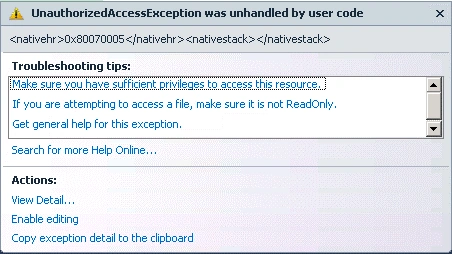
Even though I was using SPSecurity.RunWithElevatedPrivileges I was getting the
error. That is because "when using SPSecurity.RunWithElevatedPrivileges, we need
to open an elevated site context through a new SPSite object in order to really
be elevated". Then I tried with the following code which added users to the
columns successfully.
public
override void
ItemAdded(SPItemEventProperties properties)
{
base.ItemAdded(properties);
SPSecurity.RunWithElevatedPrivileges(delegate()
{
using(SPSite
site=new SPSite
(properties.SiteId))
{
using (SPWeb
web = site.RootWeb)
{
SPListItem item = properties.ListItem;
SPGroup group = web.Groups["Service
Team"];
web.AllowUnsafeUpdates = true;
SPFieldUserValueCollection UserCollection =
new
SPFieldUserValueCollection();
foreach (SPUser user
in group.Users)
{
SPFieldUserValue
UserName = new
SPFieldUserValue(web, user.ID, user.LoginName);
UserCollection.Add(UserName);
}
item["Service Account"]
= UserCollection;
item.Update();
}
}
});
}
Join the conversation! Your thoughts help the community grow.