

In this article we will be seeing how to enforce unique value for a list or
library column in SharePoint 2010.
In SharePoint 2010 we can enforce uniqueness on values in a list or library
column, effectively creating a primary key. When you create a column in the list
or library you could see an option "Enforce Unique Values" where you can enforce
uniqueness. When you enforce uniqueness on a Lookup column, the list item in the
target list can have only one list item looking up to it from the child list.
Supported Column Types
- Single line of text
- Choice field (but not multichoice)
- Number
- Currency
- Date/ Time
- Lookup (but not multivalve)
- Person or Group (but not multivalve)
- Title (but not in a document library)
Unsupported Column Types
- Multiple lines of text
- Hyperlink/Picture
- Custom Field Types
- Calculated Field
- Boolean (yes/no)
- Modified by
- Modified time
- UI version
- Created time
- Checked out to
- Content type ID
I have created one list "cl" which has "Title", "TestCol" and "LookUp Col".
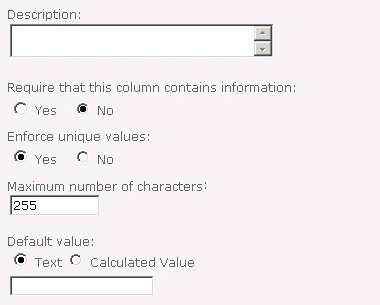
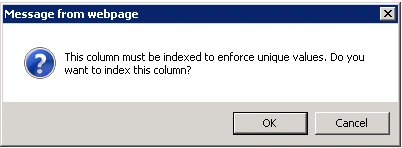
When you make Enforce Unique values to "Yes", you will be getting the following
pop up.
I have enforced unique values to "Yes" for TestCol (Single Line of text) and
LookUp Col.
The items in the list are shown in the following

When I try to add the same value, I was getting the following error
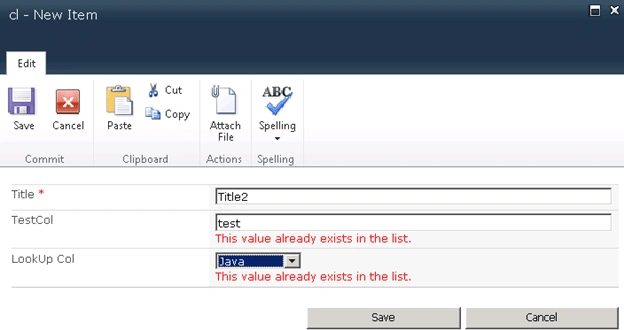
Note: Comparison is case-insensitive, so the values "Test" and "test" are
evaluated as equivalent.
Join the conversation! Your thoughts help the community grow.