
The problem
There are situations where we would like to detect if the post back is from a form interaction (i.e. submit or button clicks) or is it by hitting the browser F5 refresh button.
Many of them will jump saying how about checking 'Ispostback' value. 'IsPostback' will always have the value which was set previously. So for instance if the page was posted back before refresh, then the value will be true and if the page is not posted back before refresh, then the value will be false.This article will first explain the fundamentals of how to solve the above problem and later this article will go in depth of how the source code looks like.
Please feel free to download my free 500 question and answer eBook which covers .NET , ASP.NET , SQL Server, WCF , WPF , WWF , Silver light , Azure @ http://tinyurl.com/4nvp9t
Reference
The solution which this article proposes first came in an ASP.NET book written by Dino Esposito and it was taken further by Mr. SimoneB to make a small open source code which you can get from http://sourceforge.net/projects/busybox.A brief explanation is also provided at this link.
http://dotnetslackers.com/Community/blogs/simoneb/archive/2007/01/07/Using-an-HttpModule-to-detect-page-refresh.aspx
The article will go step by step to explain the ideas proposed by Mr. Dino Esposito in a simplified manner.
The fundamental
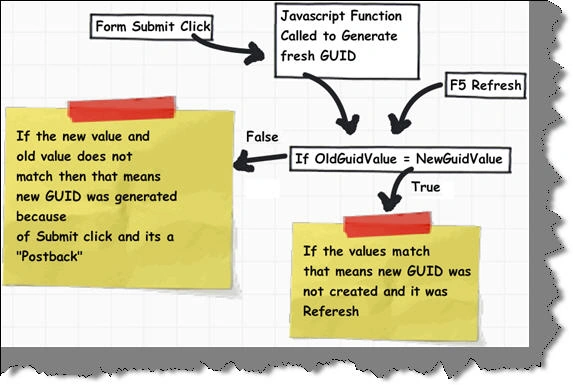
- Step 1 :- We have created a javascript which will generate unique fresh GUID in submit button click. This GUID will be stored in the HttpContext object.
- Step 2 ( User presses submit click ) :- If user presses submit button it will call the necessary javascript function to create the new fresh GUID again.
- Step 3 :- In 'HttpHandler' or 'HttpModule' the new GUID value is checked with the old GUID value. If the values are not equal then it means this was not called from a submit click and it's a refresh event. Accordingly the HttpContext session value is set.
- Step 4 :- In the page load we can then check if this was a refresh or post back using the session variables.
3 important parts of the code
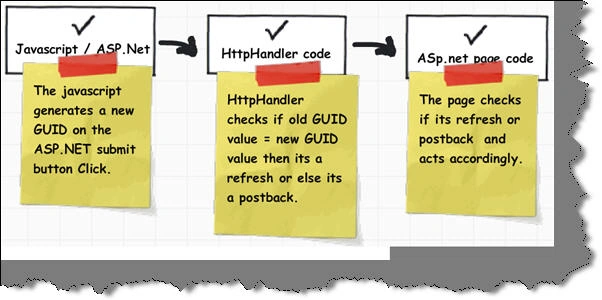
There are 3 important part of the code to be understood :-- Javascript which generates the unique GUID.
- HtppHandler which checks if the old value is equal to the new value.
- ASP.NET page which finally checks if it's a refresh or postback and handles logic accordingly.
Javascript code
So first lets start with the javascript code. The 'genereateRandomSequence' function generates unique GUID by using 'math' functions like 'random' and 'floor'.
The 'onPostBack'function calls 'generateRandomSequence' function to generate GUID and attach the same to a hidden field with name 'hdnGuid'. This hidden field is generated on fly in the 'HttpHandler' module which will be explained shortly. Below is the code snippet for the same.function onPostBack()
{
var y=generateRandomSequence();
var hdnGuid=document.getElementById("hdnGuid");
hdnGuid.value=y;
}
function generateRandomSequence()
{
var g = "";
for(var i = 0; i <
32; i++)
g +=
Math.floor(Math.random() * 0xF).toString(0xF)
return g;
}
The above javascript function is referred in a JS files and called on the button submit click as shown in the below HTML code snippet.
<title>Untitled Page</title>
<script type="text/javascript"
language="javascript"
src="Client-Side_Validn.js"
temp_src="Client-Side_Validn.js"></script>
</script>
</head>
<body>
<form id="form1"
runat="server"
onsubmit="onPostBack()">
<asp:Button ID="Button1" runat="server" Text="Button" />
</form>
</body>
</html>
HttpModule code
The next important code is the 'HttpModule' code. As a first step let's create a simple GUID class which help us store the GUID values as shown in the below figure.
public class GuidClass The next step is to create a simple 'HttpModule' class which overrides the 'page_Init' event and the 'page_Load' event.
{
public GuidClass()
{
//
// TODO: Add constructor logic here
//
}
private string guid;
public string Guid
{
get
{
return guid;
}
set
{
guid = value;
}
}
}
In the 'page_Init' event we have created a simple hidden field by name 'hdnGuid' which is attached to the page on the first hit itself.
void _page_Init(object sender, EventArgs e)
{
HiddenField hdnGuid
= new HiddenField();
hdnGuid.ID = "hdnGuid";
if (!_page.IsPostBack)
hdnGuid.Value =
Guid.NewGuid().ToString();
_page.Form.Controls.Add(hdnGuid);
}
In the 'page_Load' event we check if the hidden field value is same as the old value. In case the value is not same that means it's a 'postback' and if the value is same then its 'refresh'. As per situation we set the 'httpContent.Items["Refresh"]' value.
void _page_Load(object sender, EventArgs e) We also need to ensure that the handler is registered in the 'httpModules' tag. <httpModules>
<add name="Myhandler" type="Myhandler"/>
</httpModules>
{
HiddenField h1 =
(HiddenField)(_page.Form.FindControl("hdnGuid"));
GuidClass
currentGuid =new GuidClass();
currentGuid.Guid=
h1.Value;
System.Web.HttpContext _httpContext = System.Web.HttpContext.Current;
if (temp.Contains<string>(currentGuid.Guid))
{
_httpContext.Items.Add("IsRefresh",true);
}
else
{
if(!(currentGuid.Guid.Equals(null)||currentGuid.Guid.Equals("")))
temp.Enqueue(currentGuid.Guid);
_httpContext.Items.Add("IsRefresh",false);
}
}
ASP.NET page code
The final part is to detect in the ASP.NET page whether it's a 'refresh' or 'postback'. The below code demostrates how 'HttpContext' session can be referred to check the same and act accordingly.if ((bool)HttpContext.Current.Items["IsRefresh"])
{
Response.Write("refreshed");
}
else
{
Response.Write("Postback");
}
Source Code
You can download the course code from top of this article.
Join the conversation! Your thoughts help the community grow.