

A JQ Grid is a light weighted open source grid developed in JavaScript Jquery to fill data from the database.
To download the JQ Grid js file go to the following site:
http://www.trirand.com/blog/?page_id=6.
Now I will create an ASP.Net application where I will display the record from an array through the JQ Grid.
Step 1:
In Visual Studio 2010 first create a simple ASP.Net web project named "JQgridapplication".
Step 2:
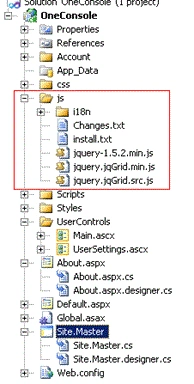
After that add the required JS file and folder for the JQ grid. The folder and file structure will look as shown in the following figure1 marked with red.
Figure 1:
Step 3:
Now create a folder named "UserControls" under the main project. After that create a user control named "Main.ascx" under the "UserControls" folder.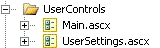
Step 4:
Now in the Main.ascx file first call all the related JQ Grid related js files.
<script src="../js/jquery-1.5.2.min.js" type="text/javascript"></script>
<script src="../js/i18n/grid.locale-en.js" type="text/javascript"></script>
<script src="../js/jquery.jqGrid.min.js" type="text/javascript"></script>
<script src="../Scripts/json2-min.js" type="text/javascript"></script>
After that for the JQ Grid paste The following code:
<script type="text/javascript">
$(document).ready(function () {
jQuery("#list1").jqGrid({
datatype: "local",
colNames: ['Inv No', 'Date', 'Client', 'Amount', 'Tax', 'Total', 'Notes'],
colModel: [
{ name: 'id', index: 'id', width: 60, sorttype: "int" },
{ name: 'invdate', index: 'invdate', width: 90, sorttype: "date" },
{ name: 'name', index: 'name', width: 100 },
{ name: 'amount', index: 'amount', width: 80, align: "right", sorttype: "float" },
{ name: 'tax', index: 'tax', width: 80, align: "right", sorttype: "float" },
{ name: 'total', index: 'total', width: 80, align: "right", sorttype: "float" },
{ name: 'note', index: 'note', width: 150, sortable: false }
],
multiselect: true,
rowNum: 10,
rowList: [5, 10, 20, 50, 100],
pager: jQuery('#pager1'),
sortorder: "desc",
viewrecords: true,
caption: "Manipulating Array Data"
});
var mydata = [
{ id: "1", invdate: "2007-10-01", name: "test", note: "note", amount: "200.00", tax: "10.00", total:
"210.00" },
{ id: "2", invdate: "2007-10-02", name: "test2", note: "note2", amount: "300.00", tax: "20.00", total: "320.00" },
{ id: "3", invdate: "2007-09-01", name: "test3", note: "note3", amount: "400.00", tax: "30.00", total: "430.00" },
{ id: "4", invdate: "2007-10-04", name: "test", note: "note", amount: "200.00", tax: "10.00", total: "210.00" },
{ id: "5", invdate: "2007-10-05", name: "test2", note: "note2", amount: "300.00", tax: "20.00", total: "320.00" },
{ id: "6", invdate: "2007-09-06", name: "test3", note: "note3", amount: "400.00", tax: "30.00", total: "430.00" },
{ id: "7", invdate: "2007-10-04", name: "test", note: "note", amount: "200.00", tax: "10.00", total: "210.00" },
{ id: "8", invdate: "2007-10-03", name: "test2", note: "note2", amount: "300.00", tax: "20.00", total: "320.00" },
{ id: "9", invdate: "2007-09-01", name: "test3", note: "note3", amount: "400.00", tax: "30.00", total: "430.00" }
];
for (var i = 0; i <= mydata.length; i++)
jQuery("#list1").jqGrid('addRowData', i + 1, mydata[i]);
});
// });
</script>
Here I am defining the JQ Grid and binding it through an array.
So the whole code of the "Main.ascx " is:
<%@ Control Language="C#" AutoEventWireup="true" CodeBehind="Main.ascx.cs" Inherits="OneConsole.UserControls.Main" %><link href="../css/ui-darkness/jquery-ui-1.8.12.custom.css" rel="stylesheet" type="text/css" />
<link href="../css/ui.jqgrid.css" rel="stylesheet" type="text/css" />
<script src="../js/jquery-1.5.2.min.js" type="text/javascript"></script>
<script src="../js/i18n/grid.locale-en.js" type="text/javascript"></script>
<script src="../js/jquery.jqGrid.min.js" type="text/javascript"></script>
<script src="../Scripts/json2-min.js" type="text/javascript"></script>
<script type="text/javascript">
$(document).ready(function () {
jQuery("#list1").jqGrid({
datatype: "local",
colNames: ['Inv No', 'Date', 'Client', 'Amount', 'Tax', 'Total', 'Notes']
colModel: [
{ name: 'id', index: 'id', width: 60, sorttype: "int" },
{ name: 'invdate', index: 'invdate', width: 90, sorttype: "date" }
{ name: 'name', index: 'name', width: 100 },
{ name: 'amount', index: 'amount', width: 80, align: "right", sorttype: "float" },
{ name: 'tax', index: 'tax', width: 80, align: "right", sorttype: "float" },
{ name: 'total', index: 'total', width: 80, align: "right", sorttype: "float" },
{ name: 'note', index: 'note', width: 150, sortable: false }
],
multiselect: true,
rowNum: 10,
rowList: [5, 10, 20, 50, 100],
pager: jQuery('#pager1'),
sortorder: "desc",
viewrecords: true,
caption: "Manipulating Array Data"
});
var mydata = [
{ id: "1", invdate: "2007-10-01", name: "test", note: "note", amount: "200.00", tax: "10.00", total: "210.00" },
{ id: "2", invdate: "2007-10-02", name: "test2", note: "note2", amount: "300.00", tax: "20.00", total: "320.00" },
{ id: "3", invdate: "2007-09-01", name: "test3", note: "note3", amount: "400.00", tax: "30.00", total: "430.00" },
{ id: "4", invdate: "2007-10-04", name: "test", note: "note", amount: "200.00", tax: "10.00", total: "210.00" },
{ id: "5", invdate: "2007-10-05", name: "test2", note: "note2", amount: "300.00", tax: "20.00", total: "320.00" },
{ id: "6", invdate: "2007-09-06", name: "test3", note: "note3", amount: "400.00", tax: "30.00", total: "430.00" },
{ id: "7", invdate: "2007-10-04", name: "test", note: "note", amount: "200.00", tax: "10.00", total: "210.00" },
{ id: "8", invdate: "2007-10-03", name: "test2", note: "note2", amount: "300.00", tax: "20.00", total: "320.00" },
{ id: "9", invdate: "2007-09-01", name: "test3", note: "note3", amount: "400.00", tax: "30.00", total: "430.00" }
];
for (var i = 0; i <= mydata.length; i++)
jQuery("#list1").jqGrid('addRowData', i + 1, mydata[i]);
});
// });
</script>
<asp:ScriptManager ID="ScriptManager1" runat="server"> <Services>
</Services>
</asp:ScriptManager>
<table id="list" ></table>
<div id="pager" ></div>
<br />
<br />
<table id="list1" ></table>
<div id="pager1" ></div>
Step 5:
Now in the "Default.aspx" we have to call the "Main.ascx" UserControl.
So the code is:
<%@ Page Title="Home Page" Language="C#" MasterPageFile="~/Site.master" AutoEventWireup="true"
CodeBehind="Default.aspx.cs" Inherits="OneConsole._Default" %>
<%@ Register TagPrefix="OneConsole" TagName="MainControl" Src="~/UserControls/Main.ascx" %><asp:Content ID="HeaderContent" runat="server" ContentPlaceHolderID="HeadContent">
</asp:Content>
<asp:Content ID="BodyContent" runat="server" ContentPlaceHolderID="MainContent">
<h2>
OneConsole
</h2>
<OneConsole:MainControl ID="mainControl" runat="server" />
</asp:Content>
Step 6:
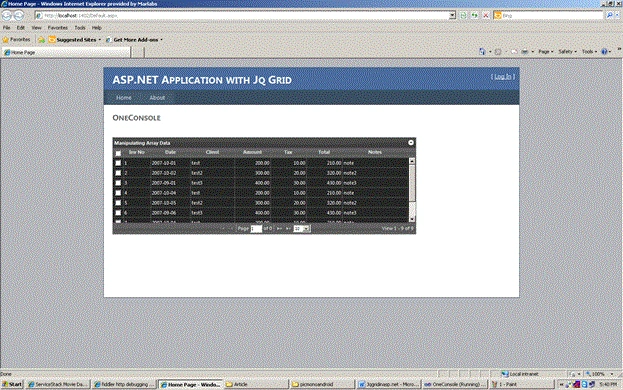
Now run the application. It will look like the following figure.
Conclusion: So in this example we have seen how to bind the value from an array to a JQ Grid.
saharsh kumarPosted Mar 14, 2015, 3:03 AM
how to bind data from database pls help me
MerxPosted Jan 24, 2014, 12:36 PM
There is a full fledged jqGrid ASP.NET server control here http://codemerx.com/jqgrid/products/codemerx-jqgrid-for-asp-net That one is free but it comes branded.
kranthiPosted Nov 5, 2013, 8:02 AM
How to bind data from database to jqgrid in asp.net?
SIVAPosted Feb 26, 2013, 7:26 AM
Hi, How can i update the cell value, when we change the value of somecell. I need to update automatically the value in previous cell, when we do change in next cell. Let me know how to this?
Kuttikrishnan kodothPosted Nov 3, 2012, 1:17 PM
Could you please help in formatting the date from /Date(1224043200000)/ to dd-mm-yyyy format to display in JQGrid
ism dela vegaPosted Nov 2, 2012, 10:31 AM
hi, i've followed this tutorial, but i always have the same error in despite of installing the jquery library : TypeError: jQuery("#customerGrid").jqGrid is not a function http://localhost:port/Customer I really don't understand, so if someone could help me, it would be great
swarna lakshmiPosted Apr 23, 2012, 6:40 AM
How to bind the jqgrid using DataSet or Datatable in code behind ?
sathya saPosted Feb 2, 2012, 8:16 AM
how to do the same for data's which are loaded from the database.....