

Introduction
Globalization is the process of designing and developing applications which can
be adapted to different languages. Globalization is the process of designing and
developing a software product that function for multiple cultures.
If you want that your website will accessible in several languages in different
regions you should globalize it.
Background
Globalization is very efficient functionality that you can give to your website
so that it can be adapted to different languages and regions.
A very good example you can see is Google home page. There are different
languages options are given below you can select one language and the whole site
would adapt for that particular language.
How would you Globalize you website in ASP.NET
Deign your page
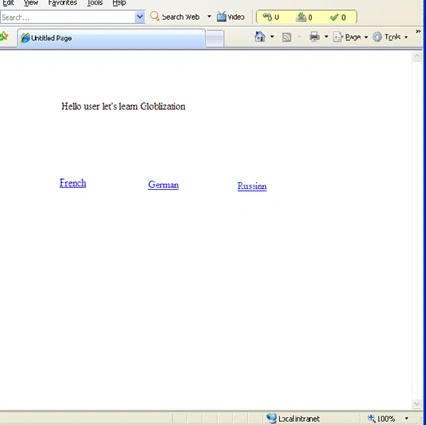
Start visual studio 2005, go for a new website name it 'GloblizationEx'. First
design your website like a sample I have given below. Take 3 link buttons and a
label. Change the text property of label to 'Hello user let's learn
Globalization' and change the text property of three link buttons to French,
German, Russian.
Now make click event of LinkButton1 by double clicking on it. Go to LinkButton2
property select event tab, select 'LinkButton1_Click' for click event. Repeat
this for LinkButton3.
Add resources files
Now you have to add resources file to your website, but first add a New Folder
to your website and named it 'resources' for this just go to solution explorer
right click on root and select 'New folder' now right click to this resources
folder and select 'Add New Item..' option, Add New Item dialog box will appears,
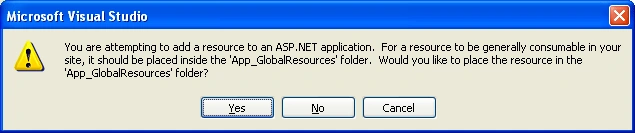
select 'Resource File' and named it 'strings.fr-FR.resx'. A message box will
appear click 'No' as given below.
Now a screen appears you have to enter Name and value for your resource file.
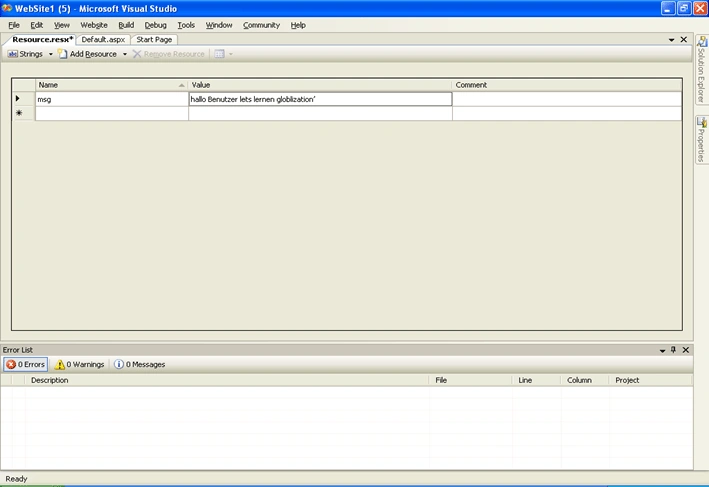
Enter 'msg' for Name and 'bonjour utilisateur apprenons globlization' for value
field. Don't worry, this msg is only French conversion your message that you had
given at your home page. Repeat these steps for German and Russian, file name
will be 'strings.de-DE.resx' and 'strings.ru-RU.resx' respectively. You can give
value field for German and Russian as 'hallo Benutzer lets lernen globlization'
and '@ hallo lernen globlization' respectively. But Name field will be the same
'msg'. Save all. Sample is given below.
Note: You can translate your messages use Google More>>Translate tab.
Generate '.resources' Files
Now you have to generate '.resources' file for this you have to open visual
studio command prompt, you can find it at 'visual studio 2005>> Visual studio
Tools' menu. As you start visual studio command prompt, cmd screen appears. You
have to locate 'resources' folder, like if you are creating your website in C
drive with name 'GloblizationEx', you have to locate like 'c:\Globlization\resources'
now type command 'resgen strings.fr-FR.resx' for French resx file. Do it for
German and Russian as 'resgen strings.de-DE.resx' and 'resgen strings.ru-RU.resx'
respectively.
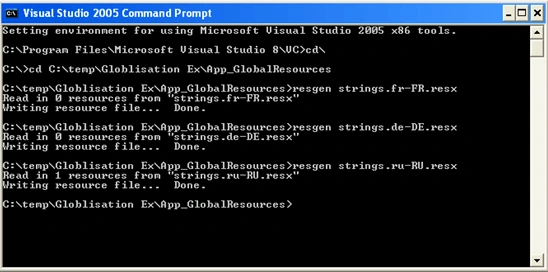
You can notice that .resources files are added to 'resources' folder.
Use Following Code
You should use following namespaces.
using
System;
using
System.Data;
using
System.Configuration;
using
System.Web;
using
System.Web.Security;
using
System.Web.UI;
using
System.Web.UI.WebControls;
using
System.Web.UI.WebControls.WebParts;
using
System.Web.UI.HtmlControls;
using
System.Resources;
using
System.IO;
using
System.Globalization;
Now type the following code to click event (LinkButton1_Click) of LinkButton1.
protected
void LinkButton1_Click(object
sender, EventArgs e)
{
string lanName="";
LinkButton lnkBtn=(LinkButton)sender;
switch (lnkBtn.ID)
{
case
"LinkButton1":
lanName = "fr-FR";
break;
case
"LinkButton2":
lanName = "de-DE";
break;
case
"LinkButton3":
lanName = "ru-RU";
break;
}
System.Resources.ResourceManager rm =
ResourceManager.CreateFileBasedResourceManager("strings",
Server.MapPath("resources") +
Path.DirectorySeparatorChar,
null);
CultureInfo cinfo =
new CultureInfo(lanName);
Label1.Text = rm.GetString("msg",
cinfo);
}
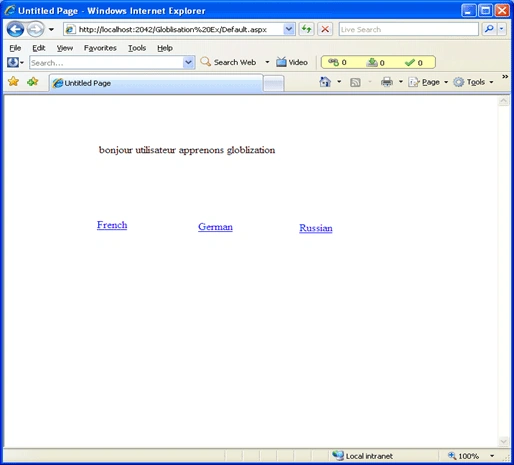
Now just debug your website and click on 'French'/'German'/'Russian' link to
change your welcome message.
Anil KumarPosted Apr 27, 2011, 4:10 AM
This is a nice article.