

You might have started using .Net 4.0 and Visual Studio 2010. But are you sure that you all are using most of the advance features of .Net or still you are using the same boring .Net 1.1 features, as someone said "Old Wine in New Bottle". If so, I think this article will help you to implement some new features available in .Net 2.0/3.5/4.0.
Abstract
This article will guide you to migrate your application from 2-Tier architecture (was possible in VB6.0, .Net 1.0/1.1) to the most advance Data Access methodology available in .Net 4.0.
Please keep watching all migration articles one by one. If it really helps you out then please don't forget to put your feedback and comments.
Old Wine in New Bottle
If you are writing all the data access logic inside your code behind, I guess your code looks like this.
- While Inserting Data into Database:
SqlConnection sqlConnection =
new SqlConnection
(ConfigurationManager.ConnectionStrings["EmployeeConString"].ConnectionString);SqlCommand sqlCommand =
new SqlCommand
(string.Format("INSERT INTO Department
(DepartmentId, Name, Budget, StartDate) VALUES ({0}, '{1}', {2}, '{3}')",
txtDeptId.Text, txtDeptName.Text, txtBudget.Text, txtStartDate.Text), sqlConnection);sqlConnection.Open();
sqlCommand.ExecuteNonQuery();
sqlConnection.Close();
- While Binding Data to ComboBox /DropDownList:
SqlConnection sqlConnection =
new SqlConnection
(ConfigurationManager.ConnectionStrings["EmployeeConString"].ConnectionString);
SqlDataAdapter sqlDataAdapter =
new SqlDataAdapter
("SELECT DepartmentId, Name FROM Department", sqlConnection);DataTable deptList = new DataTable("Department");
sqlDataAdapter.Fill(deptList);cmbDepartment.DataSource = deptList;
cmbDepartment.DisplayMember = "Name";
cmbDepartment.ValueMember = "DepartmentId";
OR
- While Binding Data to DataGridView:
SqlConnection sqlConnection =
new SqlConnection
(ConfigurationManager.ConnectionStrings["EmployeeConString"].ConnectionString);
SqlCommand sqlCommand =
new SqlCommand
("SELECT DepartmentId, Name FROM Department", sqlConnection);sqlConnection.Open();
SqlDataReader dataReader = sqlCommand.ExecuteReader();while (dataReader.Read())
cmbDepartment.Items.Add(dataReader["Name"].ToString());dataReader.Close();
- While Binding Data to ListView:
SqlConnection sqlConnection =
new SqlConnection
(ConfigurationManager.ConnectionStrings["EmployeeConString"].ConnectionString);
SqlCommand sqlCommand =
new SqlCommand
("SELECT DepartmentId, Name, Budget, StartDate FROM Department", sqlConnection);sqlConnection.Open();
SqlDataReader dataReader = sqlCommand.ExecuteReader();while (dataReader.Read())
{
ListViewItem item = new ListViewItem(dataReader["DepartmentId"].ToString());
item.SubItems.Add(dataReader["Name"].ToString());
item.SubItems.Add(dataReader["Budget"].ToString());
item.SubItems.Add(dataReader["StartDate"].ToString());lvwDepartment.Items.Add(item);
}
dataReader.Close();
So, all your data access code is being meshed up within the code behind and these practices were very old compared to the new advanced design patterns.
Let's do this application in a 3-Tier approach. Although the 3-Tier approach is obsolete, still it is the base for any advanced design pattern. So it's very much essential to learn and know the pattern. Let's see the fundamental diagram of a 3-Tier architecture.
Basics of 3-tier Architecture:
Basic 3-Tier architecture
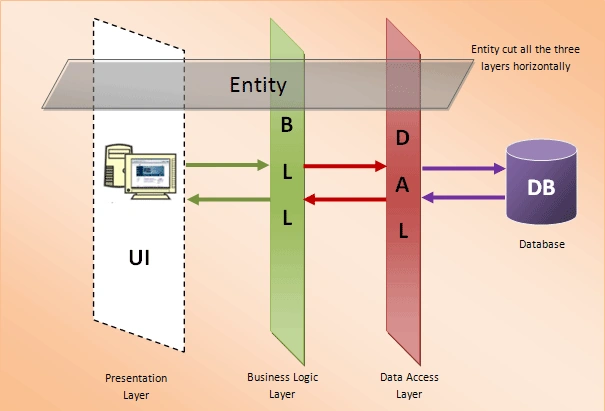
Figure 1: Basic 3-Tier architecture
The above describes a very simple architecture of a 3-tier model.
- DAL (Data Access Layer) interacts with Database directly, so all the SQL operation are being done within DAL only.
- BLL (Business Logic Layer) works like a mediator between DAL and the Presentation Tier.
- No direct communication is allowed between DAL and Presentation Layer.
- Although there is no physical presence of the Entity Layer, but Entity encapsulates all the information/data and passes it from one layer to the other.
- So all the Database object name and the Database Schema is being restricted inside the DAL which gives an extra security layer to the application.
- As Business rules/logics are being defined inside BLL, any update to business logic will not impact the DAL and the presentation layer.
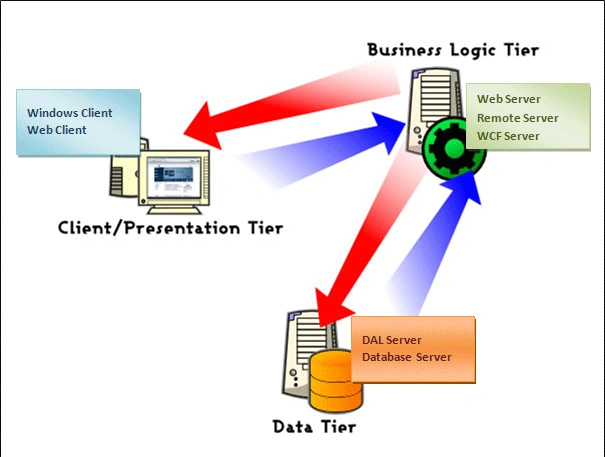
Figure 2: Complex 3-Tier Architecture
- Data Access Service and the Database Server can be hosted in single Server.
- Mostly SQL Server 2000/2005/2008 or Oracle can be hosted on Windows 2000/2003 Server.
- Business Server exposes all the operation through Web Service /Remoting/WCF.
- A highly configured server with Windows 2000/2003 can be used to host the Business Service, or else Microsoft BizTalk Server also can be used for this.
- Presentation Tier or the Client Consumes the Service exposed at Business Server by using the Proxy through http:// pipeline.
- Client can be any standalone machine with the application is being installed in case of Desktop Application (Win-Form or Console Application), or having a Browser to run Web Application.
- Data/Information are being encapsulated by entity and transferred from one location to another over network followed by all the network protocol.
To know more about 3-Tier Architecture please visit my next Article ADO .NET Evolution: Part I: 2-Tier to 3-Tier.
Muhammad UsmanPosted Jun 16, 2017, 2:05 AM
Good site good thing
vijay kumarPosted Mar 4, 2015, 12:40 PM
best article.........
Rohatash KumarPosted Aug 9, 2011, 11:56 PM
Good Article. keep it up....
Dharma BPosted Dec 9, 2010, 1:08 AM
Thanks it's really help me. but m not found Part II plz tell me.