


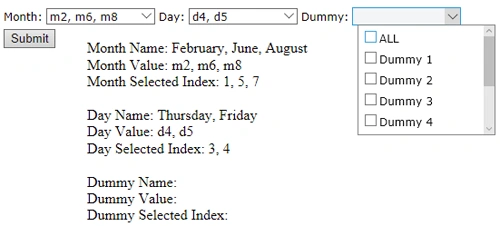
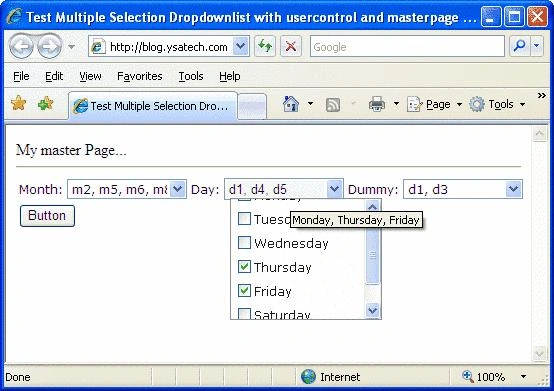
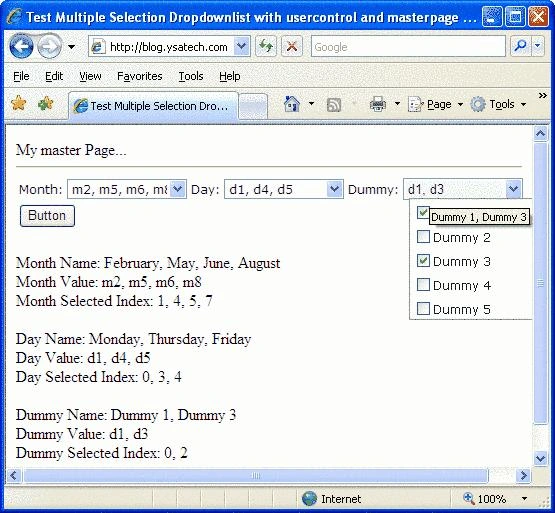
Introduction
Recently, I was looking for a multiple selection dropdownlist control for my new project. After spending some time researching for it, I decided to put together all my finding in one web user control. This web user control consists of an ASP.NET AJAX HoverMenuExtender, JavaScript, StyleSheet and CheckBoxListExCtrl. The final product will work with or without a masterpage and you can drag and drop more than one instances of the control on to the page. This is not a perfect control, feel free to modify it to tailor your requirement and share your thoughts. Below is a step by step tutorial on how I have accomplished this. Hope this tutorial will give someone an idea on how to use ASP.NET AJAX HoverMenuExtender and create multiple selection dropdownlist.
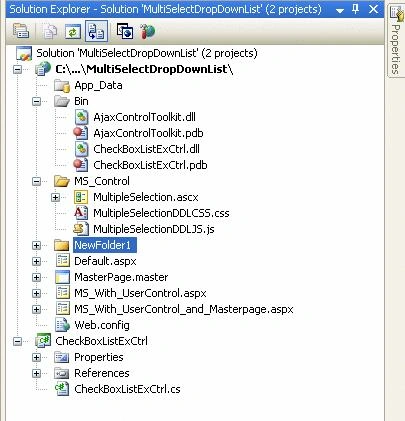
Before we begin, here is the structure of my project.
Using the Code
This is a usercontrol, just drag and drop. But make sure to include the ScriptManager.
The project includes:
-
Default.aspx - this page do not use master page and user control
-
MS_With_UserControl.aspx - this page use multiple instances of the user control and no master page.
-
MS_With_UserControl_and_Masterpage.aspx - this page use multiple instances of the user control and a master page.
-
CheckBoxListExCtrl - How to get the CheckBoxlist Value using Javascript?
-
The rest of the files are fairly self explanatory.
CheckBoxListExCtrl
The code is pretty much the same except I had made a few changes to return the text of the selected checkbox. Please see comments.
//09042009 BT - var
string clientID = UniqueID + this.ClientIDSeparator + repeatIndex.ToString(NumberFormatInfo.InvariantInfo);
writer.WriteBeginTag("input");
writer.WriteAttribute("type", "checkbox");
writer.WriteAttribute("name", UniqueID + this.IdSeparator + repeatIndex.ToString(NumberFormatInfo.InvariantInfo));
writer.WriteAttribute("id", clientID);
writer.WriteAttribute("value", Items[repeatIndex].Value);
if (Items[repeatIndex].Selected)
writer.WriteAttribute("checked", "checked");
System.Web.UI.AttributeCollection attrs = Items[repeatIndex].Attributes;
foreach (string key in attrs.Keys)
writer.WriteAttribute(key, attrs[key]);
}
writer.Write("/>"); //09042009 BT - close the input tag
writer.Write("<label for="" + clientID + "">"); //09042009 BT - added label to hold the checkbox
text
writer.Write(Items[repeatIndex].Text); //text
writer.Write("</label>"); //close label tag
}
ultipleSelectionDDLCSS.css - style sheet
MultipleSelectionDDLJS.js
Here is the content of the JavaScript, please read the comments.
/*detect the browser version and name*/
var Browser = {
Version: function() {
var version = 999; // we assume a sane browser
if (navigator.appVersion.indexOf("MSIE") != -1)
// bah, IE again, lets downgrade version number
version = parseFloat(navigator.appVersion.split("MSIE")[1]);
return version;
}
}
function showIE6Tooltip(e){
//we only want this to execute if ie6
if (navigator.appName=='Microsoft Internet Explorer' && Browser.Version() == 6) {
if(!e){var e = window.event;}
var obj = e.srcElement;
tempX = event.clientX + (document.documentElement.scrollLeft || document.body.scrollLeft);
tempY = event.clientY + (document.documentElement.scrollTop || document.body.scrollTop);
var tooltip = document.getElementById('ie6SelectTooltip');
tooltip.innerHTML = obj.options.title; //set the title to the div
//display the tooltip based on the mouse location
tooltip.style.left = tempX;
tooltip.style.top = tempY+10;
tooltip.style.width = '100%';
tooltip.style.display = 'block';
}
}
function hideIE6Tooltip(e){
//we only want this to execute if ie6
if (navigator.appName=='Microsoft Internet Explorer' && Browser.Version() == 6) {
var tooltip = document.getElementById('ie6SelectTooltip');
tooltip.innerHTML = '';
tooltip.style.display = 'none';
}
}
/* get and set the selected checkbox value and
text and selected index to a hidden field */
function getCheckBoxListItemsChecked(elementId) {
//var
var elementRef = document.getElementById(elementId);
var checkBoxArray = elementRef.getElementsByTagName('input');
var checkedValues = '';
var checkedText = '';
var checkedSelIndex = '';
var myCheckBox = new Array();
for (var i = 0; i < checkBoxArray.length; i++) {
var checkBoxRef = checkBoxArray[i];
if (checkBoxRef.checked == true) {
//selected index
if (checkedSelIndex.length > 0)
checkedSelIndex += ', ';
checkedSelIndex +=i;
//value
if (checkedValues.length > 0)
checkedValues += ', ';
checkedValues += checkBoxRef.value;
//text
var labelArray = checkBoxRef.parentNode.getElementsByTagName('label');
if (labelArray.length > 0) {
if (checkedText.length > 0)
checkedText += ', ';
checkedText += labelArray[0].innerHTML;
}
}
}
myCheckBox[0] = checkedText;
myCheckBox[1] = checkedValues;
myCheckBox[2] = checkedSelIndex;
return myCheckBox;
}
function readCheckBoxList(chkBox, ddlList, hiddenFieldText, hiddenFieldValue, hiddenFieldSelIndex) {
var checkedItems = getCheckBoxListItemsChecked(chkBox);
$get(ddlList).options[0].innerHTML = checkedItems[1]; //set the dropdownlist value
$get(ddlList).title = checkedItems[0]; //set the title for the dropdownlist
//set hiddenfield value
$get(hiddenFieldValue).value = checkedItems[1];
$get(hiddenFieldText).value = checkedItems[0];
$get(hiddenFieldSelIndex).value = checkedItems[2];
}
MultipleSelection.ascx
In this page, I have HoverMenuExtender, DropDownList, CheckBoxListExCtrl, a few hidden fields and a div to display tooltip information for IE 6.0. And I have added some dummy data to my checkboxlist so it wouldn't look empty when I drag it onto the page.
<div>
<cc2:HoverMenuExtender ID="HoverMenuExtender1"
runat="server"
TargetControlID="MultiSelectDDL"
PopupControlID="PanelPopUp"
PopupPosition="bottom"
OffsetX="6"
PopDelay="25" HoverCssClass="popupHover">
</cc2:HoverMenuExtender>
<asp:DropDownList ID="MultiSelectDDL" CssClass="ddlMenu regularText" runat="server">
<asp:ListItem Value="all">Select
</asp:DropDownList>
<asp:Panel ID="PanelPopUp" CssClass="popupMenu" runat="server">
<cc1:CheckBoxListExCtrl ID="CheckBoxListExCtrl1" CssClass="regularText" runat="server">
<asp:ListItem Value="d1">Dummy 1
<asp:ListItem Value="d2">Dummy 2
<asp:ListItem Value="d3">Dummy 3
<asp:ListItem Value="d4">Dummy 4
<asp:ListItem Value="d5">Dummy 5
<asp:ListItem Value="d6">Dummy 6
<asp:ListItem Value="d7">Dummy 7
<asp:ListItem Value="d8">Dummy 8
</cc1:CheckBoxListExCtrl>
</asp:Panel>
<asp:HiddenField ID="hf_checkBoxValue" runat="server" />
<asp:HiddenField ID="hf_checkBoxText" runat="server" />
<asp:HiddenField ID="hf_checkBoxSelIndex" runat="server" />
</div>
<div id="ie6SelectTooltip" style="display:none;position:absolute;padding:1px;border:1px
solid #333333;;background-color:#fffedf;font-size:smaller;z-index: 99;"> </div>
MS_With_UserControl_and_Masterpage.aspx
<asp:ScriptManager ID="ScriptManager1" runat="server">
</asp:ScriptManager>
<asp:Label ID="Label1" CssClass="regularText" runat="server" Text="Month:" />
<uc1:MultipleSelection ID="MultipleSelection1" runat="server" />
MS_With_UserControl_and_Masterpage.aspx.cs - How to bind the data
DataTable dt = new DataTable();
DataColumn dcValue = new DataColumn("Value", typeof(string));
DataColumn dcText = new DataColumn("Text", typeof(string));
dt.Columns.Add(dcText);
dt.Columns.Add(dcValue);
DataRow dr;
dr = dt.NewRow();
dr["Text"] = "January";
dr["Value"] = "m1";
dt.Rows.Add(dr);
//datasource, dataTextField, dataValueField
MultipleSelection1.CreateCheckBox(dt, "Text", "Value");
How to set selected value
MultipleSelection1.selectedIndex = "1,5,7";
How to get the SelectedIndex, SelectedValue, SelectedText
MultipleSelection1.sText

MultipleSelection1.sValue

MultipleSelection1.selectedIndex
Points of Interest
For some reason I didn't load the ScriptManager dynamically. So, make sure you include a ScriptManager on the page before using the usercontrol or you will come across this error message: "The control with ID 'HoverMenuExtender1' requires a ScriptManager on the page. The ScriptManager must appear before any controls that need it."
"Invalid postback or callback argument. Event validation is enabled using". Initially, I was trying to modify the value of the dropdownlist through the JavaScript and I kept getting the error whenever I hit the submit button. The easiest solution was to set the EnableEventValidation = false on the page directive, but instead, I found another work around by using hidden field.
The tooltip (title) were displaying correctly on IE 7.0, 8.0, FireFox and Google Chrome but not in IE6.0. In order to remedy the problem, I included a separate function to show and hide the tooltip.
I am using a checkboxlist controls and having difficulty to get the checkboxlist value and text using JavaScript. After conducting some research, I came across a class library by Trilochan Nayak. I have modified his class so that I can retrieve the value and text of the selected checkbox through the JavaScript.
References
How do you get the value from a CheckBoxList using JavaScript
How to get the CheckBoxlist Value using Javascript?
Easiest way to check IE version with JavaScript
How to display tooltip for Select control in HTML?
Injecting Client-Side Script from an ASP.NET Server Control
How Do I: Use the ASP.NET AJAX HoverMenu Extender?
patawee kiewtiangPosted Jun 16, 2011, 3:20 AM
Hi I am P from Thailand For ASP.NET Multiple Selection DropDownList with AJAX HoverMenuExtender , if i created one more check box is "Select All" And How to check All when i click "Select All" Please help me to solve this Problem,Thank you
JohnPosted Aug 2, 2010, 12:03 PM
Cannot load into VS 2008. Missing csproj file for the multiselectdropdownlist. Can you include this in the zip file?