

This article will cover the code-only approach, which provides developers the ability to use the Entity Framework using POCO entities and without an EDMX file. This approach lets developers view code as their model. This includes topics such as
- Deferred or lazy loading.
- Complex types.
- Change tracking.
- Foreign key association support.
The EntityClient
Apart from using LINQ to Entities and Entity SQL, there is one more way we can query the EDM by using EntityClient. The EntityClient provider can be used by the Entity Framework to access data. This provider uses a.NET Framework data provider to access data sources, such as SQL Server. Like, the SqlClient provider for SQL Server is used by the EntityClient provider to access the SQL Server database.
The key to using this provider is found in the System.Data.EntityClient namespace. Although this provider operation is performed on a conceptual model, entities are translated into operations performed on physical sources and returned results are translated from physical data sources into conceptual Entities back again.
The EntityClient uses Entity SQL language to execute commands against an entity model. As such, the Entity Framework facilitates the communication and translation of Entity SQL into storage-specific queries.
Since the Entity SQL language doesn't have a specific language to query the database, Entity SQL works great for the EntityClient provider. Using the EntityClient is extremely similar to using other .NET data access technologies such as the SqlClient.
It has got classes similar to SqlClient; EntityConnection, EntityCommand, EntityReader, etc. We will see all of these classes in action.
Note: Please download the database scripts as well to run the sample code.
Create POCO Class (Data Project)
Create a solution called CodeOnlyDesign.sln. I am using the VSTS 2010 Ultimate trial version. Add a new class library project to the solution and name it as CodeOnlyData. As of now, our primary focus is on creating a POCO class.
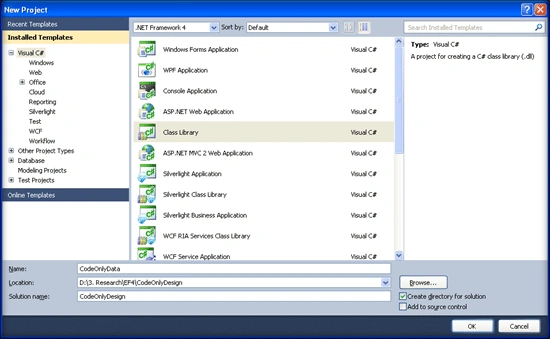
Make sure EF4FeatureCTP3.exe is installed on the machine.
Once the project is created, create a class called Person. cs and Add the following code to the Person class.
using System;
using System.Data;
using System.Collections.Generic;
using System.Linq;
using System.Text;

namespace CodeOnlyData
{
    public class Person
    {
        public Person() { }
        public int PersonID { get; set; }
        public string FirstName { get; set; }
        public string MiddleName { get; set; }
        public string LastName { get; set; }
        public string Title { get; set; }
        public DateTime BirthDate { get; set; }
        public string MaritalStatus { get; set; }
        public string Gender { get; set; }
        public string Suffix { get; set; }
        public string EmailAddress { get; set; }
        public string Phone { get; set; }
        public DateTime ModifiedDate { get; set; }
    }
}
Create UI Project
We need a UI project that will consume our data project, so let's add that. From the file menu, select Add New Project. When the Add New Project dialog opens, select the ASP.NET web application template, Name this project CodeOnlyUI, and click OK.
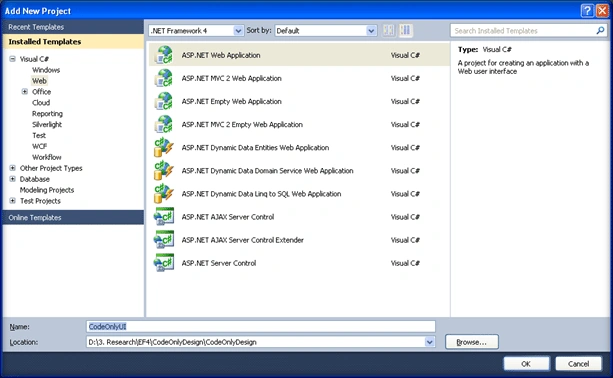
Add the reference of System.Data.Entity.dll and Microsoft.Data.Entity.Ctp.dll to the UI project and CodeOnlyData project. Now we have to create the context and connections or any configuration. So create two classes namely, PersonContext.cs and PersonConfiguration.cs.
Finally, our solution looks as follows.
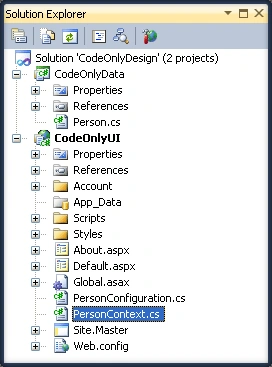
Coding for Context class. Open the PersonContext.cs. Add the following code.
This class is our context and extends the ObjectContext. It represents the shape of our model and is the entry and tunnel to the database. We added a single constructor, which accepts an EntityConnection. This is simply a wrapper around the true database connection and the EF metadata.
This connection information is passed to the constructor when a new instance of the PersonContext is instantiated.
We also declare two typed entities using the IObjectSet interface, which allows us to perform create, read, update, and delete operations. Since the ObjectSet class derives from ObjectQuery, it can also work as a query object.
using System;
using System.Collections.Generic;
using System.Linq;
using System.Web;
using System.Data.Objects;
using System.Data.EntityClient;
using CodeOnlyData;

namespace CodeOnlyUI
{
    public class PersonContext : ObjectContext
    {
        public PersonContext(EntityConnection connection) : base(connection)
        {
            DefaultContainerName = "PersonContext";
        }

        public IObjectSet<Person> Contact
        {
            get { return base.CreateObjectSet<Person>(); }
        }
    }
}
Create the Person configuration class.
This class holds the entire configuration for the Person class. In this class, we define the property that is the primary key by using the IsIdentity() property. We also specify other property facets such as MaxLength and IsRequired. Notice that this example also illustrates that you can combine the properties on a single line instead of two separate statements.
This class is derived from EntityConfiguration which allows us to configure the entity properties like max length, Identity, required, or optional.
using System;
using System.Data;
using System.Collections.Generic;
using System.Linq;
using System.Web;
using System.Data.Objects;
using System.Data.EntityClient;
using Microsoft.Data.Objects;
using CodeOnlyData;

namespace CodeOnlyUI
{
    public class PersonConfiguration : EntityConfiguration<Person>
    {
        public PersonConfiguration()
        {
            Property(c => c.PersonID).IsIdentity();
            Property(c => c.FirstName).HasMaxLength(50).IsRequired();
            Property(c => c.MiddleName).HasMaxLength(50);
            Property(c => c.LastName).HasMaxLength(50).IsRequired();
            Property(c => c.Title).HasMaxLength(8);
            Property(c => c.Gender).IsRequired();
            Property(c => c.Suffix).HasMaxLength(10);
            Property(c => c.EmailAddress).HasMaxLength(50);
            Property(c => c.Phone).HasMaxLength(25);
        }
    }
}
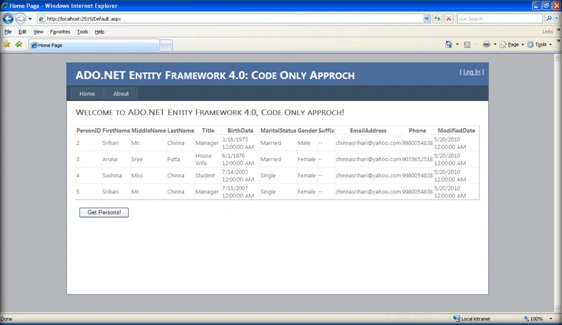
Now it is time to query the database using code only approach. Go to the UI project, on the default.aspx file, and add GridView and a button on the screen. Names I am leaving up to you. In my case, they are going to be gvPersons and getPersons respectively.
Add the following code in the getPersons event.
protected void getPersons_Click(object sender, EventArgs e)
{
    try
    {
        SqlConnection conn =
            new SqlConnection(@"Data Source=BLRLXP-SCHINNA\SQLEXPRESS;Initial Catalog=CodeOnlyDataBase;Integrated Security=SSPI");
        var builder = new ContextBuilder<PersonContext>();
        builder.Configurations.Add(new PersonConfiguration());
        var context = builder.Create(conn);
        gvPersons.DataSource = context.Person;
        gvPersons.DataBind();
    }
    catch (Exception ex)
    {
        Response.Write(ex.Message);
    }
}
Kuppurasu NagarajPosted Apr 24, 2016, 12:48 PM
Nice Sharing..
leandro bacciPosted Aug 3, 2011, 3:44 AM
¿Do you know how connect Entity Framework 3.5 with Oracle in VS2008 SP1?¿It is possible? Thank's
M MeqdadiPosted Jun 2, 2011, 5:19 AM
plz can u add some more examples for how can the new tables be shown in the context how to make inner join between them should we use the LINQ after retreving the full data??
NeCroFirePosted Aug 19, 2010, 3:43 AM
I don't know much about the entity frame work, but I was wondering what advantages this has over using the entity framework normally? Is it a performance thing? This is very interesting ;)