

The scope of this document is to describe integration of SAP Web Services and Microsoft .NET using Microsoft Visual Studio.
SAP WEB SERVICES AND VISUAL STUDIO .NET ARCHITECTURE AND OVERVIEW
BACK GROUND
SAP and Microsoft .NET can be integrated via couple of options. On the top: SAP Web Services can be consumed in a straight line in .NET web client, ASP.NET. ASP.NET has built in support for the consuming Web Service WSDL and generating the proxy code. Once we have the proxy code, that can be consumed in any .NET client applications like console application, web application, WCF application.
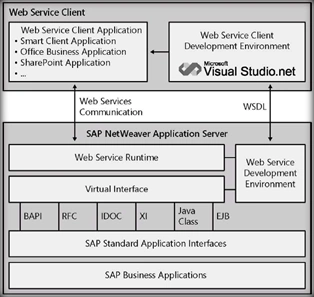
USING VISUAL STUDIO.NET TO GENERATE PROXY FROM SAP WEB SERVICE
There two steps involved the creation of the proxy. First create a wsdl for the given web service and then generate the proxy by consuming the WSDL. I will let you the reason behind it.
A. Creating WSDL from the Web Service URL.
- Open the Internet explorer and input the web service URL that is created in SAP server and click enter. Enter the credentials when it asks for. And click on OK button

- It will generate the WSDL for the web service
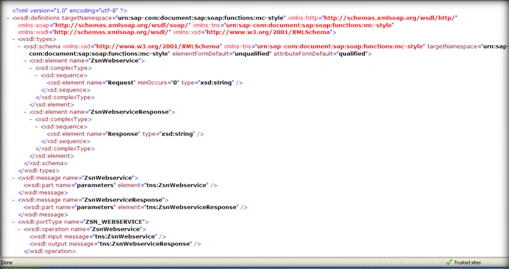
- Save the WSDL file to the disk with the WSDL extension and open the WSDL in .NET IDE or in the notepad.
Find the 'System' in the WSDL and replace with "SYSTEM" because the namespace System is already reserved in Visual Studio. If you do not change the name of this element here to all capital letters, you will get errors when building the application.
The next change you need to make on the WSDL is to rename all instances of "parameters" to "parameter." This is necessary to be able to read the methods of the Web service correctly in Visual Studio. Save the changes for further use to generate the proxy.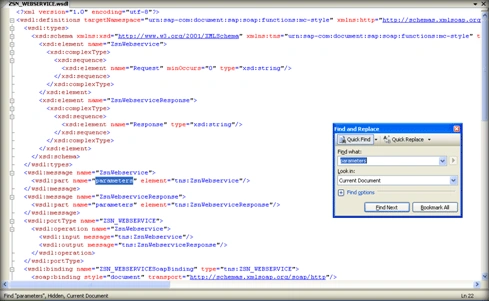
B. In the second step, Follow the steps to generate the proxy for client.
- Open up the Microsoft Visual Studio any version. Create a blank solution with the same if SAPDotNetIntegration.
- Create a new class library project, by adding a new project to the solution. Name it is SAPWebServiceProxyLibrary. The purpose of creating it as separate library is the it can be reference in .net client application for use.
- Right click oin the SAPWebServiceProxyLibrary project and click on 'Add web referance' context menu.
- Enter the Disk path of the WSDL generated in the first step in the URL drop down and click on 'Go' button.
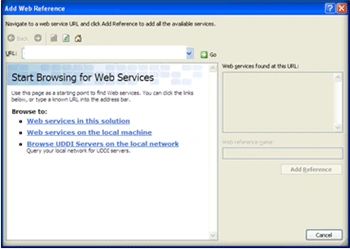
- System shows the following screen.
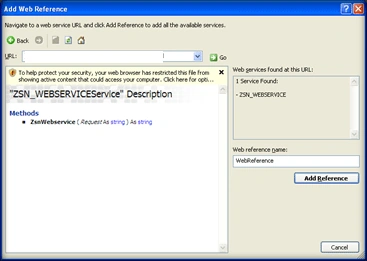
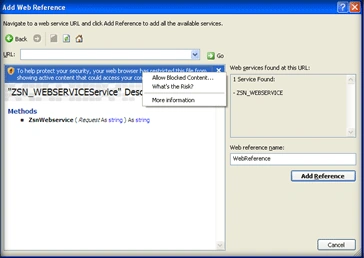
- Click on the 'Allow block content' as shown below. Which show the generated WSDL.
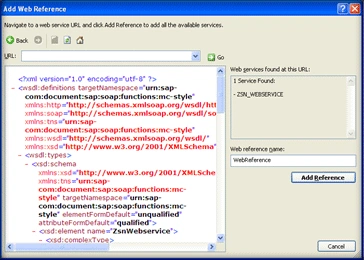
- Enter 'SAPWebServiceNamespace' in the 'Web reference name' text box and click on 'Add Referance' button. Which will generate the .NET proxy class of the client to consume.
- Compile the solution. Now the proxy class is ready to be consumed by .NET clients. Which will be detailed in the next section.
- Also following entries are made to the app.config for runtime use to identify the web service.

CONSUMING PROXY IN .NET CLIENT
Follow the steps to create and read the data by using the proxy.
- Add a new 'ASP.NET Web application' to the SAPDotNetIntegration solution. And name it as AspDotNetClient.
- Add the reference to the SAPWebServiceProxyLibrary.dll compiled and saved on the disk. By right clicking on the AspDotNetClient, and clicking on the 'Add reference context' menu.
- Add the following statement to the code behind
using SAPWebServiceProxyLibrary.CustomerMasterNamespace; - Following are the basic lines of code to be written to asscess the data from SAP system.
//Creating the Service
ZSN_WEBSERVICEService
_proxy = new ZSN_WEBSERVICEService();
//stores the return row XML data from the SAP web service
String outData;
//Setting the User Credentials
_proxy.Credentials = new NetworkCredential("loginName", "password");
//We have a stateful communication therefore we have to use a //CookieContainer
CookieContainer _cookie = new CookieContainer();
_proxy.CookieContainer = _cookie;
// p_filepath_app is the input parameter to identify the specific SAP web // service
outData = _proxy.ZsnWebservice("xmlfilepathonthesapserver");
ib belladPosted Nov 16, 2017, 4:49 AM
Hi, as you guided same thing dong but i am getting "the request was aborted the request was canceled" in my application while connecting to sap web service. why this error is throwing.
Abhishek AmanPosted Jul 20, 2017, 7:36 AM
This indeed is very helpful for people who don't know a bit about integration of SAP and .Net. I would like to know, if we have written an API in C# & asp.net, how can we invoke an SAP service and consume the info from it?
siva kumarPosted Nov 28, 2016, 5:26 AM
I have sap service url.This url need to call from dotnet application which need to authenticate.I am not abel to do it.Can you help on this.
Arjun DhilodPosted Sep 23, 2013, 7:19 AM
if we follow Right click oin the SAPWebServiceProxyLibrary project and click on 'Add web referance' context menu. than not able to see "'Add web referance" this option pls let me know
Arjun DhilodPosted Sep 20, 2013, 7:59 AM
xmlfilepathonthesapserver= can u explain me about this
Arjun DhilodPosted Sep 20, 2013, 1:59 AM
Sir if i want the data in label or grid-view wt is step i required pls let me know thank
Saravanan RamamurthyPosted Mar 26, 2013, 4:51 AM
Hi nice blog. I am trying to consume sap web service using asp.net. I have done all the steps which you have mentioned. But i couldn't figure out the xml file path to be pass as a argument to the _proxy.ZsnWebservice(). Where can I find this?
PabloPosted Oct 5, 2011, 11:21 AM
Hi We are trying to connect to a SAP web service from an smart device using .NET Compact Framework. Is it possible? If yes, what is needed? Thanks
nathan guediniPosted Aug 23, 2010, 4:52 PM
Srihari, I am developing an application that integrates SAP and .net and have some doubts. I'm .net developer. All SAP versions support Web service? What sap developers need to make a web service? Thanks
Mahesh ChandPosted Aug 20, 2010, 9:30 PM
Thank you for sharing one more wonderful article Srihari. I don't know much about communication between SAP and .NET. Good to know this.