

Designing screens is the important thing in the Software Development. In this article we shall discuss how to design the screens in a LightSwitch application.
In LightSwitch, designing the screen is pretty simple. We are going to design our application screen using the available default screen Templates in LightSwitch.
Short intro about Screen Templates:
Screen Templates are nothing but the predefined screens which can used and edited to satisfy user requirements.
There are 5 types of Screen Templates available in LightSwitch application.
- Details Screen
- Editable Grid Screen
- List and Details Screen
- New Data Screen
- Search Data Screen
We will see how to efficiently use these templates in our application in this article.
Also we can download the Screen Templates from the LightSwitch Communities. Let's discuss about the New Data Screen.
Preparing the Solution:
Fire up the VS 2010; create a LightSwitch Desktop application with the name "DesigningScreensInLSPartII" as shown in the following figure.
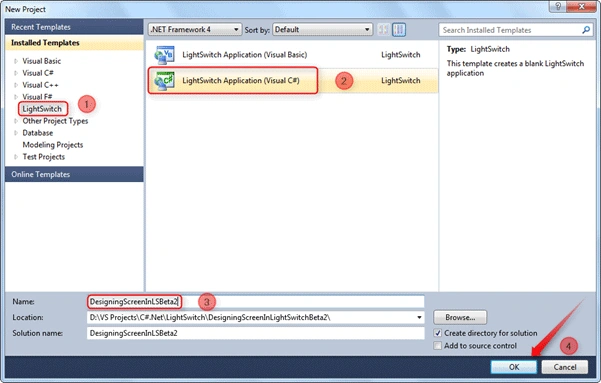
Follow the [No: #] to create the Solution.
The Entity Designer:
Let us create a table.

This screen to create an Entity is new in Beta 2 which is not available in Beta 1. Select the rounded option to create a new table.
After clicking on the "Create new table" option the following Entity Designer will be displayed.
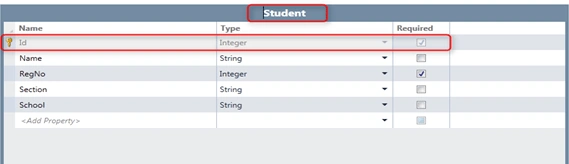
To change the Table name simply click on the Header of the Entity Designer and give the Name. In our sample application we have given the name Student.
When you are creating a Table [Entity], the field Id is the default one. At run time sometimes we don't need the Id to be displayed.
To make the visibility of the Id false, Select the Id and select the properties for the Id field.
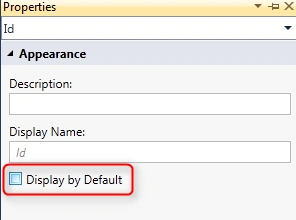
Just uncheck the option "Display by Default". It will hide the Id from the running screen.
Creating the New Data Screen:
There are two ways to create a screen. One of the options is by selecting the Screen... button on the Entity Designer screen top.

Another way is to right-click on the Screens section in the Solution Explorer.
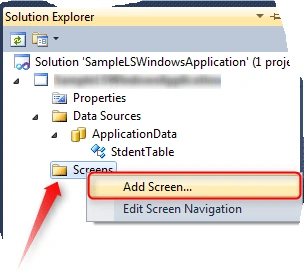
Adding New Data Screen:
In this article we will mainly focus on the New Data Screen.
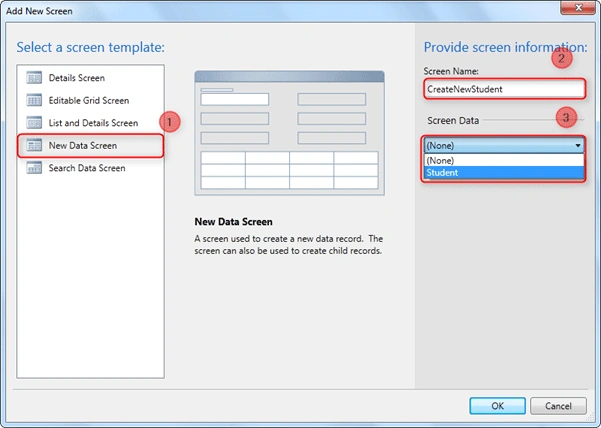
To create the New Data Screen, Select the New Data Screen from the screen template in the left side panel [No: 1].
Give a suitable name for the screen to be created. In this application we are using the name CreateNewStudent [No: 2].
Quick Note:
- The name should start with alphabetical character and contain only numbers and underscore.
Select the Entity which will be created via the New Data Screen. For our application we have selected the Students; only one Entity [No: 3].
The screen-like structure in the center is to simply display our screen to be displayed.
Where & When to use Search Data Screen:
The New Data Screen is the important screen as it is used to create the records for our application.
The New Data Screen allows the user to create and save the record into the database. We can use it as the Primary part of the application screens.
Changing the Appearance of Search Data Screen
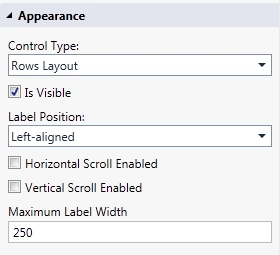
We can change the appearance of the New Data Screen using the Properties available. We can change the Control which allows creating the new data. By default the AutoComplete Layout will be the control for the new data screen.
Application in Action:
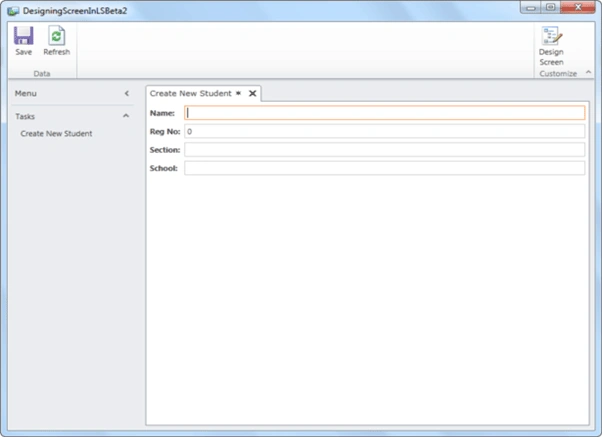
The above screen shows how the New Data Screen will be in our application.
The Labels for the fields are automatically created by the LightSwitch application.
To save the entered data into the Database simply click on the Save button which is available on the left top corner.
Summary:
In this article part I, we have seen the types of Screen Templates available and how to use the New Data Screen in a LightSwitch application.
We have created a new data screen and saved some data in the database using the New Data Screen. To view the saved data or to search among the saved data we need a screen. In the next article we will see how to create and use the Search Data Screen in a LightSwitch Application.
Thanks for spending your precious time here. Please provide your valuable feedbacks and comments, which enable me to give a better article the next time.
Please rate this Article.
Thanks.
bhuvenPosted Sep 19, 2011, 1:54 PM
Hello Jagan: I notice in the many examples, string sizes are left at default 255. Is it not better to decalre the max size example Name as 40 etc instead of leaving at 255 MAny thanks, Bhuven
bhuvenPosted Sep 6, 2011, 1:53 PM
Hello Jagan: I have a new data screen with header and detail records for orders. I create the header details as you example above and the detail records are in a row in a datagrid where lightswitch automatically creates commands as well. I donot want to use default entry screen for child records becuase I cannot make changes in the code behind. I create a defgault screen and change the code to access the default screen instead of lightswitch default. I am able to open screen but screen is in read only mode. Can you kindly assist with suggestion of what I am missing or doing wrong. Thank you in advance Bhuven