

This article describes how to build a Tool for installing a Silverlight OutOfBrowser Application in WPF.
Creating OOB Silverlight Application:
Fire up the VS 2010, create Silverlight Application and Name it SilverlightOOBApplication. The important thing to have in mind while creating an OOB Application is to uncheck the OOB Host checkbox in Silverlight application.
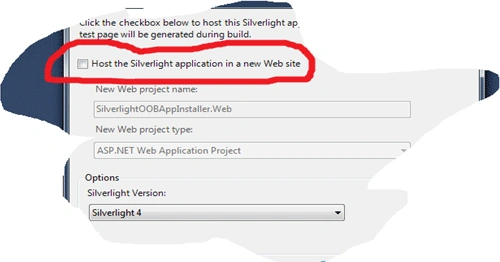
The above image shows how to make the OOB Silverlight application.
Creating the Silverlight OOB Application Installer:
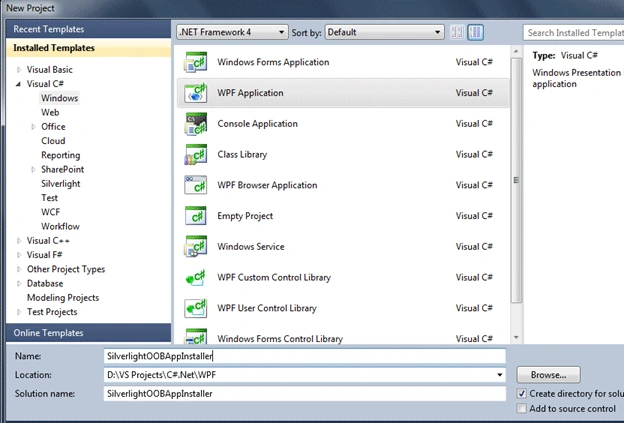
As usual, start the VS 2010 and create a WPF application named SilverlightOOBAppInstaller as shown below.
Moreover, design the Tool like this using WPF Controls.
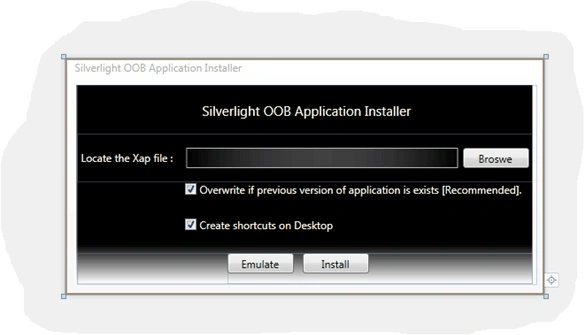
In this Tool, we have three buttons, two check boxes and three text blocks.
- The first check box chkOverwrite is used to check whether the install command can have the overwrite option or not.
- The second check box chkShortcut used here is to add the option with install command that tells the Silverlight to create the shortcut on desktop.
- The buttons install and emulate is used to install and emulate the Silverlight application.
- The browse button used is to select the .xap file to install.
The MasterProcess Class:
Here we are using the Process class to execute the sllauncher.exe. For that we have created a separate class called MasterProcess.
To use the Process class in the project we should add the reference System.Diagnostis as shown here.
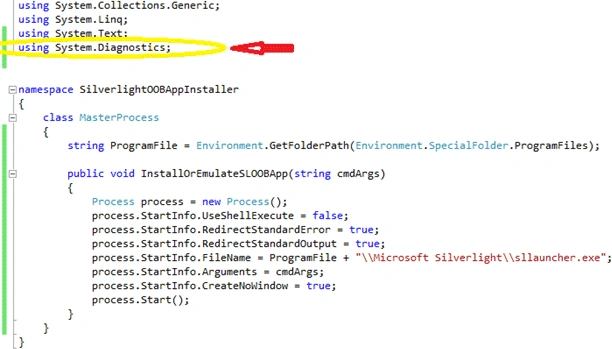
In the above code, in the InstallOrEmulateSLOOBApp method we are setting the filename of the exe to be executed, arguments for the file and for silent execution we are setting the CreateNoWindow that avoids the Windows Command-Prompt screen.
Installing the Silverlight OOB Application:
To install the Silverlight application we should select the .xap file and check the necessary checkboxes.
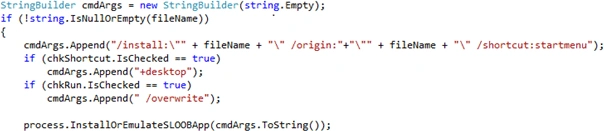
By default, we are creating Start menu -> Programs shortcut and for desktop is user choice. Here
we are building the argument for the sllauncher to install the Silverlight application.
Emulating the Silverlight OOB Application:

If you don't check the overwrite option then if there is a previous version of Silverlight installed then the sllauncher sometimes won't install the current version. So that I made the overwrite option as recommended.
Summary:
In this article, I have just made the Silverlight installation user friendly using the WPF application.
Please provide your valuable suggestions and feedbacks. Thanks
Shirsendu NandiPosted Apr 5, 2011, 9:59 AM
Hi jagan..it is really a very good article..
Diptimaya PatraPosted Feb 23, 2011, 4:56 AM
Nice Article. Keep it up.
SapnaeditedPosted Jan 31, 2011, 11:02 PMEdited Jan 31, 2011, 11:05 PM
Really good article, it helps me lot.
Mahesh ChandPosted Jan 31, 2011, 9:22 AM
Good work Jagan. I like your simple & sample style.
Dinesh BeniwalPosted Jan 30, 2011, 11:08 PM
Nice article jaganathan, welcome on the C# Community.