

While using Entity Framework, it is very common to write a method and call it multiple times from various modules/sections of the applications. For example, in an application, we may be fetching the list of States and Cities and so on. So when we write a LINQ query to perform this operation, behind the scenes, this LINQ query is first checked for any syntax error, then it is converted into its SQL equivalent and finally executed in the database to fetch the results.
So imagine the situation where this type of query is fired many times, once for each request it receives. The type of data it returns could be a list of thousands of records at a time. To add to the overhead of this operation, the LINQ query will be first parsed, then converted into SQL and finally executed in the database. So it can result in performance issues. One thing we could have done is to use the Stored Procedures to handle this situation. Another alternative is to use compiled queries. So let's discuss the second approach.
What a Compiled query in LINQ is
A compiled query is a cached version of the actual query, that we use to get the results. We write the query. For the first time it is parsed or verified for any kind of syntax error in LINQ, then converted into SQL version and is added into cache. So every subsequent request for this query, the cached version of this query is used and thus avoids parsing and conversion of the LINQ query into its SQL version.
Create compiled query in LINQ
To create a compiled query, we have a static method named "Compile" in the "System.Data.Objects.CompiledQuery" namespace. It is a static function with 16 overload versions and it returns a generic "Func" delegate type. See the list of its definitions.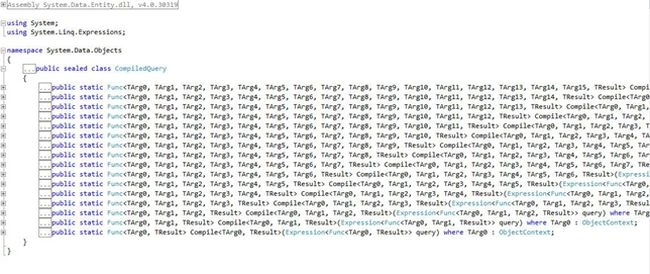
The following are some important points to be noted here:
- In the preceding definitions list, it specifies that TArg0 must be of type ObjectContext. This means that the first parameter passed to this method should be an instance or context of our entities that we are using.
- TArg1...TArgn is the list of any other input parameters that are used to query the results or we can say, add to the filter condition of the query.
- TResult is the final result or output that we expect from the query. It could be the list of cities or users and so on. from the database.
- The delegate variable we use to cache the query, will have the same signature as that of the Compile method, as it will act as a pointer to the function or we can say it is basically the return type of the method. It's like we have an INT32 return type of a function and storing it in an INT32 type static variable.
The delegate variable that this method returns must be declared as static. By making this variable static, the SQL version of the query is stored or cached in this variable. Any further requests to this query are then handled using this static variable.
An example to create a compiled query in LINQ
Let's say we want to get the list of all the users of our application with an Id greater than 50. Our first step will be to write the Compile method, with signatures, having 2 input parameters of type context of entities and an integer type variable and returns us the list of the users. So our method will look like the following: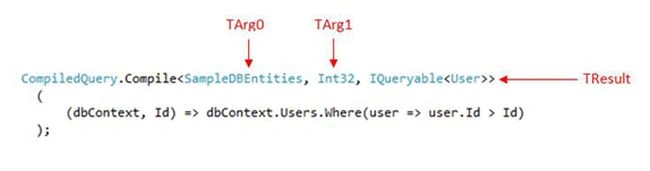
By comparing the code above with the overload definitions of the Compile method (previous image), we can see that we have TArg0 as our object context of entities, TArg1 is a filter condition and TResult is the output of the query or List of the Users, in our example. Like TArg0 and TArg1, we can have up to TArg15 as input parameters in the query.
Next, we will store the returned values in a delegate variable with the same signatures, as that of our Compile method, returning the list of users. Make sure that the variable we declare is of static type. So our code becomes: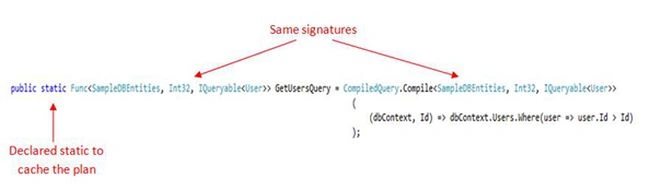
This is it. Now we just need to create a method in order to call this query multiple times. In our case we will add a method named GetUsersByCompiledQuery. This will invoke our delegate, that will further execute the Compile method.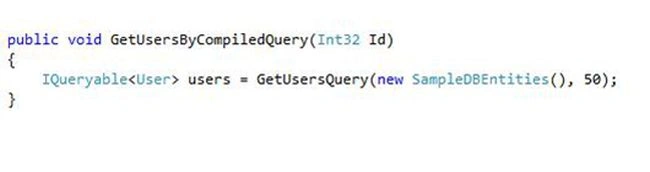
The point to note here is that for the very first time, this query may also take the same amount of time for execution, as it would have done in the case of a normal LINQ query. But subsequent calls will take much less time than the first call, since it will be already compiled by then and its cache plan will be used. Another point to be mentioned, as per MSDN, starting with the .NET Framework 4.5, LINQ queries are cached automatically.
So this was about the concept of compiled queries in LINQ. I hope you enjoyed reading it.
Navratna PawalePosted Feb 9, 2016, 9:32 AM
nice..
Hemant MahajanPosted Jan 26, 2016, 1:08 PM
Never knew this capability of LinQ. Thanks for sharing!!
Sandeep Singh ShekhawatPosted Feb 12, 2014, 7:02 AM
nice.. well explained..