

Ajax release the html editor control in May 13 2009 release. We found the Ajax's editor control in the Ajax toolkit. This provides the html enabled editor to write into it.
This control looks like this at the runtime
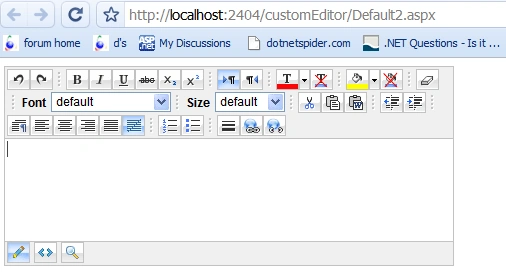
As you can see there are lots of tools available in the editor. But sometime we require only few tools to be displayed in this editor. For that we can change the editor and override FillTopToolbar() and FillBottomToolbar() methods of editor control.
For that in the App_code folder we have to add one .cs file. And then add the namespace AjaxControlToolkit.HTMLEditor
protected override void FillBottomToolbar()
{
BottomToolbar.Buttons.Add(new
AjaxControlToolkit.HTMLEditor.ToolbarButton.DesignMode());
BottomToolbar.Buttons.Add(new AjaxControlToolkit.HTMLEditor.ToolbarButton.PreviewMode());
BottomToolbar.Buttons.Add(new AjaxControlToolkit.HTMLEditor.ToolbarButton.HtmlMode());
}
protected override void FillTopToolbar()
{
TopToolbar.Buttons.Add(new
AjaxControlToolkit.HTMLEditor.ToolbarButton.Bold());
TopToolbar.Buttons.Add(new AjaxControlToolkit.HTMLEditor.ToolbarButton.Italic());
}
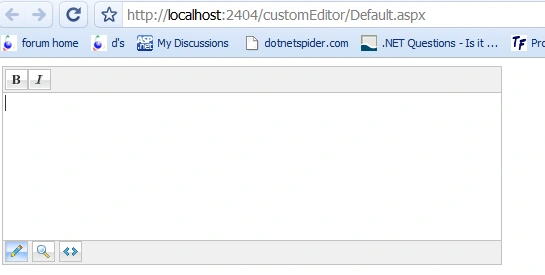
As you can see here in the bottom toolbar we have added all three modes that is design, preview and html. But from the top we just add bold and italic.
So at run time this will look like:
We can use this control in asp.net page same as we use the usercontrol.
<%@ Register namespace="MyControls"
tagprefix="custom"
%>
<html xmlns="http://www.w3.org/1999/xhtml">
<head runat="server">
<title>Untitled Page</title>
</head>
<body>
<form id="form1" runat="server">
<cc1:ScriptManager ID="ScriptManager1"
runat="server"
/>
<div>
<custom:CustomEditor ID="CustomEditor1"
Width="500px"
Height="200px"
runat="server"
/>
</div>
</form>
</body>
</html>
Here the MyControls is the namespace that we use in .cs file of customEditor. And to use it in the cs of this aspx page we use the namespace
using MyControls;
protected void Page_Load(object sender, EventArgs
e)
{
CustomEditor1.Content = "hello.. this is
custome editor...";
}
Guest UserPosted Dec 10, 2013, 7:32 AM
thank you for sharing....
waqas memonPosted Aug 15, 2011, 8:58 PM
can you please tell me how can upload image in editor?
barby swPosted Feb 17, 2011, 4:09 AM
on editor i need to add button (to browse image)so when click on this button will open to me popup which have my desired design to browse image by url or by file uploder so how can i add this button on editor toolbar plz send to me on [email protected]
anant kolvankarPosted Feb 16, 2011, 5:03 PM
thank's it helped me lot in my project work THANK U VERY MUCH