

This beginner's tutorial is all about the Razor View Engine and MVC 3. You will be building a trivia game that simulates the world cup final. By completing this tutorial you will start to develop a basic understanding of MVC 3, build an understanding of the Razor View Engine and have some fun along the way.
The Razor View Engine is a syntax utilising .NET (C# or VB.NET) to build clean functional web pages using standard HTML.
Scott Guthrie sums up it up really well:
We had several design goals in mind as we prototyped and evaluated "Razor":
- Compact, Expressive, and Fluid: Razor minimizes the number of characters and keystrokes required in a file, and enables a fast, fluid coding workflow. Unlike most template syntaxes, you do not need to interrupt your coding to explicitly denote server blocks within your HTML. The parser is smart enough to infer this from your code. This enables a really compact and expressive syntax which is clean, fast and fun to type.
- Easy to Learn: Razor is easy to learn and enables you to quickly be productive with a minimum of concepts. You use all your existing language and HTML skills.
- Is not a new language: We consciously chose not to create a new imperative language with Razor. Instead we wanted to enable developers to use their existing C#/VB (or other) language skills with Razor, and deliver a template markup syntax that enables an awesome HTML construction workflow with your language of choice.
- Works with any Text Editor: Razor doesn't require a specific tool and enables you to be productive in any plain old text editor (notepad works great).
- Has great Intellisense: While Razor has been designed to not require a specific tool or code editor, it will have awesome statement completion support within Visual Studio. We'll be updating Visual Studio 2010 and Visual Web Developer 2010 to have full editor intellisense for it.
- Unit Testable: The new view engine implementation will support the ability to unit test views (without requiring a controller or web-server, and can be hosted in any unit test project - no special app-domain required).
Scott Guthrie, 2010
If you want to know about Razor have a look at Scott's blog post in full: http://weblogs.asp.net/scottgu/archive/2010/07/02/introducing-razor.aspx
This is one of my first applications built using MVC3 and I am sure I will be refactoring soon. I'll be posting further updates to this game on my blog at http://www.domscode.com/ so check there soon for the latest instalment.
Prerequisites
You will need VS2010 or Express Version and the latest version of MVC 3.0 (Including the recent Tools Update). Just go to http://www.asp.net/mvc and click on the MVC 3 Installer.
Whilst some knowledge of MVC would be really useful, there are lots of great resources out there to start including:
http://ASP.NET/MVC
http://websitesmaderight.com/2011/03/getting-started-with-asp-net-mvc/
http://weblogs.asp.net/jgalloway/archive/2011/03/17/asp-net-mvc-3-roundup-of-tutorials-videos-labs-and-other-assorted-training-materials.aspx
The Cricket World Cup 2011
First of all I must confess to being a cricket fanatic and If you can't get excited about the world cup of Cricket then what can you get excited about. Yes, unfortunately Australia did not win and my tears have filled my keyboard, but to be honest, my once mighty Aussies were not the same force they have been and despite Ricky Ponting's fine century against India in the quarter finals, Australia simply did not get enough runs. On the contrary India's success was based on a mighty top 6 batting line up and few teams rarely dismantled their top order. Well done India. It may be a bit harder in 2015 in OZ. Now back to the code....
The game
You play as India in the final and you will need to chase down a competitive target by correctly answering WC trivia cricket questions. You can select an easy, medium or hard question every over and an incorrect answer will mean a wicket has been lost or a correct answer means runs based on the following: easy: 2 runs an over, medium: 4 runs an over and hard:8 runs an over. You will notice when answering questions there are no spaces to enter and when you answer names surnames are all you need.
You'll notice I have only started with 30 questions but will be building this up in the future - feel free to add additional questions!!!
Let's get coding
- Start Visual Studio
- Select File->New Project and then select Visual C# -> Web -> ASP.NET MVC 3 Web Application
- Enter the name MVCCricketWorldCupTrivia make sure Create directory for solution is ticked and click OK
- Then select Internet Application, Razor View Engine and untick the Use HTML semantic markup. Also, Don't worry about adding any unit test projects at this stage.
This will create a basic starting MVC3 Project. First thing we need to do is get rid of some unnecessary files that are not of any use - they are mainly the account views and models.
- Delete the following:
- AccountController.cs from the Controller folder
- AccountModel.cs from the Models folder
- Account folder in the View folder
- LogOnPartial.cshtml in the /Views/Shared folder
We are going to start by adding our models. We need 3 main classes for our game.
- Game - Key class that provides all the game logic and data
- Question - loads the questions from an XML file.
- ShotResult - Simple class storing the result of our answer or played shot.
- Now we need to add our first model so right click on the Models folder and select Add Class...
- Name the class Game
- Replace the existing code with the following code:
using System;
using System.Collections.Generic;
using System.Linq;
namespace MVCCricketWorldCupTrivia.Models
{
public class Game
{
#region Properties
public int SriLankaScore { get; set; }
public int Wickets { get; set; }
public int Runs { get; set; }
public int Overs { get; set; }
#endregion
#region public methods
public void CreateGame()
{
if (System.Web.HttpContext.Current.Session["Game"] == null)
{
Runs = 0;
Wickets = 0;
Overs = 0;
SriLankaScore = GameSettings.SriLankaScore;
System.Web.HttpContext.Current.Session["Game"] = this;
}
}
public ShotResult GetResult(Question questionAnswered)
{
Question question = Question.Questions.SingleOrDefault(
q => q.QuestionID == questionAnswered.QuestionID &&
String.Compare(questionAnswered.PlayersAnswer, q.Answer, true) != -1);
return (question != null) ? new ShotResult
{
Out = false,
Runs = (int)Math.Pow((GameSettings.BaseRunValue), question.Level)
}
: new ShotResult { Out = true, Runs = 0 };
}
public bool IsGameActive()
{
return System.Web.HttpContext.Current.Session["Game"] == null ? false : true;
}
#endregion
}
}
This is really a simple class. The properties are simply the main properties of the Game Class. The CreateGame method will add a Game object to the session. GetNextQuestion returns a new random question. GetResult determines the outcome of a shot and returns a shotresult object. IsGameActive simply determines if there is a game running.
- Now we need to add the model for Questions so right click on the Models folder and select Add Class...
- Name the class Question
- Replace the existing code with the following code:
using System;
using System.Linq;
using System.Xml.Linq;
using System.ComponentModel.DataAnnotations;
using System.Xml;
using System.Collections.Generic;
namespace MVCCricketWorldCupTrivia.Models
{
public class Question
{
#region Fields
private Game currentGame;
#endregion
#region Properties
public int QuestionID { get; set; }
public string QuestionText { get; set; }
public int Level { get; set; }
public string Answer { get; set; }
[Range(1, 3)]
public int AttackLevel { get; set; }
[Required(ErrorMessage = "Please enter an answer for the question")]
public string PlayersAnswer { get; set; }
public Game CurrentGame
{
get
{ return (Game)System.Web.HttpContext.Current.Session["Game"]; }
set
{ currentGame = value; }
}
#endregion
#region Question Data
private static List<Question> questions;
public static List<Question> Questions
{
get
{
if (questions == null)
{
questions = LoadQuestionsFromFile();
}
return questions;
}
}
#endregion
#region private methods
private static List<Question> LoadQuestionsFromFile()
{
XDocument loaded = XDocument.Load(
System.Web.HttpContext.Current.Server.MapPath("~") +
GameSettings.CricketQuestionsXMLFileLocation);
var questions = from q in loaded.Element("Questions").Descendants("Question")
select new Question
{
QuestionID = int.Parse(q.Element("ID").Value),
Level = int.Parse(q.Element("Level").Value),
QuestionText = (string)q.Element("QuestionText").Value,
Answer = (string)q.Element("AnswerText").Value
};
return questions.ToList();
}
#endregion
#region public methods
public static Question GetNextQuestion(int questionLevel)
{
Random r = new Random();
int questionIndex = r.Next(GameSettings.RandomQuestionsPerLevel);
var questionsAtLevel = Questions.Where(q => q.Level == questionLevel);
return questionsAtLevel.ToList().ElementAt(questionIndex);
}
#endregion
}
}
The properties represent the attributes of the question class and you can see we are using data annotations for Answer and AttackLevel that enable us to facilitate the use of unobtrusive JavaScript a little later on when we create our views.
LoadQuestionsFromFile simply allows us to load the XML file into a collection of Questions.
- Now we need to add the class for ShotResult so right click on the models folder and select Add Class...
- Name the class ShotResult
- Replace the existing code with the following code:
namespace MVCCricketWorldCupTrivia.Models
{
public class ShotResult
{
#region properties
public int Runs { get; set; }
public bool Out { get; set; }
#endregion
}
}
- And finally let's add a class for GameSettings
- so right click on the models project and select Add Class...
- Name the class GameSettings
- Insert the following code:
namespace MVCCricketWorldCupTrivia.Models
{
public static class GameSettings
{
#region properties
public static int BaseRunValue
{
get { return 2; }
}
public static int MaxOvers
{
get { return 50; }
}
public static int MaxWickets
{
get { return 10; }
}
public static int RandomQuestionsPerLevel
{
get { return 9; }
}
public static int StartAttackLevel
{
get { return 1; }
}
public static string CricketQuestionsXMLFileLocation
{
get { return @"\Models\CricketQuestions.xml"; }
}
public static int SriLankaScore
{
get { return 274; }
}
#endregion
}
}
Note in this class that the RandomQuestionsPerLevel (9) is for a 0 based array - so it refers to 10 items. In future versions I will replace the constant with a linq query to determine the questions per level.
Now we need to add our controllers. Let's start by adding the controller for the Questions. This is the key to our controllers because it is the director of all the logic within our Game. In general you will find that the controllers are the directors or facilitators of traffic in your MVC application.
- Right click on the Controller folder and select Add Controller
- Name it QuestionController and ensure the template is set to empty controller
- Replace the existing code with the following:
using System.Web.Mvc;
using MVCCricketWorldCupTrivia.Models;
using System.Configuration;
namespace MVCCricketWorldCupTrivia.Controllers
{
public class QuestionController : Controller
{
public ActionResult Play(int? attackLevel)
{
//If there is no attack level for this game lets set it to the
//start attack level
if (!attackLevel.HasValue || attackLevel == 0)
{
attackLevel = GameSettings.StartAttackLevel;
}
//Get the next question
Question question = Question.GetNextQuestion(attackLevel.Value);
//question.AttackLevel = attackLevel.Value;
if (HttpContext.Session["Game"] == null)
{
//No game in the session so lets create it
Game game = new Game();
game.CreateGame();
question.CurrentGame = game;
question.AttackLevel = attackLevel.Value;
}
return View(question);
}
[HttpPost]
public ActionResult Play(Question question)
{
if (question.CurrentGame == null)
{
return RedirectToAction("Index", "Home");
}
//get the shot result for by calling the getresult method
ShotResult result = question.CurrentGame.GetResult(question);
if (result.Out)
{
question.CurrentGame.Wickets++;
}
else
{
question.CurrentGame.Runs += result.Runs;
}
//Increment the Overs then check if the game is over
question.CurrentGame.Overs++;
if (question.CurrentGame.Overs >= GameSettings.MaxOvers ||
question.CurrentGame.Wickets >= GameSettings.MaxWickets ||
question.CurrentGame.Runs > question.CurrentGame.SriLankaScore)
{
return View("Complete", question.CurrentGame);
}
//Next over will begin
return RedirectToAction("Play",
new { AttackLevel = question.AttackLevel });
}
}
}
There are two methods that we use in our controller. The first is:
public ActionResult Play(int? attackLevel)
This is called on a HTTP Get and you should think of it as the controller action that is called when the page is loaded or refreshed. We pass this method the Attack Level the user has entered so that when we display the question we load the appropriate question based on the Attack Level.
The second method (overloaded version of the first) is:
[HttpPost]
public ActionResult Play(Question question)
This method is only called on a HTTP Post from the form in the Game View that we will see in a moment. The attribute is needed to tell the controller that this method will only be called on a Post. We can see that we pass the Question model to this controllers action. Again in a moment we will see that this is the model that our view is bound to and is posted to the controller so that we can access that model within the controller.
Just before we create the views, we need a minor change to the index controller. So open the index controller and replace the existing code with:
using System.Web.Mvc;
using MVCCricketWorldCupTrivia.Models;
namespace MVCCricketWorldCupTrivia.Controllers
{
public class HomeController : Controller
{
public ActionResult Index()
{
Game game = new Game();
return View(game);
}
public ActionResult About()
{
return View();
}
}
}
-
Now right-click within either of the Play methods and select Add View
-
Name it Play and accept all other defaults
-
Replace the existing code with the following:
@model MVCCricketWorldCupTrivia.Models.Question
@{
ViewBag.Title = "Create";
Layout = "~/Views/Shared/_Layout.cshtml";
}
<script src="../../Scripts/jquery-1.5.1.js" type="text/javascript"></script>
<script src="../../Scripts/jquery.validate.js" type="text/javascript"></script>
<script src="../../Scripts/jquery.validate.unobtrusive.js" type="text/javascript"></script>
<script type="text/javascript">
$(document).ready(function () {
$('#PlayersAnswer').focus();
});
</script>
<fieldset>
<h3>Scoreboard</h3>
<div class="Scoreboard">
@{if( Model!= null)
{
<div class="display-label">Sri LankaScore</div>
<div class="display-field">@Model.CurrentGame.SriLankaScore</div>
<div class="display-label">Wickets</div>
<div class="display-field">@Model.CurrentGame.Wickets</div>
<div class="display-label">Runs</div>
<div class="display-field">@Model.CurrentGame.Runs</div>
<div class="display-label">Overs</div>
<div class="display-field">@Model.CurrentGame.Overs</div>
}
}
</div>
</fieldset>
@using (Html.BeginForm())
{
@Html.ValidationSummary(true)
<fieldset>
<h3>Question</h3>
@Html.HiddenFor(m => m.QuestionID)
<div class="display-label">Question:</div>
<div class="display-field"> @Model.QuestionText </div>
@Html.LabelFor(model => model.PlayersAnswer)
<div class="editor-field" >
@Html.EditorFor(model => model.PlayersAnswer)
@Html.ValidationMessageFor(model => model.PlayersAnswer)
</div>
<div class="editor-label">
@Html.LabelFor(model => model.AttackLevel)
</div>
<div class="editor-field" >
@Html.EditorFor(model => model.AttackLevel)
@Html.ValidationMessageFor(model => model.AttackLevel)
</div>
<p>
<input type="submit" value="Play" />
</p>
</fieldset>
}
Now there's a little bit going on here so I'll break it down.
First:
@model MVCCricketWorldCupTrivia.Models.Question
@{
ViewBag.Title = "Create";
Layout = "~/Views/Shared/_Layout.cshtml";
}
This indicates that the model for this page is the Question model and we are also setting the View Title and the layout (similar to ASP.Net master pages).
Next:
<script src="../../Scripts/jquery-1.5.1.js" type="text/javascript"></script>
<script src="../../Scripts/jquery.validate.js" type="text/javascript"></script>
<script src="../../Scripts/jquery.validate.unobtrusive.js"
type="text/javascript"></script>
<script type="text/javascript">
    $(document).ready(function () {
        $('#PlayersAnswer').focus();
    });
</script>

The scripts would normally be referenced in the /views/shared/_layout.cshtml, but I found that there was a problem with getting unobtrusive JavaScript to work without them in this view.

Then we have a neat snippet of jQuery that enables the focus on each page load to be the question answer textbox of the form.

Next:

<fieldset>
<h3>Scoreboard</h3>
    <div class="Scoreboard">
    @{if( Model!= null)
        {
            <div class="display-label">Sri LankaScore</div>
            <div class="display-field">@Model.CurrentGame.SriLankaScore</div>

            <div class="display-label">Wickets</div>
            <div class="display-field">@Model.CurrentGame.Wickets</div>

            <div class="display-label">Runs</div>
            <div class="display-field">@Model.CurrentGame.Runs</div>

            <div class="display-label">Overs</div>
            <div class="display-field">@Model.CurrentGame.Overs</div>
        }
    }
    </div>
</fieldset>

This is just the scoreboard element of the view. Nothing really complex here; we just display all the important elements of the Models Current Game object. Although, we could potentially use a partial view here - I am just keeping things really simple and we'll get to partial views in future tutorials.

Finally:

@using (Html.BeginForm())
{
    @Html.ValidationSummary(true)
    <fieldset>
        <h3>Question</h3>

        @Html.HiddenFor(m => m.QuestionID)

        <div class="display-label">Question:</div>
        <div class="display-field"> @Model.QuestionText </div>

        @Html.LabelFor(model => model.PlayersAnswer)

        <div class="editor-field" >
            @Html.EditorFor(model => model.PlayersAnswer)
            @Html.ValidationMessageFor(model => model.PlayersAnswer)
        </div>
         <div class="editor-label">
            @Html.LabelFor(model => model.AttackLevel)
        </div>
        <div class="editor-field" >
            @Html.EditorFor(model => model.AttackLevel)
            @Html.ValidationMessageFor(model => model.AttackLevel)
        </div>
        <p>
            <input type="submit" value="Play" />
        </p>
    </fieldset>
}

So this is the main form for the View and contains all the important fields from the Game model class. Although it's a very simple piece of markup it provides
a lot of functionality through the Razor Engine and also built in validation via the models data annotations.
Now just a minor change; let's modify the /Views/Home/Index.cshtml to look like:

@model MVCCricketWorldCupTrivia.Models.Game
@{
    ViewBag.Title = "Home Page";
}

<h3>Welcome to the MVC 3 World Cup Cricket 2011 Trivia Game</h3>

   @if (!Model.IsGameActive())
   {
       <p>Game is not active</p>
       @Html.ActionLink("Play Game","Play", "Question");
   }
Also the/Views/Shared /_Layout.cshtml needs to be modified to include:
Change the title to:

<div id="title">
                <h3>World Cup 2011 Trivia Game</h3>
        </div>
Add a new action link into the markup
<li>@Html.ActionLink("Game", "Play", "Question")</li
Now, We need to just add our final view.
Right click on the /Views/Question folder and select Add->View
Name the view Complete and accept all other default settings
Replace the existing code with

@model MVCCricketWorldCupTrivia.Models.Game
@{
    ViewBag.Title = "End Game";
    Layout = "~/Views/Shared/_Layout.cshtml";
}

<h2>Final Scoreboard</h2>

<fieldset>
    <div class="Scoreboard">

        <div class="display-label">OppositionScore</div>
        <div class="display-field">@Model.SriLankaScore</div>

        <div class="display-label">Wickets</div>
        <div class="display-field">@Model.Wickets</div>

        <div class="display-label">Runs</div>
        <div class="display-field">@Model.Runs</div>

        <div class="display-label">Overs</div>
        <div class="display-field">@Model.Overs</div>

    </div>
</fieldset>
<p>
    @Html.ActionLink("Back to main page","Index","Home")
</p>
@{
    //Clean up the Session because we don't want anything else now
    HttpContext.Current.Session["game"] = null;
}
Of course we probably should be using a partial view here and removing the session in the view is also not great but for a tutorial it will do.

Just to add a nice black background to the scoreboard part of the view, let's change the main css file sightly.
Open /Content/Site.css
Add the following at the very bottom of the file

.Scoreboard
{
    background-color:Black;
    color:White;
}
The last thing we need to do is to add the XML file. You can find it with the sourcecode for this project (It will be residing in the model folder of the solution).
Download the XML file
Right cick on models and select Add existing item. Find the XML file and click OK
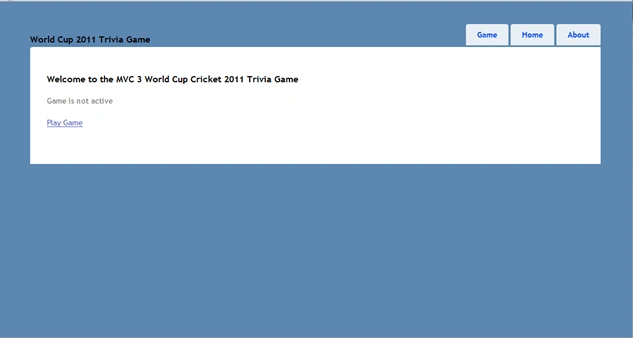
Save everything and now run the application (F5); you should see:
Click on Play Game and you should see:


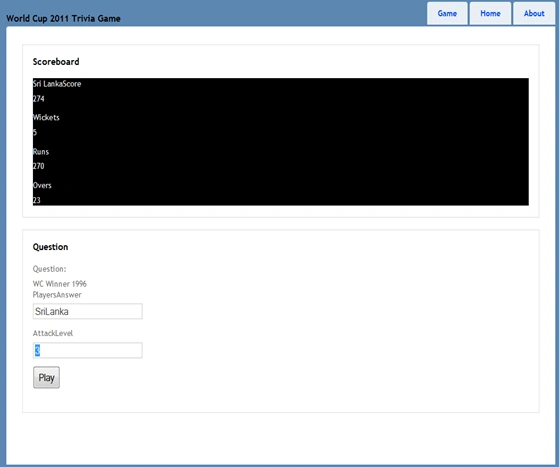
Of course I was being optimistic and the scoreboard on the following screen shows the result:
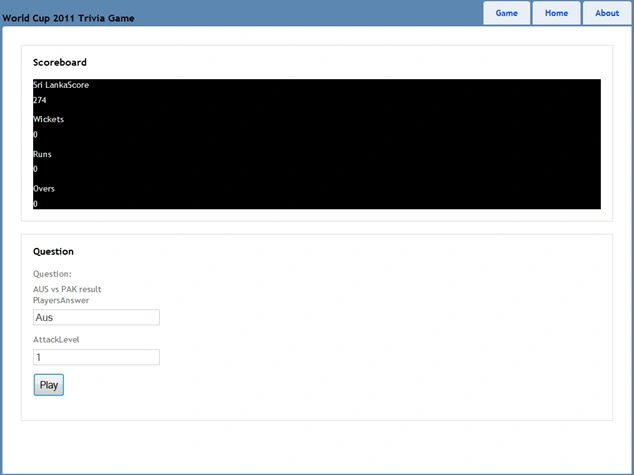
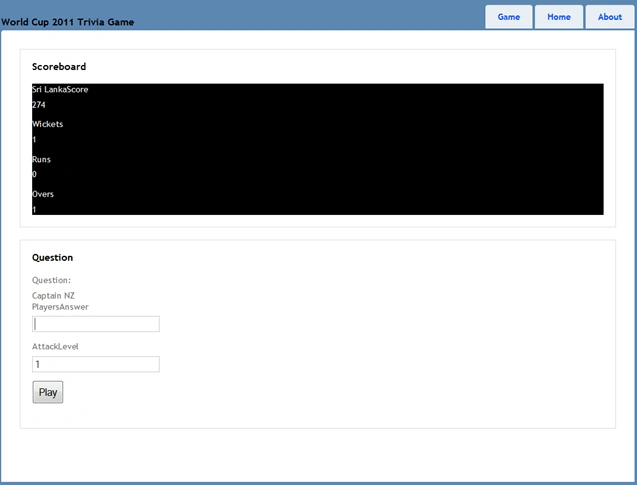
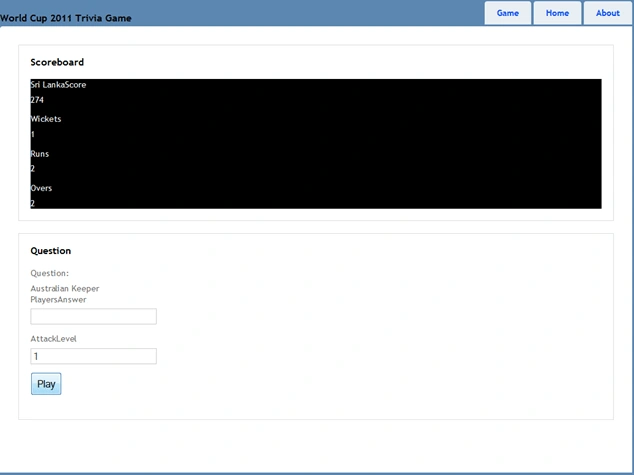
Terrible start really - One over down and a wicket already; this is an easier question:


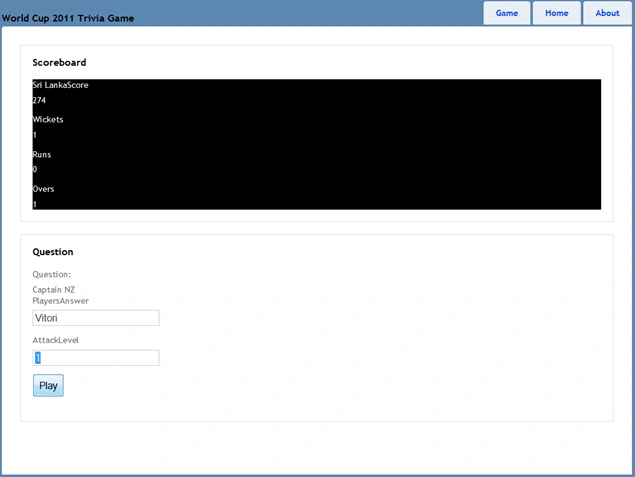
And we click Play:


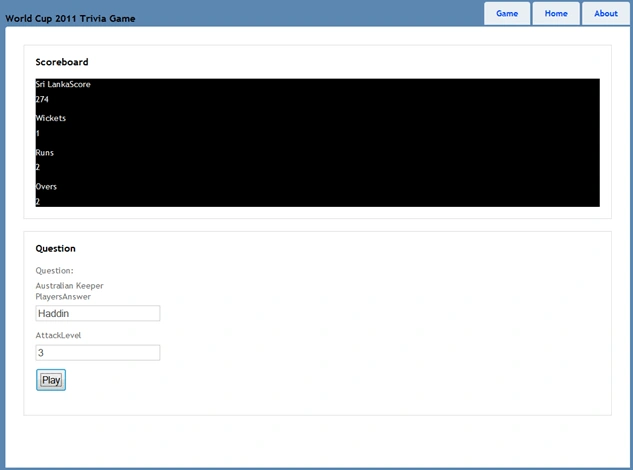
Now we are on the board with the chase but the run rate's a problem so let's increase the rate. Remember this will only take place after the next over
so the current question is still the easy one. So we answer this and enter the new attack level and click play.


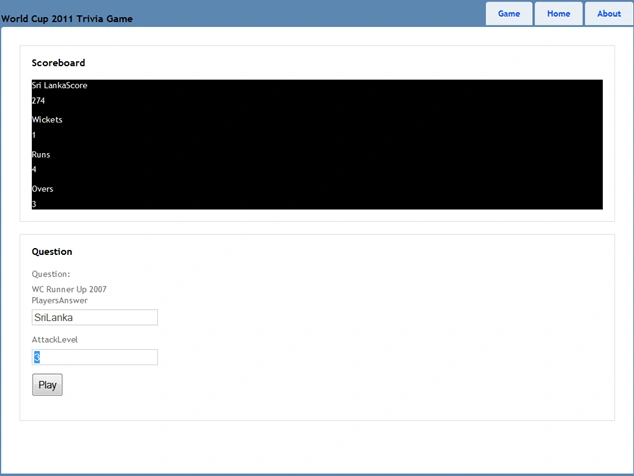
You can see below that now we have a harder question and the Attack Level has changed.


So we answer SriLanka and then of course click play


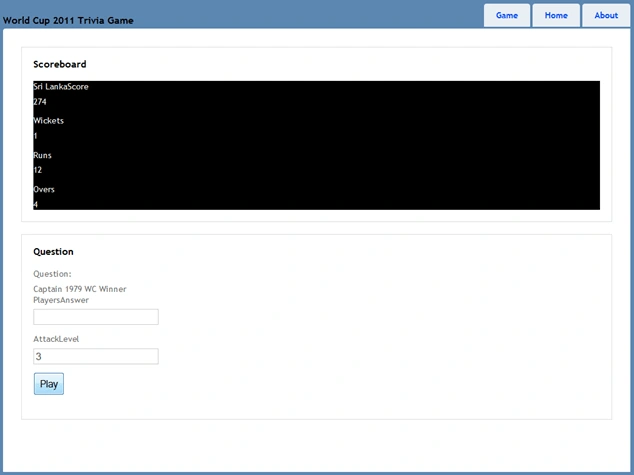
Ok we are starting to look good. I think you get the idea by now so let's fast forward to the end and the last ball...


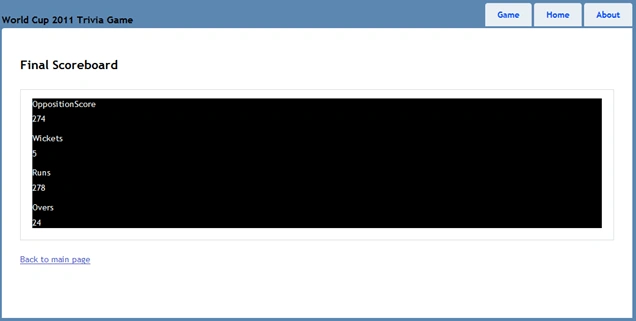
Click Play and of course with a winning score we get taken to the Complete View....


So you should get the idea - it is a simple game and you can modify it as you need
In Conclusion:

OK so the game is pretty simple but you get the idea. If you feel like making some more changes a few things you could do would be:
More Questions
Highest Score Page
Multiple Players
More Teams and much more...
I hope you have enjoyed this simple introduction to MVC 3 and well done again to the Indian cricket team for winning the 2011 world cup.

Dom

References

www.asp.net/mvc
http://weblogs.asp.net/scottgu/
http://www.hanselman.com/blog/
Aman KumarPosted Feb 8, 2013, 12:56 PM
sry sir i got my solution and thankyou sir
Aman KumarPosted Feb 8, 2013, 12:51 PM
Error 2 The name 'GameSettings' does not exist in the current context c:\documents and settings\agile\my documents\visual studio 2010\Projects\MvcApplication2\MvcApplication2\Models\Game.cs 33 37 MvcApplication2
Mahesh ChandPosted May 18, 2011, 8:04 PM
Nicely written Dominic. Thank you for sharing. Also being a Cricket fan, it is fun to see building apps for CWC. Also agreed. India was the best batting side, specially consistency of Sachin. Plus India deserves it after all those years of Sachin's work. Who knows if he will play next WC or not. Australia did very well and Pakistan was a big surprise. Cheers!