
Introduction
In this article we will see how we can change the Cell Alignment in DataGrid in
WPF.
Creating WPF Application Project
Fire up Visual Studio 2008 and Create a WPF Application and name the project as
CellAlignmentDataGridWPF.
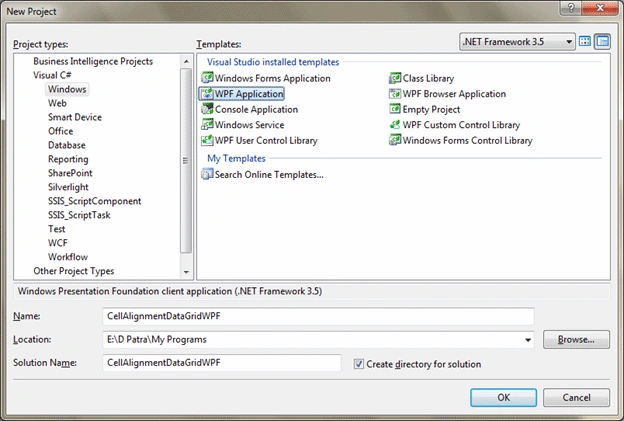
Let's have a DataGrid and then we would bind some sample data to it, so that we
can visualize the Data in DataGrid.
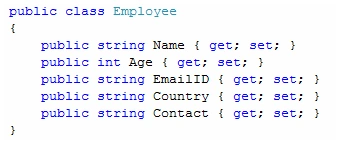
The above class represents the structure of Employee Entity.
Now we would have some sample data and bind it to DataGrid.

Now we will run the application and see how the cell alignment are look by
default.

As you see in above display the default alignement of the DataGrid Cell is Left
Alignment.
Now we would try to have Right and Center Alignement for Cells too.
We have to create a style that would Change the Template of DataGridCell, so
let's do it.
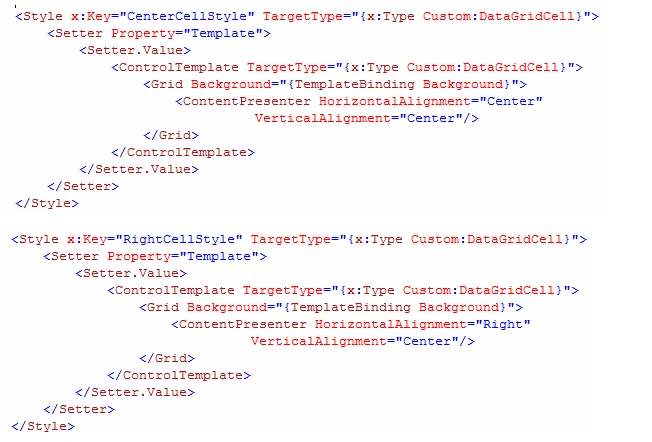
The above styles are for DataGridCell. Now we will use Custom columns in our
DataGrid and have these styles applied on.
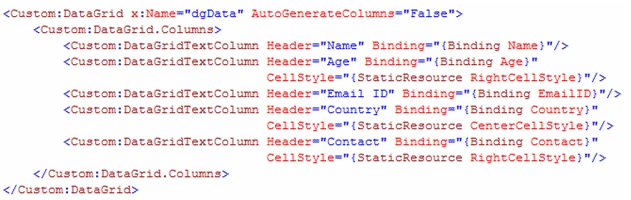
Now let's see how does it look in run time.

As simple as that. So we have achieved the Cell Alignment in DataGrid.
Hope this article helps.

Cell Alignment in DataGrid in WPF
Join the conversation! Your thoughts help the community grow.
Sign in to leave a comment
It is the same account you read, post and publish with — and you will come straight back to this page.
CARLOS E IBARRA CPosted Aug 9, 2020, 10:17 AM
Thanks a lot, quite useful, straight to the point. No problem .
Ömer BirlerPosted Jun 8, 2020, 10:40 AM
Not working. xaml has errors
GandalfPosted Jun 27, 2013, 3:19 AM
I'm working with Visual Studio 2010 and can not create the styles. Error: Namespace Custom is not declared.
avmfree avmfreePosted Feb 24, 2011, 6:34 AM
thank you very much. very helpful article. avm