

Introduction
This is a new widget of my recent posts in c-sharpcorner. This widget is called RSS Feed Widget. The basic functionality of this widget is to display the Links when the RSS Feed is provided. The following figure will describe you everything.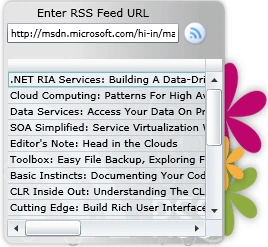
Figure 1.1 RSS Feed Widget
Steps
To begin with we need the following requirements:
-
Silverlight 3
-
Visual Studio 2008 SP1
-
Expression Blend 3
Creating a Silverlight Project with or without RIA enabled.
-
Create project in Visual Studio and open the solution in Expression Blend 3.
-
The following figure will guide you for that.
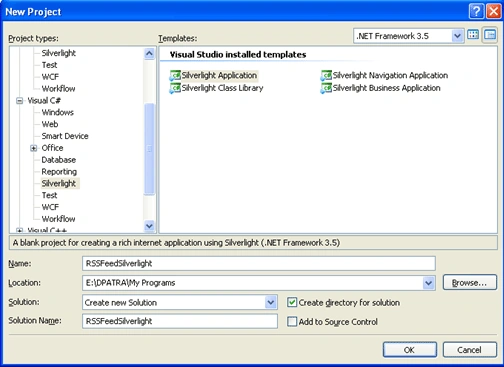
Figure 1.2 Create a new Silverlight project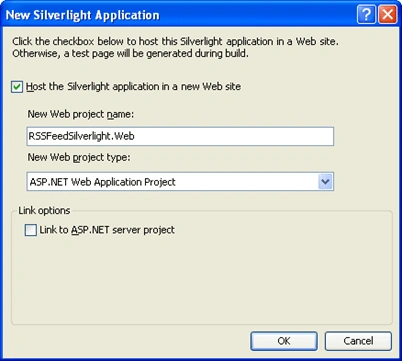
Figure 1.3 Uncheck the bottom checkbox to create the project without RIA support
Designing the User Control in Expression Blend 3
The User Control we are going to make should contain a background which matches a RSS Feed. I am taking a simple .png file which is looking simple.
Figure 1.4 RSS Feed Background.
Now our task is to add textbox, datagrid and image to fulfill our requirement. The following figure describes the design of the grid.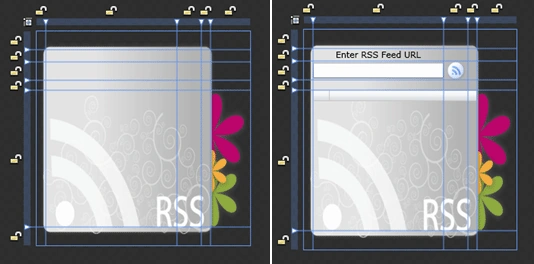
Figure 1.5 Designing the grid and placing the required controls.
The XAML will look like the following after all the design changes above.
<Grid x:Name="LayoutRoot" Width="280" Height="280">
<Grid.ColumnDefinitions>
<ColumnDefinition Width="0.043*"/>
<ColumnDefinition Width="0.614*"/>
<ColumnDefinition Width="0.114*"/>
<ColumnDefinition Width="0.043*"/>
<ColumnDefinition Width="0.186*"/>
</Grid.ColumnDefinitions>
<Grid.RowDefinitions>
<RowDefinition Height="0.086*"/>
<RowDefinition Height="0.057*"/>
<RowDefinition Height="0.086*"/>
<RowDefinition Height="0.045*"/>
<RowDefinition Height="0.64*"/>
<RowDefinition Height="0.086*"/>
</Grid.RowDefinitions>
<Canvas Grid.ColumnSpan="5" Grid.RowSpan="6">
<Image Source="image/rss.png" Width="270" Height="270" Canvas.Left="5" Canvas.Top="5"/>
</Canvas>
<Image x:Name="btnFetch" Source="image/rssButton.png" Grid.Column="2" Grid.Row="2" MouseLeftButtonDown="btnFetch_MouseLeftButtonDown" ToolTipService.ToolTip="Click To get all RSS Feeds" Curser="Hand" />
<TextBlock HorizontalAlignment="Center" Grid.Column="1" Grid.Row="1" Text="Enter RSS Feed URL" TextWrapping="NoWrap"/>
<TextBox x:Name="txtFeedLoc" Grid.Column="1" Grid.Row="2" Height="20" FontSize="9" Text="" TextWrapping="NoWrap" Margin="0,2,0,2" ToolTipService.ToolTip="Copy and Paste the URL of the RSS feed"/>
<data:DataGrid x:Name="dGrid" Grid.Column="1" Grid.Row="4" AutoGenerateColumns="False"
IsReadOnly="True" CanUserSortColumns="True" AlternatingRowBackground="{x:Null}" Background="{x:Null}" Grid.ColumnSpan="3"
HeadersVisibility="Column" GridLinesVisibility="Horizontal"
FontSize="10" FontWeight="Normal" BorderBrush="{x:Null}">
<data:DataGrid.Columns>
<data:DataGridTemplateColumn IsReadOnly="True">
<data:DataGridTemplateColumn.CellTemplate>
<DataTemplate>
<StackPanel>
<HyperlinkButton Foreground="Black" Content="{Binding Path=Title}" NavigateUri="{Binding Path=NavURL}" TargetName="_blank"/>
</StackPanel>
</DataTemplate>
</data:DataGridTemplateColumn.CellTemplate>
</data:DataGridTemplateColumn>
</data:DataGrid.Columns>
</data:DataGrid>
<TextBlock x:Name="lblError" FontSize="8" Foreground="Red" Grid.Column="1" Grid.Row="3" Text="" HorizontalAlignment="Center" TextWrapping="Wrap"/>
</Grid>
Getting RSS Feed from a particular RSS URI
For now we are collecting the rss feed URIs and pasting into our RSS Feed textbox, but in further enhancement we are planning to make use of the concept of caching. The following code is for a basic rss feed getter.
namespace RSSFeedSilverlightWidget
{
public partial class MainPage : UserControl
{
public MainPage()
{
InitializeComponent();
}
protected void LoadRSS(Uri uriFeed)
{
WebClient wc = new WebClient();
wc.DownloadStringCompleted += new DownloadStringCompletedEventHandler(wc_DownloadStringCompleted);
wc.DownloadStringAsync(uriFeed);
}
void wc_DownloadStringCompleted(object sender, DownloadStringCompletedEventArgs e)
{
if (e.Error != null)
{
lblError.Text = "*URL has no Authentication";
return;
}
lblError.Text = "";
string xml = e.Result;
if (xml.Length == 0)
return;
StringReader stringReader = new StringReader(xml);
XmlReader reader = XmlReader.Create(stringReader);
List<SyndicationItem> feedItems = new List<SyndicationItem>();
SyndicationFeed feed = SyndicationFeed.Load(reader);
foreach (SyndicationItem feedItem in feed.Items)
{
feedItems.Add(feedItem);
}
var posts = from item in feedItems
select new RSSFeed()
{
Title = item.Title.Text,
NavURL = item.Links[0].Uri.AbsoluteUri,
Description = item.Summary.Text
};
dGrid.ItemsSource = posts;
dGrid.Visibility = Visibility.Visible;
}
private void txtFeedLoc_GotFocus(object sender, RoutedEventArgs e)
{
lblError.Text = string.Empty;
}
#region Requesting for RSS Feed
private void btnFetch_MouseLeftButtonDown(object sender, MouseButtonEventArgs e)
{
Uri feedUri;
Uri.TryCreate(txtFeedLoc.Text, UriKind.Absolute, out feedUri);
#region URI Validations
if (feedUri == null)
{
if (txtFeedLoc.Text == "")
{
lblError.Text = "*URL Field should not empty";
}
else
{
lblError.Text = "*Invalid RSS feed URL";
}
return;
}
#endregion
LoadRSS(feedUri);
}
#endregion
}
#region RSS Feeds class
public class RSSFeed
{
public string Title { get; set; }
public string NavURL { get; set; }
public string Description { get; set; }
}
#endregion
}
Enjoy the RSS Feed Widget, hope you like it.
Join the conversation! Your thoughts help the community grow.