
Introduction
Business Application is a template available when you install RIA services into your system. It carries two assemblies as System.Windows.RIA and System.Windows.RIA.Controls. And it adds two Silverlight Templates to VS 2008. One of them is Silverlight Navigation application and Silverlight Business Application. Here we are going to see Silverlight Business Application.
Silverlight Business Application
The basic addition in this template we can see is the User Authentication. That is login and logout functionality. As you can see on top right corner, login is displayed in the following figure.
Figure 1.1 Silverlight Business Application Home Page
Figure 1.2 Login link.
If you try to login, a new child window will pop up; which contains the login information such as username and passwords. If you don't have any of them; you have links to create a new account.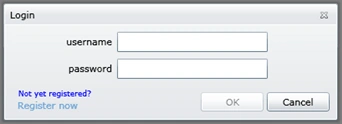
Figure 1.3 Login Page
If the login information is wrong a error message in the form of child window will pop up, showing the error details.
Figure 1.4 Login Error message.
If you choose for Register now in the main login window, it will pop the following window. This window is called the Register window. It contains valuable information to Register a user Such as: username, password, email, security question, and security answer.
Figure 1.5 Register Window.
After registering yourself, now you can login to follow the authentication process. The following figure displays the Application after logging in.
Figure 1.6 Application after the user logged in.
After the user logged has logged on, the user can have the following two displays such as the welcome user and one link to logout from the application.
Figure 1.7 User Logged in information and Logout link.
Conclusion
This is a wonderful template provided by RIA Services which is helpful for user authentication applications. It can be customized for user's requirement.

Silverlight Business Application
Join the conversation! Your thoughts help the community grow.
Sign in to leave a comment
It is the same account you read, post and publish with — and you will come straight back to this page.
kalyan chakravartyPosted May 10, 2010, 3:13 AM
Dipty, How can we customize the Authentication System in case of Business application model. How can we achivwe this ?
Varsga MotwaniPosted May 7, 2010, 3:20 AM
Hey, I would like to know what is the best option of pattern MVC or MVVM to work with Silevrlight.Application has normal insert updates deletes.