

Installing NHibernate
- Download NHibernate (http://sourceforge.net/projects/nhibernate/).
- Start a new project.
- Add reference to the NHibernate.dll by browsing the folders.
- Copy NHibernate.dll and NHibernate.xml to the Bin folder of the project. (This step is optional if the files are copied automatically)
- Now NHibernate is installed for the project.
Getting Started
In our example we have created a web application with the following database design.
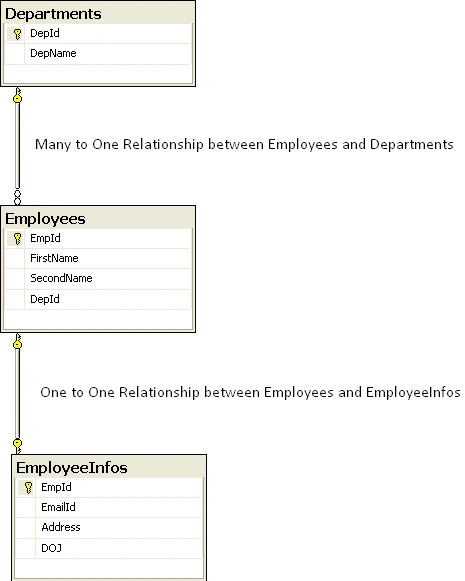
We will incorporate the basic database operations like Insert, Update and Load. Before that we need to take care of the following things to be added to our project.
- Add NHibernate Schema definition in Web.config File
- <Table Name>.hbm.xml File
- <Table Name>.cs File
- Insert, Update and Load Operations
1. Adding NHibernate Schema definition in Web.config
Web.config is the basic configuration file for a web application. If we are not developing the web application the configuration file name should be App.config. But the concept and the content will remain same for the configuration files.
<!--NHibernate Configuration in Section tag-->
<configSections>
<section name="hibernate-configuration" type="NHibernate.Cfg.ConfigurationSectionHandler, NHibernate" />
</configSections>
<!--NHibernate Configuration (Adding Properties)-->
<hibernate-configuration xmlns="urn:nhibernate-configuration-2.2" >
<session-factory>
<property name="dialect">
NHibernate.Dialect.MsSql2005Dialect
</property>
<property name="connection.provider">
NHibernate.Connection.DriverConnectionProvider
</property>
<property name="connection.driver_class">
NHibernate.Driver.SqlClientDriver
</property>
<property name="connection.connection_string">
Server=C849USS\SQLEXPRESS2K5;
Database=ReferenceDB;
Integrated Security=True;
</property>
</session-factory>
</hibernate-configuration>
2. Mapping the Business Model
Mapping is the heart of what NHibernate does, and it presents the greatest stumbling blocks for beginners. Once we have discussed mapping, we will turn to the code required to configure and use NHibernate.
Mapping simply specifies which tables in the database go with which classes in the business model. Note that we will refer to the table to which a particular class is mapped as the "mapping table" for that class.
Mapping can be done by separate XML files, or by attributes on classes, properties, and member variables. If files are used for mapping they can be incorporated in the project in any of several ways. To keep things simple, we are going to show one way of mapping i.e. map to XML files that are compiled as resources of an assembly.
You can map as many classes as you want in a mapping file, but it is conventional to create a separate mapping file for each class. This practice keeps the mapping files short and easy to read. We will follow our business model as described in figure.
Employees.hbm.xml
<?xml version="1.0" encoding="utf-8" ?>
<hibernate-mapping xmlns="urn:nhibernate-mapping-2.2">
<class name="NHibernateWebSample.Employees, NHibernateWebSample" table="Employees">
<id name="EmpId" column="EmpId" type="Int32">
<generator class="identity" />
</id>
<property name="FirstName" column="FirstName" type="String" length="50"/>
<property name="SecondName" column="SecondName" type="String" length="50"/>
<property name="DepId" column="DepId" type="String" length="10"/>
<one-to-one name="empInfo" access="field"/>
</class>
<class name="NHibernateWebSample.EmployeeInfos, NHibernateWebSample" table="EmployeeInfos">
<id name="EmpId" column="EmpId" type="Int32">
<generator class="assigned" />
</id>
<property name="EmailId" column="EmailId" type="String" length="50"/>
<property name="Address" column="Address" type="String" length="50"/>
<property name="DOJ" column="DOJ" type="DateTime"/>
</class>
</hibernate-mapping>
EmployeeInfos.hbm.xml
<?xml version="1.0" encoding="utf-8" ?>
<hibernate-mapping xmlns="urn:nhibernate-mapping-2.2">
<class name="NHibernateWebSample.EmployeeInfos, NHibernateWebSample" table="EmployeeInfos">
<id name="EmpId" column="EmpId" type="Int32">
<generator class="assigned" />
</id>
<property name="EmailId" column="EmailId" type="String" length="50"/>
<property name="Address" column="Address" type="String" length="50"/>
<property name="DOJ" column="DOJ" type="DateTime"/>
</class>
</hibernate-mapping>
Departments.hbm.xml
<?xml version="1.0" encoding="utf-8" ?>
<hibernate-mapping xmlns="urn:nhibernate-mapping-2.2">
<class name="NHibernateWebSample.Departments, NHibernateWebSample" table="Departments">
<id name="DepId" column="DepId" type="String">
<generator class="assigned" />
</id>
<property name="DepName" column="DepName" type="String" length="30"/>
</class>
</hibernate-mapping>
The <class> Tag
The next tag identifies the class we are mapping in this file:
<!-- Mappings for class 'Employee' -->
<class name="NHibernateWebSample.Employees, NHibernateWebSample" table=" Employees" lazy="false">
The <class> tag's attributes specifies the class being mapped, and its mapping table in the database:
- The name attribute specifies the class being mapped
- The table attribute specifies the mapping table for that class
- The lazy attribute tells NHibernate not to use 'lazy loading' for this class
'Lazy loading' tells NHibernate not to load an object from the database until the application needs to access its data. That approach helps reduce the memory footprint of a business model, and it can improve performance. To keep things simple, we aren't going to use lazy loading in this application. However, you should learn its ins and outs as soon as possible after you get up and running with NHibernate.
The <id> Tag
Once we have identified the class being identified and its mapping table, we need to specify the identity property of the class and its corresponding identity column in the mapping table. Note that when we set up the database, we specified the EmpId field as the primary key of the database. In the column's IdentitySpecification property, we specified that the column was the identity column that it should initialize at 1 and increment by the same value:
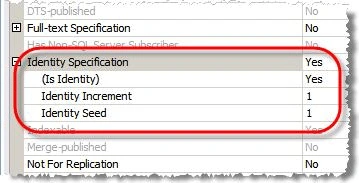
So, what we need to do is this:
- Specify the identity property in the Employees class;
- Specify the record identity column in the Employee table; and
- Tell NHibernate to let SQL Server set the value of the EmpId column in the Employees table.
The identity specification is set by a combination of attributes and enclosed tags:
- The <id> tag's name attribute specifies the identity property in the Employees class. In this case, it is the Id property.
- The <column> tag's name attribute specifies the record identity column in the Employees table. In this case, it's the EmpId column.
- The <generator> tag's class attribute specifies that record identity values will be generated natively by SQL Server.
The <property> Tag
Once we have mapped the identity property for the class, we can begin mapping other properties. The Employees class has simple properties, FirstName, SecondName, and DepId. We want to map it to the respective columns of the Employees table. Since the property and column names are the same, our mapping is very simple.
<property name="FirstName" column="FirstName" type="String" length="50"/>
<property name="SecondName" column="SecondName" type="String" length="50"/> …
3. Adding Tables to project as class files
This is a simple cs file which contains the properties of the respective table. In case of any relationships in between the tables we can add some additional properties.
Employees.cs
namespace NHibernateWebSample
{
public class Employees
{
private int _EmpId;
private string _FirstName;
private string _SecondName;
private string _DepId;
private EmployeeInfos empInfo = new EmployeeInfos();
public virtual int EmpId
{
get { return _EmpId; }
set
{
_EmpId = value;
empInfo.EmpId = value;
}
}
public virtual string FirstName
{
get { return _FirstName; }
set { _FirstName = value; }
}
public virtual string SecondName
{
get { return _SecondName; }
set { _SecondName = value; }
}
public virtual string DepId
{
get { return _DepId; }
set { _DepId = value; }
}
//Properties of EmployeeInfos table
public virtual string EmailId
{
get { return empInfo.EmailId; }
set { empInfo.EmailId = value; }
}
public virtual string Address
{
get { return empInfo.Address; }
set { empInfo.Address = value; }
}
public virtual DateTime DOJ
{
get { return empInfo.DOJ; }
set { empInfo.DOJ = value; }
}
}
}
EmployeeInfos.cs
namespace NHibernateWebSample
{
public class EmployeeInfos
{
private int _EmpId;
private string _EmailId;
private string _Address;
private DateTime _DOJ;
public virtual int EmpId
{
get { return _EmpId; }
set { _EmpId = value; }
}
public virtual string EmailId
{
get { return _EmailId; }
set { _EmailId = value; }
}
public virtual string Address
{
get { return _Address; }
set { _Address = value; }
}
public virtual DateTime DOJ
{
get { return _DOJ; }
set { _DOJ = value; }
}
}
}
Departments.cs
namespace NHibernateWebSample
{
public class Departments
{
private string _DepId;
private string _DepName;
public virtual string DepId
{
get { return _DepId; }
set { _DepId = value; }
}
public virtual string DepName
{
get { return _DepName; }
set { _DepName = value; }
}
}
}
4. Insert, Update and Load Operations
Our Web Application looks like the following.
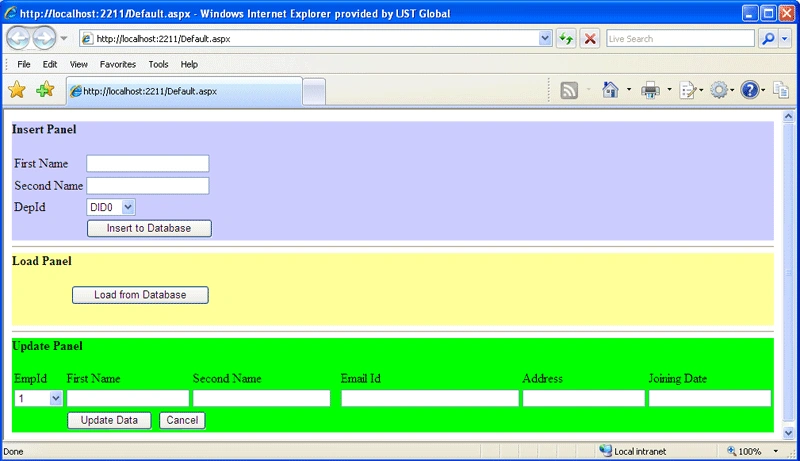
For Insert Operation
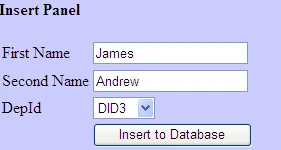
The Insert operation takes three arguments to be updated, such as FirstName, SecondName and DepId. As soon as the data get inserted into Employees table; it fires a trigger for insert into EmployeeInfos table.
SQL Trigger for Insert into EmployeeInfos
USE [ReferenceDB]
GO
SET ANSI_NULLS ON
GO
SET QUOTED_IDENTIFIER ON
GO
CREATE TRIGGER [dbo].[Trigger_AddEmployee]
ON [dbo].[Employees]
AFTER INSERT
AS
BEGIN
Declare @tempEmpId int;
Select @tempEmpId=@@IDENTITY;
SET NOCOUNT ON;
INSERT INTO EmployeeInfos values(@tempEmpId,'Not Set', 'Not Set', GetDate())
END
Inserting data into Employees and EmployeeInfos
#region Insert
protected void btnInsert_Click(object sender, EventArgs e)
{
NHibernate.Cfg.Configuration cfg = new NHibernate.Cfg.Configuration();
cfg.AddAssembly("NHibernateWebSample");
ISessionFactory factory = cfg.BuildSessionFactory();
ISession session = factory.OpenSession();
ITransaction transaction = session.BeginTransaction();
Employees newUser = new Employees();
newUser.FirstName = txtFirstName.Text;
newUser.SecondName= txtLastName.Text;
newUser.DepId = ddlDeptId.SelectedValue.ToString();
// Tell NHibernate that this object should be saved
session.Save(newUser);
// commit all of the changes to the DB and close the ISession
transaction.Commit();
// Closing the session
session.Close();
}
#endregion
For Update Operation

The update operation includes two basic operations, such as adding EmpIds to dropdownlist and then updates the data.
Loading EmpIds to DropDownList
#region Loding EmpId and DepId into DropDownList
protected void Page_Load(object sender, EventArgs e)
{
if (!IsPostBack)
{
NHibernate.Cfg.Configuration cfg = new NHibernate.Cfg.Configuration();
cfg.AddAssembly("NHibernateWebSample");
ISessionFactory factory = cfg.BuildSessionFactory();
ISession session = factory.OpenSession();
IList empIds = session.CreateCriteria(typeof(Employees)).List();
ddlEmpId.DataSource = empIds;
ddlEmpId.DataTextField = "EmpId";
ddlEmpId.DataValueField = "EmpId";
ddlEmpId.DataBind();
session.Close();
}
}
#endregion
Updating the data
#region Updating the Data for two Tables(Employees, EmployeeInfos)
protected void ddlEmpId_SelectedIndexChanged(object sender, EventArgs e)
{
string test = ddlEmpId.SelectedValue.ToString();
NHibernate.Cfg.Configuration cfg = new NHibernate.Cfg.Configuration();
cfg.AddAssembly("NHibernateWebSample");
ISessionFactory factory = cfg.BuildSessionFactory();
ISession session = factory.OpenSession();
session = factory.OpenSession();
Employees dataEmpId = (Employees)session.Load(typeof(Employees), Convert.ToInt32(test));
EmployeeInfos dataEmpIdInfo = (EmployeeInfos)session.Load(typeof(EmployeeInfos), Convert.ToInt32(test));
txtFirstUpdate.Text = dataEmpId.FirstName.ToString();
txtLastUpdate.Text = dataEmpId.SecondName.ToString();
txtUpdateEmail.Text = dataEmpIdInfo.EmailId.ToString();
txtUpdateAddress.Text = dataEmpIdInfo.Address.ToString();
txtUpdateDOJ.Text = dataEmpIdInfo.DOJ.ToString();
}
protected void btnUpdate_Click(object sender, EventArgs e)
{
string test = ddlEmpId.SelectedValue.ToString();
NHibernate.Cfg.Configuration cfg = new NHibernate.Cfg.Configuration();
cfg.AddAssembly("NHibernateWebSample");
ISessionFactory factory = cfg.BuildSessionFactory();
ISession session = factory.OpenSession();
// set property
Employees dataEmpId = (Employees)session.Load(typeof(Employees), Convert.ToInt32(test));
EmployeeInfos dataEmpIdInfo = (EmployeeInfos)session.Load(typeof(EmployeeInfos), Convert.ToInt32(test));
dataEmpId.FirstName = txtFirstUpdate.Text;
dataEmpId.SecondName = txtLastUpdate.Text;
dataEmpIdInfo.EmailId = txtUpdateEmail.Text;
dataEmpIdInfo.Address = txtUpdateAddress.Text;
dataEmpIdInfo.DOJ = Convert.ToDateTime(txtUpdateDOJ.Text);
// flush the changes from the Session to the Database
session.Flush();
}
#endregion
For Update Operation
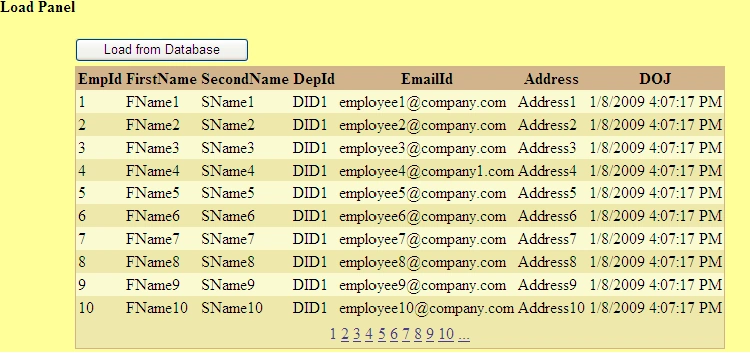
This is a simple operation where the gridview binds with the data source.
#region Loading Data into Gridview
protected void btnLoad_Click(object sender, EventArgs e)
{
NHibernate.Cfg.Configuration cfg = new NHibernate.Cfg.Configuration();
cfg.AddAssembly("NHibernateWebSample");
ISessionFactory factory = cfg.BuildSessionFactory();
ISession session = factory.OpenSession();
IList dataEmployee = session.CreateCriteria(typeof(Employees)).List();
grdEmployee.DataSource = dataEmployee;
grdEmployee.DataBind();
session.Close();
}
#endregion
Nguyen LanPosted Jul 26, 2017, 11:35 PM
Oh my glod, if a project has multiple tables which NHibernate used, I have been taken multiple *.hbm.xml files by hand. That's not good!
Chandra Sekhar KPosted Nov 14, 2011, 3:46 AM
Download NHibernate (http://sourceforge.net/projects/nhibernate/).
vipsha vipshaPosted Mar 2, 2011, 7:21 AM
i dont understand cfg.AddAssembly("NHibernateWebSample"); line what is NHibernateWebSample
vongsi LoryongpaoPosted Feb 21, 2011, 2:25 AM
It's great And I want to ask all professional about NHibernate configuration Example: I have website there are two projects one is the library and other is web interface my question is: How can i implement my NHibernate configuration (NHibernate and Log4Net) in my library project? If I implement in interface project it's fine Thank you in advance
khokon sarkerPosted Feb 3, 2011, 12:19 AM
Boss , please write a full article on configuration, step by step with a simple example . i am beginner in NHhibernate but configuration prb cannot overcome. please please please. i will be gratefull to you.
Rohti AmbaniPosted Feb 1, 2011, 4:25 AM
Well if I want to learn about NHibernate, I got several links for that. But the way of explanation matters. It should not be too high which makes reader less interest to read that topic. But your are the one who have explained in a beautiful ways Thanks so much.
Ramalingam sPosted Dec 21, 2010, 11:47 PM
i could not add assembly in solution when at runtime..... am getting an error like this
Ramalingam sPosted Dec 21, 2010, 11:41 PM
No persister for: Employees when try save session.Save() am getting this error who tell my nhibernate dll this save operation pls replay me ...
gayathri APosted Dec 6, 2010, 10:56 PM
Hi i got this Err after Implementing your Code can you help me out with this? I am trying to do an insert here ERROR NHibernate.HibernateException: The hibernate.connection.driver_class must be specified in the NHibernate configuration section. at NHibernate.Connection.ConnectionProvider.ConfigureDriver(IDictionary settings) at NHibernate.Connection.UserSuppliedConnectionProvider.Configure(IDictionary settings) at NHibernate.Connection.ConnectionProviderFactory.NewConnectionProvider(IDictionary settings) at NHibernate.Cfg.SettingsFactory.BuildSettings(IDictionary properties) at NHibernate.Cfg.Configuration.BuildSettings() at NHibernate.Cfg.Configuration.BuildSessionFactory() at projectHibernate.WebForm1.Button1_Click(Object sender, EventArgs e) in C:\Users\documents\visual studio 2010\Projects\projectHibernate\projectHibernate\WebForm1.aspx.cs:line 28
Don SweitzerPosted Mar 31, 2009, 11:42 AM
You really need to have a link to the source code. A sample is best, especially for this.