

Introduction
This is a widget we are going to make; which has same functionalities as in Vista. In Vista the sidebar contains this type of widget called Calendar widget. The main functionality of this Widget is to display the Year, Month, Date and Day. The following figure describes about the widget.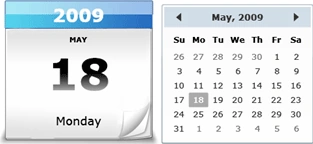
Figure 1.1 Calendar Widget's two views
Steps
To begin with we need the following requirements:
-
Silverlight 3
-
Visual Studio 2008 SP1
-
Expression Blend 3
Creating a Silverlight Project with or without RIA enabled.
-
Create project in Visual Studio and open the solution in Expression Blend 3.
-
The following figure will guide you for that.
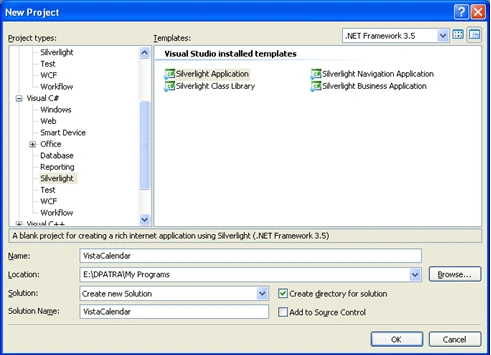
Figure 1.2 Create a new Silverlight project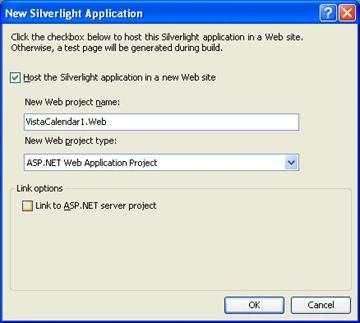
Figure 1.3 Uncheck the bottom checkbox to create the project without RIA support
Designing the User Control in Expression Blend 3
While designing our main aim is to display the year, month, date and the day one after another. So we need a background picture (Calendar) in any format. For this example I have used PNG format file as it mixes with the background.
Figure 1.4 Calendar Background.
Now the big task is to displaying the data in right areas. Like the year on the top, day in middle and all. We have used grid to contain the data and fulfill our aim. The following figure describes everything.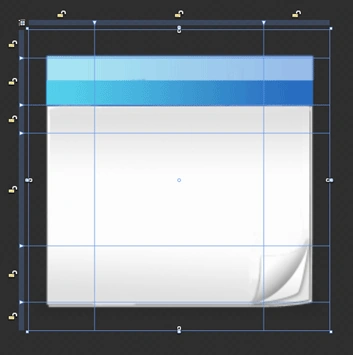
Figure 1.5 Designing the grid.
Now we can keep our respective controls (TextBlocks) into our specific areas. After putting it all together it will look like the following figure.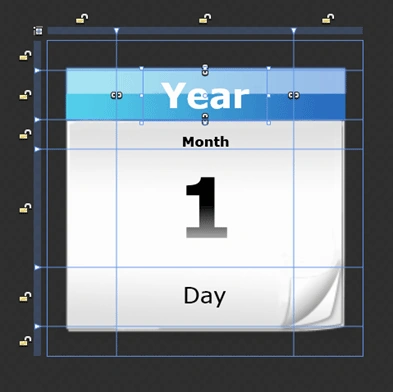
Figure 1.6 Controls inside the grids
Now add a Calendar Control to our design and transform it to match the background image. It will look the following.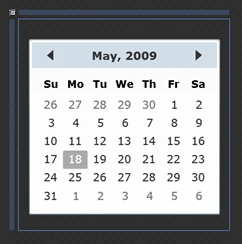
Figure 1.7 Adding Calendar to the grid
The XAML will look like the following after all the design changes above.
<UserControl
xmlns="http://schemas.microsoft.com/winfx/2006/xaml/presentation"
xmlns:x="http://schemas.microsoft.com/winfx/2006/xaml"
xmlns:controls="clr-namespace:System.Windows.Controls;assembly=System.Windows.Controls"
xmlns:d="http://schemas.microsoft.com/expression/Expression%20Blend/2008"
xmlns:mc="http://schemas.openxmlformats.org/markup-compatibility/2006"
x:Class="VistaCalendar.MainPage"
Width="256" Height="256" mc:Ignorable="d">
<Grid>
<Grid>
<Image x:Name="imageCalendar" Source="images/calendar.png"
MouseLeftButtonDown="imageCalendar_MouseLeftButtonDown"/>
<Grid x:Name="gridCalendarText">
<Grid.RowDefinitions>
<RowDefinition Height="0.094*"/>
<RowDefinition Height="0.156*"/>
<RowDefinition Height="0.094*"/>
<RowDefinition Height="0.375*"/>
<RowDefinition Height="0.188*"/>
<RowDefinition Height="0.094*"/>
</Grid.RowDefinitions>
<Grid.ColumnDefinitions>
<ColumnDefinition Width="0.219*"/>
<ColumnDefinition Width="0.562*"/>
<ColumnDefinition Width="0.219*"/>
</Grid.ColumnDefinitions>
<TextBlock x:Name="yearText" Grid.Column="1"Grid.Row="1" Width="100" Text="" TextAlignment="Center" FontWeight="Bold" FontSize="28" FontStretch="Expanded" HorizontalAlignment="Center" VerticalAlignment="Center" TextWrapping="NoWrap" Foreground="#FFFFFFFF"/>
<TextBlock x:Name="monthText" Margin="0,10,0,-5" Grid.Column="1" Grid.Row="2" FontStretch="UltraExpanded" Text="" TextAlignment="Center" FontWeight="Bold" HorizontalAlignment="Center" TextWrapping="NoWrap" d:LayoutOverrides="Height" />
<TextBlock x:Name="dateText" Margin="0,-1,0,1" Grid.Column="1" Grid.Row="3" Text="" FontSize="68" TextWrapping="Wrap" TextAlignment="Center" FontWeight="Bold" HorizontalAlignment="Center" VerticalAlignment="Center">
<TextBlock.Foreground>
<LinearGradientBrush EndPoint="0.5,1" StartPoint="0.5,0">
<GradientStop Color="#FF000000" Offset="0.496"/>
<GradientStop Color="#FFFFFFFF" Offset="1"/>
</LinearGradientBrush>
</TextBlock.Foreground>
</TextBlock>
<TextBlock x:Name="dayText" Margin="0,10,0,14" Grid.Column="1" Grid.Row="4" Text="" FontSize="18" HorizontalAlignment="Center" TextWrapping="Wrap"/>
</Grid>
</Grid>
<controls:Calendar x:Name="calendarMain" Opacity="1" FontSize="11"
RenderTransformOrigin="0.5,0.5" Height="256" Margin="0,60,0,-60"
HorizontalAlignment="Center" VerticalAlignment="Center" d:IsHidden="True" >
<controls:Calendar.RenderTransform>
<TransformGroup>
<ScaleTransform ScaleX="1.3" ScaleY="1.3"/>
<SkewTransform/>
<RotateTransform/>
<TranslateTransform/>
</TransformGroup>
</controls:Calendar.RenderTransform>
</controls:Calendar>
</Grid>
</UserControl>
Animating Fade In and Fade Out
As we are following Vista's Calendar widget in sidebar. We will also follow the animation it does. In Vista it is FadeIn and FadeOut when you click something. Now we would do this in Expression Blend.
Adding click events to the controls and displaying data
Now we have a handful of controls in our application. We have yearText, monthText, dateText and dayText to display the calendar properties and we have image control and calendar control.
We have the basic functionality like when we click the BigCalendar the small calendar will be displayed and Vice Versa. The following code will help you doing so.
namespace VistaCalendar
{
public partial class MainPage : UserControl
{
public MainPage()
{
InitializeComponent();
BigCalendarShow();
}
private void BigCalendarShow()
{
calendarMain.Visibility = Visibility.Collapsed;
yearText.Visibility = Visibility.Visible;
monthText.Visibility = Visibility.Visible;
dayText.Visibility = Visibility.Visible;
dateText.Visibility = Visibility.Visible;
imageCalendar.Visibility = Visibility.Visible;
MonthText();
yearText.Text = DateTime.Now.Year.ToString();
dateText.Text = DateTime.Now.Day.ToString();
dayText.Text = DateTime.Now.DayOfWeek.ToString();
imageVisible.Begin();
yearVisible.Begin();
monthVisible.Begin();
dateVisible.Begin();
dayVisible.Begin();
calendarCollapsed.Begin();
}
private void MonthText()
{
switch (DateTime.Now.Month.ToString())
{
case "1":
monthText.Text = "JANUARY";
break;
case "2":
monthText.Text = "FEBRUARY";
break;
case "3":
monthText.Text = "MARCH";
break;
case "4":
monthText.Text = "APRIL";
break;
case "5":
monthText.Text = "MAY";
break;
case "6":
monthText.Text = "JUNE";
break;
case "7":
monthText.Text = "JULY";
break;
case "8":
monthText.Text = "AUGUST";
break;
case "9":
monthText.Text = "SEPTEMBER";
break;
case "10":
monthText.Text = "OCTOBER";
break;
case "11":
monthText.Text = "NOVEMBER";
break;
case "12":
monthText.Text = "DECEMBER";
break;
default:
break;
}
}
private void SmallCalendarShow()
{
calendarMain.Visibility = Visibility.Visible;
calendarMain.VerticalAlignment = VerticalAlignment.Center;
calendarMain.HorizontalAlignment = HorizontalAlignment.Center;
imageCollapsed.Begin();
yearCollapsed.Begin();
monthCollapsed.Begin();
dateCollapsed.Begin();
dayCollapsed.Begin();
calendarVisible.Begin();
yearText.Visibility = Visibility.Collapsed; ;
monthText.Visibility = Visibility.Collapsed;
dayText.Visibility = Visibility.Collapsed;
dateText.Visibility = Visibility.Collapsed;
imageCalendar.Visibility = Visibility.Collapsed;
}
private void calendarMain_MouseLeftButtonDown(object sender, MouseButtonEventArgs e)
{
BigCalendarShow();
}
private void yearText_MouseLeftButtonDown(object sender, MouseButtonEventArgs e)
{
SmallCalendarShow();
}
private void monthText_MouseLeftButtonDown(object sender, MouseButtonEventArgs e)
{
SmallCalendarShow();
}
private void dateText_MouseLeftButtonDown(object sender, MouseButtonEventArgs e)
{
SmallCalendarShow();
}
private void dayText_MouseLeftButtonDown(object sender, MouseButtonEventArgs e)
{
SmallCalendarShow();
}
private void imageCalendar_MouseLeftButtonDown(object sender, MouseButtonEventArgs e)
{
SmallCalendarShow();
}
private void calendarMain_DisplayDateChanged(object sender, CalendarDateChangedEventArgs e)
{
BigCalendarShow();
}
private void calendarMain_DisplayModeChanged(object sender, CalendarModeChangedEventArgs e)
{
BigCalendarShow();
}
private void calendarMain_SelectedDatesChanged(object sender, SelectionChangedEventArgs e)
{
BigCalendarShow();
}
}
}
Now run the application and enjoy Vista Calendar Widget.
Join the conversation! Your thoughts help the community grow.