

Design
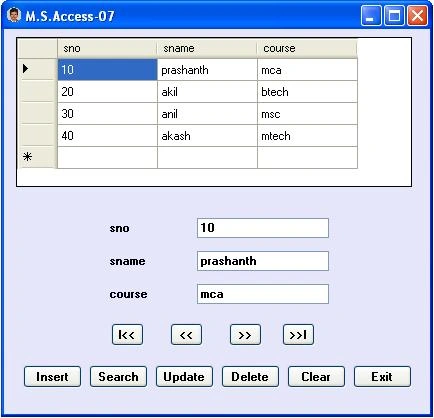
Design the form as above with a DataGridView, 3 Labels, 3 TextBoxes, and 10 buttons.
Note. In order to perform operations on M.S.Access-2007 records, M.S.Office-2007 should be installed in your system.
Introduction
As we want to use OleDb Connection include the namespace.
using System.Data.OleDb;nbsp
For accessing records from the M.S.Access-2003 file we use the 'Jet' driver,
But for accessing records from the M.S.Access-2007 file we use the 'Ace' driver.
In this application, we will search a record by taking input from the InputBox. For this, we have to add a reference to Microsoft.VisualBasic.
Adding a Reference
Goto Project Menu ->Add Reference -> select 'Microsoft.VisualBasic' from the .NET tab.
In order to use this we have to include the namespace.
Imports Microsoft.VisualBasic
Creating a primary key in the data Table
In this app. we use the Find() method to search a record, which requires details of the primary column for database tables; this is provided using the statement: adapter.MissingSchemaAction = MissingSchemaAction.AddWithKey
But as we don't have any primary key column in the M.S.Access table, we have to create a primary key column in the data table.
Eg
ds.Tables[0].Constraints.Add("pk_sno", ds.Tables[0].Columns[0], true);
Pointing to the current record in Data Table
After searching for a record, we have to get the index of that record so that we can show the next and previous records when we press '>>'(next) and '<<'(previous) buttons.
Eg
rno = ds.Tables[0].Rows.IndexOf(drow);
Code
using System;
using System.Data;
using System.Windows.Forms;
using System.Data.OleDb;
using Microsoft.VisualBasic;

namespace prash_access07
{
    public partial class Form1 : Form
    {
        public Form1()
        {
            InitializeComponent();
        }

        OleDbConnection con;
        OleDbCommand cmd;
        OleDbDataAdapter adapter;
        DataSet ds;
        int rno;
        private void Form1_Load(object sender, EventArgs e)
        {
            con = new OleDbConnection(@"provider=Microsoft.ace.Oledb.12.0;data source=E:\prash\stud.accdb;Persist Security Info=False");//stud.accdb->access07 filename
            loaddata();
            showdata();
        }
        void loaddata()
        {
            adapter = new OleDbDataAdapter("select * from student", con);
            ds = new DataSet();//student-> table name in stud.accdb file
            adapter.Fill(ds, "student");
            ds.Tables[0].Constraints.Add("pk_sno", ds.Tables[0].Columns[0], true);//creating primary key for Tables[0] in dataset
            dataGridView1.DataSource = ds.Tables[0];
        }
        void showdata()
        {
            textBox1.Text = ds.Tables[0].Rows[rno][0].ToString();
            textBox2.Text = ds.Tables[0].Rows[rno][1].ToString();
            textBox3.Text = ds.Tables[0].Rows[rno][2].ToString();
        }
        private void btnFirst_Click(object sender, EventArgs e)
        {
            if (ds.Tables[0].Rows.Count > 0)
            {
                rno = 0;
                showdata();
            }
            else
                MessageBox.Show("no records");
        }
        private void btnPrevious_Click(object sender, EventArgs e)
        {
            if (ds.Tables[0].Rows.Count > 0)
            {
                if (rno > 0)
                {
                    rno--;
                    showdata();
                }
                else
                    MessageBox.Show("First Record");
            }
            else
                MessageBox.Show("no records");
        }

        private void btnNext_Click(object sender, EventArgs e)
        {
            if (ds.Tables[0].Rows.Count > 0)
            {
                if (rno < ds.Tables[0].Rows.Count - 1)
                {
                    rno++;
                    showdata();
                }
                else
                    MessageBox.Show("Last Record");

            }
            else
                MessageBox.Show("no records");
        }

        private void btnLast_Click(object sender, EventArgs e)
        {
            if (ds.Tables[0].Rows.Count > 0)
            {
                rno = ds.Tables[0].Rows.Count - 1;
                showdata();
            }
            else
                MessageBox.Show("no records");
        }
        private void btnInsert_Click(object sender, EventArgs e)
        {
            cmd = new OleDbCommand("insert into student values(" + textBox1.Text + ",' " + textBox2.Text + " ',' " + textBox3.Text + " ')", con);
            con.Open();
            int n = cmd.ExecuteNonQuery();
            con.Close();

            if (n > 0)
            {
                MessageBox.Show("record inserted");
                loaddata();
            }
            else
                MessageBox.Show("insertion failed");
        }
        private void btnSearch_Click(object sender, EventArgs e)
        {
            int n = Convert.ToInt32(Interaction.InputBox("Enter sno:", "Search", "20", 200, 200));
            DataRow drow = ds.Tables[0].Rows.Find(n);
            if (drow != null)
            {
                rno = ds.Tables[0].Rows.IndexOf(drow);
                textBox1.Text = drow[0].ToString();
                textBox2.Text = drow[1].ToString();
                textBox3.Text = drow[2].ToString();
            }
            else
                MessageBox.Show("Record not found");
        }
        private void btnUpdate_Click(object sender, EventArgs e)
        {
            cmd = new OleDbCommand("update student set sname='" + textBox2.Text + "',course='" + textBox3.Text + "' where sno=" + textBox1.Text, con);
            con.Open();
            int n = cmd.ExecuteNonQuery();
            con.Close();
            if (n > 0)
            {
                MessageBox.Show("Record Updated");
                loaddata();
            }
            else
                MessageBox.Show("Update failed");
        }
        private void btnDelete_Click(object sender, EventArgs e)
        {
            cmd = new OleDbCommand("delete from student where sno=" + textBox1.Text, con);
            con.Open();
            int n = cmd.ExecuteNonQuery();
            con.Close();
            if (n > 0)
            {
                MessageBox.Show("Record Deleted");
                loaddata();
            }

            else
                MessageBox.Show("Deletion failed");
        }
        private void btnClear_Click(object sender, EventArgs e)
        {
            textBox1.Text = textBox2.Text = textBox3.Text = "";
        }

        private void btnExit_Click(object sender, EventArgs e)
        {
            this.Close();
        }

    }
}
Olu SolaPosted Sep 16, 2015, 9:43 AM
C# &Ms Access2007 error: no one or more value is given. Combonox is null. I don't want it to be null . What do i do?
Olu SolaPosted Sep 15, 2015, 5:11 AM
What am I doing wrong
Olu SolaPosted Sep 15, 2015, 5:11 AM
Throws error at textBox1.Text = ds.Tables[0].Rows[rno][0].ToString(); saying "There is no row at position 0"
ranadheer reddyPosted Jun 5, 2015, 5:30 AM
How to get output
ranadheer reddyPosted Jun 5, 2015, 5:29 AM
No errors but No output came.I run it in visual studio 13 and access 10
payappar palaPosted May 23, 2013, 7:32 AM
To do more about Developing Database Applications using C#.NET and MS Access you can view my video http://www.youtube.com/watch?v=6uRIIdCwFEg
Prashanth ChindamPosted Apr 1, 2013, 1:00 AM
Check this article in Csharpcorner Inserting images into MS Access file using OLEDB url:http://www.c-sharpcorner.com/uploadfile/e628d9/inserting-images-into-ms-access-file-using-oledb/
vijay nimbalkarPosted Mar 30, 2013, 1:12 AM
hi in c#.net i use access db & i want a solution to save & retrieve image in one picture box using no.
alfred sanzPosted Feb 4, 2013, 9:45 PM
Hi, can you explain the cmd = new OleDbCommand("insert into student values(" + textBox1.Text + ",' " + textBox2.Text + " ',' " + textBox3.Text + " ')", con); code? cause I can't understand, what If I have 9 textbox how's the combination for that? thanks :)
GOPI KRISHNANPosted Aug 5, 2012, 2:14 PM
hello sir, i completed 1 project successfully with reference to ur project. thanks for that. now i am not able to deploy the application. i created setup file and installed succesfuly but database not accesed by application. it will give error. so please give me the steps to convert as application with database connected. then im using visual c# 2008 express((my program running successfully in visual c#). but not in after convertion of setup file
Rajshri ShitolePosted Jun 21, 2012, 1:52 AM
Thanks Sir, i m first time working in access database. this code is nice & running proper easy to understand.
parth khatwaniPosted Jan 26, 2012, 8:37 AM
post a code in C#.net this is a vb code
martin popovPosted Feb 3, 2011, 1:52 PM
Hi, I'd like to thank you for the very good and useful tutorial. I'm beginner in this theme but it was very helpful to me! I searched a lot of time while find this!
BELLO GOLAHANPosted Oct 7, 2010, 9:51 AM
thanks for the code it really helps. pls how can i use the column (sname) to search for a record. from [email protected]
KAMLESH MESHRAMPosted Oct 7, 2010, 1:50 AM
I am getting this Exception "Could not find installable ISAM."