In this article I am trying to fetch, read, write and store data in the HINDI Language. In this article I am showing how to change your required language to Hindi Translation, English, Hindi (Devlys001), or other language change by pressing right side Alt + Shift button both ..... The first step is to download HINID Indic IME 1 V 5.0
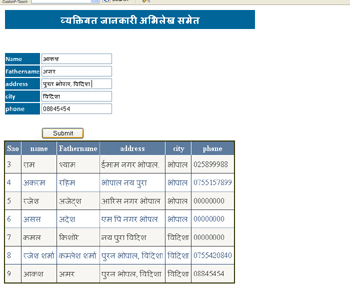
Firstly do this task . . download the Unicode generator software HINID Indic IME 1 V 5.0 then install this software on your PC . . not difficult to do .. installed in your PC . . then start ASP.NET.
In SQL
In SQL create a table with required data entry. And since you want to add Hindi in a column the data type should be NVARCHAR. The columns NAME, Father Name, Address and City are NVARCHAR data type.
In aspx page
In the aspx page, draw a textbox and button control. Then write the following code for saving the data to a SQL Database.
Write this code for the button's Click event:
protected void btnSubmit_Click(object sender, EventArgs e)
{
localclass1.myconnection();
string sql = "insert into hindi (name,Fathername,address,city,phone)values(N'" + TextBox1.Text + "',N'" + TextBox2.Text + "',N'" + TextBox3.Text + "',N'" + TextBox4.Text + "',N'" + TextBox5.Text + "')";
cmd = new SqlCommand(sql, localclass1.mycon);
int res;
res = cmd.ExecuteNonQuery();
GridView1.DataBind();
}
Since the insert query has Unicode data, character data needs to be prefixed with an N like this .... N'"+ TextBox4.Text +"' .... to support saving Unicode to Nvarchar data type.
Many Language Types Can Be Used
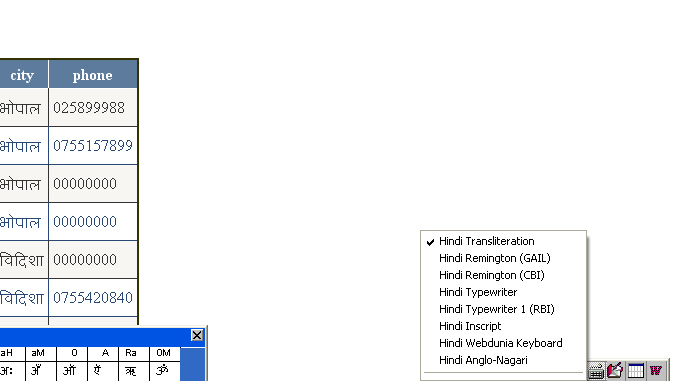
There are many options to use many languages; change in setting by clicking right side Alt + Shift button. A Hindi keyboard option can be generated using Right Side then you choosing a language, such as Hindi transliteration, Hindi Remington, Hindi Typewriter, Hinidi Inscript, Hindi Web Duniya KeyBoard, Hindi Anglo Nagri.
Change the language as you require . . and enjoy this code.
Conclusion
With this code I am trying to solve the HINDI language problem short out. Many times we want to use the Hindi language in a application but we don't know an easy way to do this, but with this code using the Hindi language will be easy in applicationa & databases . . Enjoy it.....