

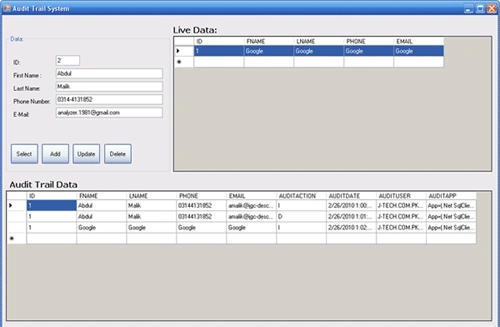
Introduction
There are multiple reasons to have an Audit trail System in your application. Some companies have to do it because of their rigid / un-professional enviroment, such as JGC-DESCON ENGINEERING PVT. LTD. But on the other end it is very useful for debugging purpose. It shows you what was in your database at any point in time.}
In this article I will explain the method I prefer for implementing an audit trail. Next, I will introduce a script to automate the implementation of the audit trail in the database.
Audit Trail With Triggers
So how to implement an audit trail? Different visions exist. The one I prefer is to use a shadow table for each table that exists in the database. Every time a record is inserted, updated or deleted in a table, the record is also inserted in the corresponding shadow table. For inserting the record in the shadow table too, I use triggers on the original table that will fire whenever something happens.
Let's make this clear with a small example.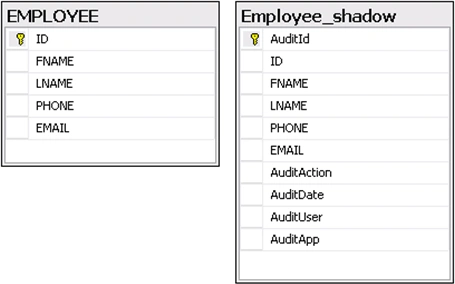
On the left side, you see the structure of a table called Employee containing five columns. I refer to this table as the base table. On the right, you see the shadow table for this table. The shadow table contains all columns from the Employee table, plus some extra columns:
-
AuditId: This the primary key of the shadow table. It is an identity field.
-
AuditAction: This is a one letter code to indicate the kind of operation. Values are I, U or D, for insert, update and delete respectively.
-
AuditDate: The date and time when the action occurred. The default value is set to getdate(), an SQL function that returns the current date and time.
-
AuditUser: The user who performed the action. The default value is set to suser_sname(), an SQL function that returns the user name of the user currently connected.
-
AuditApp: The application that was used. The default value is set to (('App=('+rtrim(isnull(app_name(),'')))+') '). This allows you to tell which application was used to modify the data, e.g. App=(Microsoft SQL Server Management Studio Express).
To fill up the shadow table, I define triggers on the Employee table. We need three triggers: one for inserts, one for updates, and one for deletes. The code for the insert action is shown below. Those for updates and deletes are similar. The method also has some drawbacks:
The Audit Trail Generator Script The stored procedure will discover the columns in the original table by querying the system tables of SQL Server. These system tables are used by SQL Server itself to store the structure of the tables. The query to get all info about the table is shown below.
CREATE TRIGGER tr_Employee_Insert ON dbo.Employee
FOR INSERT AS
INSERT INTO Employee_shadow(ID, FNAME, LNAME, PHONE, EMAIL,AuditAction) SELECT ID, FNAME, LNAME, PHONE, EMAIL,'I' FROM employee
The columns that are filled up by the trigger are only the data columns from the base table (ID, FNAME, LNAME, PHONE, EMAIL,AuditAction) and the AuditAction column. All other columns in the shadow table (AuditId, AuditDate, AuditUser and AuditApp) are filled up by their default value definition.
So what are the strengths and weaknesses of this approach? Let's start with the strengths:
If you have 50 tables in your database, adding an audit trail using the method just described means adding another 50 tables and creating 150 triggers. This is why I have created the audit trail generator. It saves time and avoids typo errors. See the link on top of this article to download the code.
The audit trail generator is written as a stored procedure. Hence, you don't need any other tools.
The stored procedure takes four arguments:
FROM sysobjects a
inner join syscolumns b on a.id = b.id
inner join systypes c on b.xtype = c.xtype and c.name <> 'sysname'
WHERE a.id = object_id(N'Employee')
and OBJECTPROPERTY(a.id, N'IsUserTable') = 1
ORDER BY b.colId
The image below shows the results if we launch this query for our Employee table.
The remainder of the stored procedure loops over the result of this query using a cursor, and dynamically builds up the SQL statements in a string to create the shadow table and to add the triggers to the original table. These statements are then executed with the EXEC command. I will not go into the details of it, since it is straight forward.
Using the Script
The script is a stored procedure, so using it means calling the stored procedure. In its simplest form, you only need to set the @TableName parameter because for all other parameters, default values have been specified. The following statement can be launched from a query window.
EXECUTE GenerateAudittrail 'Users'
The following example shows what it looks like if all parameter values are specified.
EXECUTE GenerateAudittrail 'Users', 'dbo','_shadow', 0
The script is very handy to quickly create a shadow table for a given database table. However, it was not designed to modify a shadow table to reflect changes to the corresponding base table. In this case, it can only drop the shadow table, losing all records in it, and recreate it. Set the @DropAuditTable to 1 to force dropping and recreating the shadow table.
Join the conversation! Your thoughts help the community grow.