

Introduction
Reminder is currently in the Namespace Microsoft.Phone.Scheduler, sometime it can
remind us some of work.
Idea of this Apps is very simply that you have a to do task, and when on time
these Reminder will remind you !
In this article I'll talk about a Reminder Application in Windows Phone Mango.
Fundamental
The first step, We're creating Windows Phone Application Project
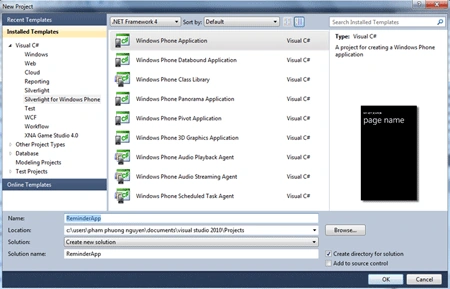
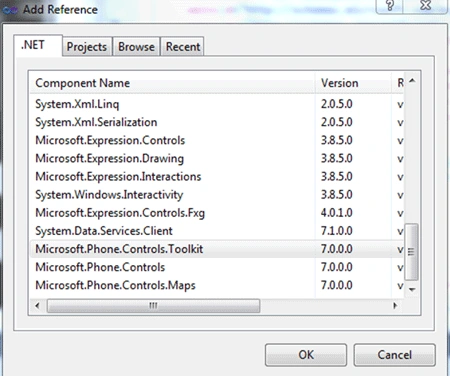
Next, we right-click to References -> choose Add Refrences ->choose
Microsoft.Phone.Controls.Toolkit :
Then we go to MainPage.xaml and build a sample User Interface but after that we
declare
xmlns:toolkit="clr-namespace:Microsoft.Phone.Controls;assembly=Microsoft.Phone.Controls.Toolkit"
To use the Control from the toolkit.
The second step, We go to Mainpage.xaml and built a sample UI include TimePicker,
DatePicker, Button and TextBox for Reminder, like that:
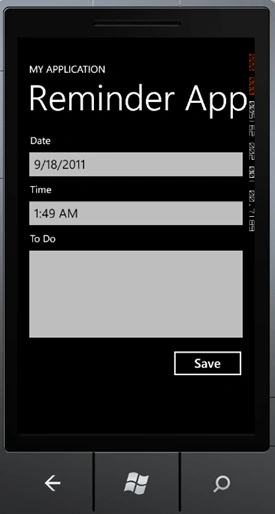
Following XAML Code :
<phone:PhoneApplicationPage
x:Class="ReminderApp.MainPage"
xmlns="http://schemas.microsoft.com/winfx/2006/xaml/presentation"
xmlns:x="http://schemas.microsoft.com/winfx/2006/xaml"
xmlns:phone="clr-namespace:Microsoft.Phone.Controls;assembly=Microsoft.Phone"
xmlns:shell="clr-namespace:Microsoft.Phone.Shell;assembly=Microsoft.Phone"
xmlns:d="http://schemas.microsoft.com/expression/blend/2008"
xmlns:mc="http://schemas.openxmlformats.org/markup-compatibility/2006"
mc:Ignorable="d"
d:DesignWidth="480"
d:DesignHeight="768"
FontFamily="{StaticResource
PhoneFontFamilyNormal}"
FontSize="{StaticResource
PhoneFontSizeNormal}"
Foreground="{StaticResource
PhoneForegroundBrush}"
xmlns:toolkit="clr-namespace:Microsoft.Phone.Controls;assembly=Microsoft.Phone.Controls.Toolkit"
SupportedOrientations="Portrait"
Orientation="Portrait"
shell:SystemTray.IsVisible="True">
<!--LayoutRoot
is the root grid where all page content is placed-->
<Grid
x:Name="LayoutRoot"
Background="Transparent">
<Grid.RowDefinitions>
<RowDefinition
Height="Auto"/>
<RowDefinition
Height="*"/>
</Grid.RowDefinitions>
<!--TitlePanel
contains the name of the application and page title-->
<StackPanel
x:Name="TitlePanel"
Grid.Row="0"
Margin="12,17,0,28">
<TextBlock
x:Name="ApplicationTitle"
Text="MY
APPLICATION"
Style="{StaticResource
PhoneTextNormalStyle}"/>
<TextBlock
x:Name="PageTitle"
Text="Reminder
App"
Margin="9,-7,0,0"
Style="{StaticResource
PhoneTextTitle1Style}"/>
</StackPanel>
<!--ContentPanel
- place additional content here-->
<Grid
x:Name="ContentPanel"
Grid.Row="1"
Margin="12,0,12,0">
<Grid.RowDefinitions>
<RowDefinition
Height="Auto"/>
<RowDefinition
Height="Auto"/>
<RowDefinition
Height="Auto"/>
<RowDefinition
Height="Auto"/>
<RowDefinition
Height="Auto"/>
<RowDefinition
Height="200"/>
<RowDefinition
Height="Auto"/>
<RowDefinition
Height="82*"
/>
</Grid.RowDefinitions>
<TextBlock
Text="Date"
Grid.Row="0"
Margin="14,0,0,0"/>
<TextBlock
Text="Time"
Grid.Row="2"
Margin="14,0,0,0"/>
<TextBlock
Text="To
Do"
Grid.Row="4"
Margin="14,0,0,0"/>
<toolkit:DatePicker
Grid.Row="1"
Name="dpkDate"
/>
<toolkit:TimePicker
Grid.Row="3"
Name="tpkTime"
/>
<Button
Content="Save"
Grid.Row="7"
Height="72"
HorizontalAlignment="Left"
Margin="293,4,0,0"
Name="btnSave"
VerticalAlignment="Top"
Width="160"
/>
</Grid>
</Grid>
</phone:PhoneApplicationPage>
The Finally, We coding for Reminder App in MainPage.xaml.cs.
Full C# Code :
using
System;
using
System.Collections.Generic;
using
System.Linq;
using System.Net;
using
System.Windows;
using
System.Windows.Controls;
using
System.Windows.Documents;
using
System.Windows.Input;
using
System.Windows.Media;
using
System.Windows.Media.Animation;
using
System.Windows.Shapes;
using
Microsoft.Phone.Controls;
using
Microsoft.Phone.Scheduler;
namespace
ReminderApp
{
public partial
class MainPage
: PhoneApplicationPage
{
// Constructor
public MainPage()
{
InitializeComponent();
this.btnSave.Click += btnSave_Click;
}
void btnSave_Click(object
sender, RoutedEventArgs e)
{
DateTime _Date =
dpkDate.Value.Value;
TimeSpan _Time =
tpkTime.Value.Value.TimeOfDay;
_Date = _Date.Date + _Time;
String _Content =
txtContent.Text;
if (_Date <
DateTime.Now)
MessageBox.Show("Your
time is not match !\nPlease Enter again !");
else if
(String.IsNullOrEmpty(_Content))
MessageBox.Show("Your
task can't be empty !\n Please enter to do task !");
else
{
ScheduledAction _OldReminder =
ScheduledActionService.Find("TodoReminder");
if (_OldReminder !=
null)
ScheduledActionService.Remove(_OldReminder.Name);
Reminder _Reminder =
new Reminder("TodoReminder")
{
BeginTime = _Date,
Title = "Reminder",
Content = _Content,
};
ScheduledActionService.Add(_Reminder);
MessageBox.Show("Set
Reminder Completed");
}
}
}
}
Result :
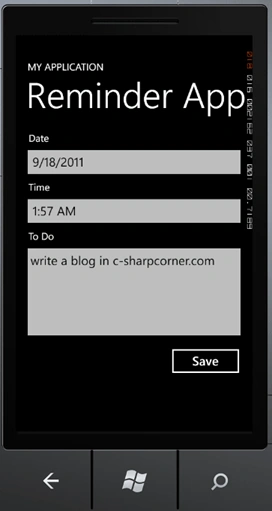
It's Remind on time :
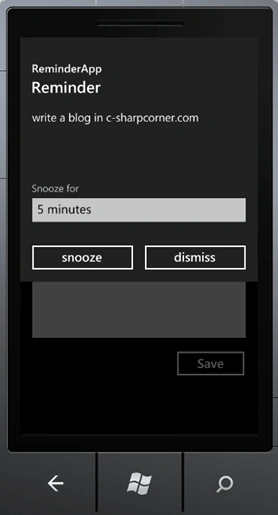
I hope this useful . Thanks for reading !
/*It's time for Windows Phone*/
Clive TeowPosted Apr 28, 2013, 2:10 AM
Ankit Bansal you can add the following line into ContentPanel: <TextBox Name="txtContent" Grid.Row="5"/>
Ankit BansalPosted May 13, 2012, 3:49 AM
Hello,ur app does not seem to be working..i am getting an error in the txtcontent.text.. the error is String _Content = txtContent.Text; the error is in txtcontent.Text.. please let me know what the error is ,it gives a message as "the name txtcontent does not exist in the current context"