

Introduction
ListPicker is a new control in the Silverlight Toolkit for Windows Phone. It is for
user's to choose another item like Combobox but ListPicker has more features than a Combobox. When you have little item about 1->4 it'll show data as a Combobox and
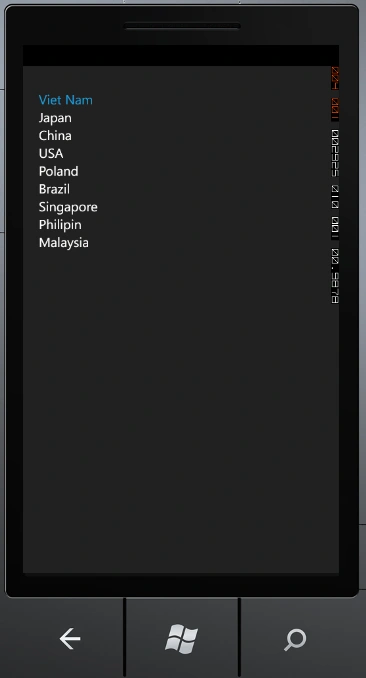
if more item Listpicker will show data as a ListBox.
In this article I will talk about Listpicker in Windows Phone.
Fundamental
First, you must install Silverlight tool for Windows Phone . you can
download it here
http://silverlight.codeplex.com/releases/view/71550
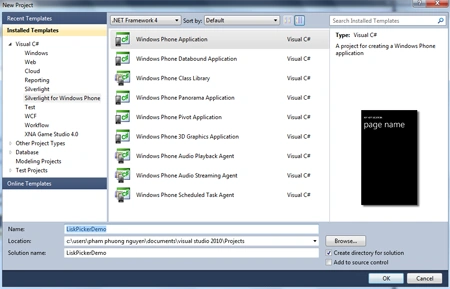
Now we're creating Windows Phone Application Project.
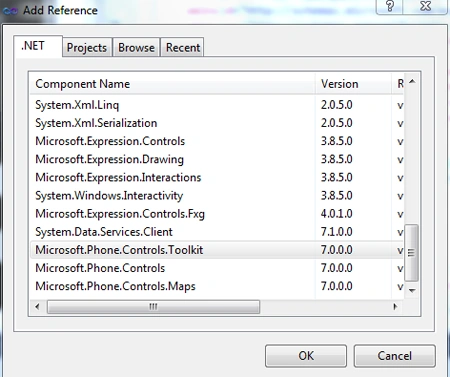
Next, we right click on References -> choose Add Refrences -> choose
Microsoft.Phone.Controls.Toolkit :
Then we go to MainPage.xaml and built a sample User Interface but after that we
declare
xmlns:toolkit="clr-namespace:Microsoft.Phone.Controls;assembly=Microsoft.Phone.Controls.Toolkit"
To use Control.
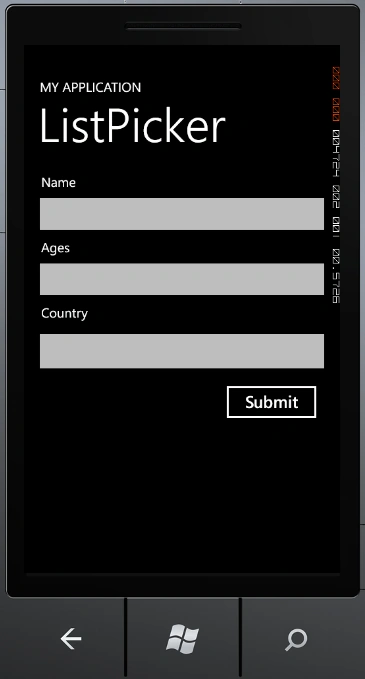
- Now we add some Control to MainPage,
they're TextBlock,TextBox and ListPicker:
- To Use ListPicker we must Define
ItemTemplate and FullModeItemTemplate :
<phone:PhoneApplicationPage.Resources>
<DataTemplate x:Name="lpkItemTemplate">
<TextBlock Text="{Binding Country}" />
</DataTemplate>
<DataTemplate x:Name="lpkFullItemTemplate">
<TextBlock Text="{Binding Country}" />
</DataTemplate>
</phone:PhoneApplicationPage.Resources>
Full XAML Code :
<phone:PhoneApplicationPage
x:Class="ListPickerDemo.MainPage"
xmlns="http://schemas.microsoft.com/winfx/2006/xaml/presentation"
xmlns:x="http://schemas.microsoft.com/winfx/2006/xaml"
xmlns:phone="clr-namespace:Microsoft.Phone.Controls;assembly=Microsoft.Phone"
xmlns:shell="clr-namespace:Microsoft.Phone.Shell;assembly=Microsoft.Phone"
xmlns:d="http://schemas.microsoft.com/expression/blend/2008"
xmlns:mc="http://schemas.openxmlformats.org/markup-compatibility/2006"
mc:Ignorable="d" d:DesignWidth="480" d:DesignHeight="768"
xmlns:toolkit="clr-namespace:Microsoft.Phone.Controls;assembly=Microsoft.Phone.Controls.Toolkit"
FontFamily="{StaticResource PhoneFontFamilyNormal}"
FontSize="{StaticResource PhoneFontSizeNormal}"
Foreground="{StaticResource PhoneForegroundBrush}"
SupportedOrientations="Portrait" Orientation="Portrait"
shell:SystemTray.IsVisible="True">
<phone:PhoneApplicationPage.Resources>
<DataTemplate x:Name="lpkItemTemplate">
<TextBlock Text="{Binding Country}" />
</DataTemplate>
<DataTemplate x:Name="lpkFullItemTemplate">
<TextBlock Text="{Binding Country}" />
</DataTemplate>
</phone:PhoneApplicationPage.Resources>
<!--LayoutRoot is the root grid where all page content is placed-->
<Grid x:Name="LayoutRoot" Background="Transparent">
<Grid.RowDefinitions>
<RowDefinition Height="Auto"/>
<RowDefinition Height="*"/>
</Grid.RowDefinitions>
<!--TitlePanel contains the name of the application and page title-->
<StackPanel x:Name="TitlePanel" Grid.Row="0" Margin="12,17,0,28">
<TextBlock x:Name="ApplicationTitle" Text="MY APPLICATION" Style="{StaticResource PhoneTextNormalStyle}"/>
<TextBlock x:Name="PageTitle" Text="ListPicker" Margin="9,-7,0,0" Style="{StaticResource PhoneTextTitle1Style}"/>
</StackPanel>
<!--ContentPanel - place additional content here-->
<Grid x:Name="ContentPanel" Grid.Row="1" Margin="12,0,12,0">
<Grid.RowDefinitions>
<RowDefinition Height="Auto"/>
<RowDefinition Height="Auto"/>
<RowDefinition Height="Auto"/>
<RowDefinition Height="Auto"/>
<RowDefinition Height="Auto"/>
<RowDefinition Height="*"/>
</Grid.RowDefinitions>
<TextBlock Text="Name" Margin="14,0,0,0"/>
<TextBox Grid.Row="1" Name="txtName"/>
<TextBlock Text="Ages " Grid.Row="2" Margin="14,0,0,0"/>
<TextBox Name="txtAge" Grid.Row="3"/>
<TextBlock Text="Country" Grid.Row="4" Margin="14,0,0,0" />
<toolkit:ListPicker FullModeItemTemplate="{Binding lpkFullItemTemplate}"
Grid.Row="5" ItemTemplate="{Binding lpkItemTemplate}"
x:Name="lpkCountry"/>
<Button Content="Submit" Grid.Row="5" Height="72" HorizontalAlignment="Left" Margin="284,87,0,0" Name="btnSubmit" Click="btnSubmit_Click"
VerticalAlignment="Top" Width="160"
/>
</Grid>
</Grid>
</phone:PhoneApplicationPage>
And Now we go to MainPage.xaml.cs and create a Array String as a sample Data,
and add is for ListPicker ItemSource Properties:
C# Code :
using System;
using System.Collections.Generic;
using System.Linq;
using System.Net;
using System.Windows;
using System.Windows.Controls;
using System.Windows.Documents;
using System.Windows.Input;
using System.Windows.Media;
using System.Windows.Media.Animation;
using System.Windows.Shapes;
using Microsoft.Phone.Controls;
namespace ListPickerDemo
{
public partial class MainPage : PhoneApplicationPage
{
String[] Country = { "Viet Nam","Japan",
"China","USA",
"Poland","Brazil",
"Singapore","Philipin","Malaysia"};
public MainPage()
{
InitializeComponent();
this.lpkCountry.ItemsSource = Country;
}
private void btnSubmit_Click(object sender, RoutedEventArgs e)
{
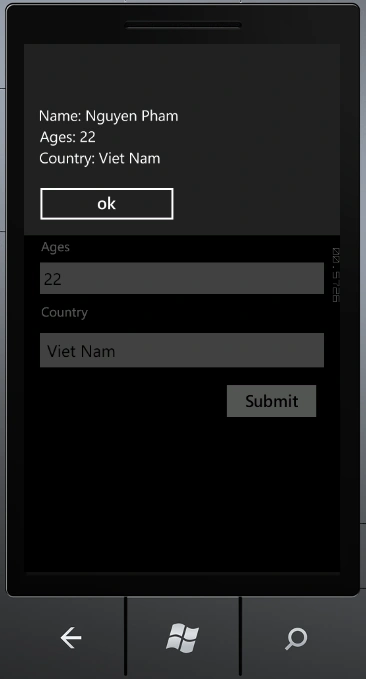
String _Content = String.Format("Name: {0} \nAges: {1}\nCountry: {2}",
txtName.Text,txtAge.Text,lpkCountry.SelectedItem);
MessageBox.Show(_Content);
}
}
}
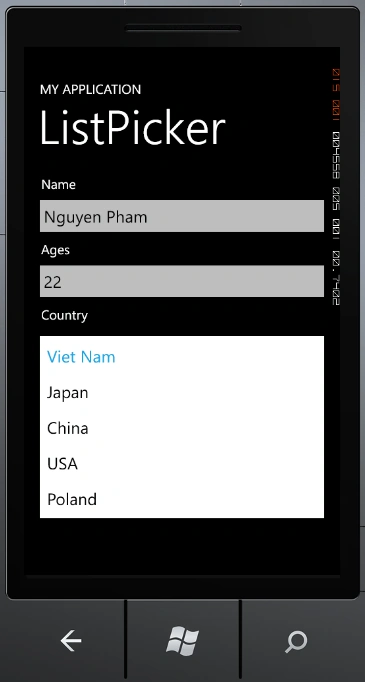
Now We Run Apps to view Resuilt :
-
When you have a little Country
-
And More Contry (FullModeItemTamplate will run):
-
And when I Submit :
Dimas AritonaPosted May 9, 2013, 10:12 AM
do you have code in vb.net?
LiamPosted Mar 9, 2013, 7:10 PM
I was really stuck with ListPicker until I came across this page. Thanks!
Nguyen PhamPosted Sep 19, 2011, 1:23 AM
Nice to See you ! Dinesh and Dhannajay ^^ I will try my best
Former memberPosted Sep 18, 2011, 11:41 PM
Nice work done by MSP :)
Dinesh BeniwalPosted Sep 15, 2011, 11:51 PM
Good work, Welcome to the Mindcracker Community.