

What is Instance Management?
Instance Management is the name for a set of techniques used by WCF to bind
client requests to service instances, governing which service instance handles
which client request. This is a service side implementation detail. Reference:
Programming WCF Services
Why we need Instance Management
We need Instance Management because applications differ too much in their needs
for scalability, performance, throughput, transactions and queued calls. So one
solution for all applications doesn't fit.
3 ways of instance management
WCF framework has provided 3 ways by which we can manage WCF service instance
creation.
- Per-Call
- Per-Session
- Single
Per-Call instance mode
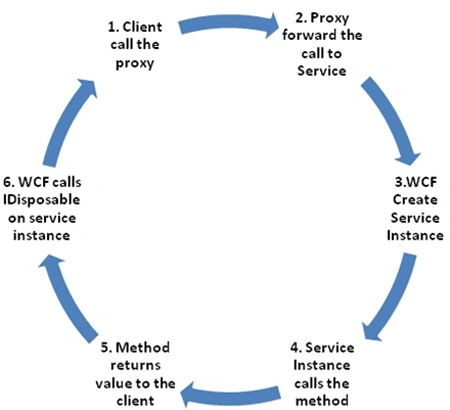
One instance of the service class is created per incoming request. A service
instance is created only when the client call is in progress and it will be
destroyed after response is sent back to client.
Every time the client sends a new request either
from the same proxy or a different proxy, a new service instance is always created.
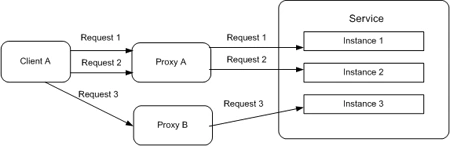
This represents the process of handling the
request from client using Per-Call instance mode.
Implementation of Per-Call services
To configure a service type as a per-call service, we need to apply the 'ServiceBehavior' attribute with the 'InstanceContextMode' property set to InstanceContextMode.PerCall.
-
Service code -
- [ServiceContract]
- interface IMyContract
- {
- [OperationContract]
- int MyMethod( );
- }
- [ServiceBehavior(InstanceContextMode = InstanceContextMode.PerCall)]
- class MyService : IMyContract,IDisposable
- {
- static int m_Counter = 0;
- public int MyMethod( )
- {
- m_Counter++;
- return m_Counter;
- }
- }
- Client code -
- MyContractClient proxy = new MyContractClient( );
- Console.WriteLine("Counter: " + proxy.MyMethod());
- Console.WriteLine("Counter: " + proxy.MyMethod());
- Console.WriteLine("Counter: " + proxy.MyMethod());
- Console.WriteLine("Counter: " + proxy.MyMethod());
- Console.ReadLine();
Counter: 1
Counter: 1
Counter: 1
Counter: 1
Important points of per-call instance mode
-
Service instance exists only when client call
is in progress. It is allocated when a client makes a request and deallocated
when response is sent back to the
client.
Per-Session instance mode
One instance of the service class is created per client session. Here, a logical
session is maintained between client and service.
Each proxy will connect to new instance.
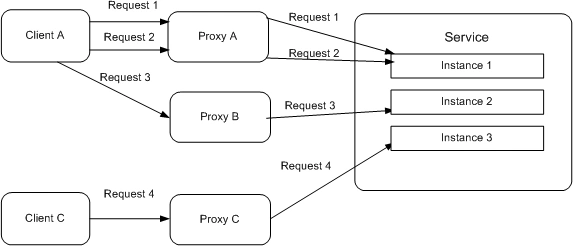
Implementation of Per-Session services
To configure a service type as a per-session service, we need to apply the
'ServiceBehavior' attribute with the 'InstanceContextMode' property set to
InstanceContextMode.PerSession.
- Service code -
- [ServiceContract]
- interface IMyContract
- {
- [OperationContract]
- int MyMethod( );
- }
- [ServiceBehavior(InstanceContextMode = InstanceContextMode.PerCall)]
- class MyService : IMyContract,IDisposable
- {
- static int m_Counter = 0;
- public int MyMethod( )
- {
- m_Counter++;
- return m_Counter;
- }
- }
- Client code -
- MyContractClient proxy = new MyContractClient( );
- Console.WriteLine("Counter: " + proxy.MyMethod());
- Console.WriteLine("Counter: " + proxy.MyMethod());
- Console.WriteLine("Counter: " + proxy.MyMethod());
- Console.WriteLine("Counter: " + proxy.MyMethod());
- Console.ReadLine();
Counter: 1
Counter: 2
Counter: 3
Counter: 4
Important points of per-session instance mode
- Each proxy will be connected to a new dedicated service instance.
- Service instance is allocated when client creates a new proxy and deallocated when client destroys this proxy object.
- Client session is per service endpoint per proxy.
Single instance mode
One instance of the service class handles all
incoming requests. This implements a singleton. When a service is configured as
a singleton, all clients connect to the same shared service instance; it is not
a factor, to which endpoint of the service they are connected.
All client requests will go to same instance.
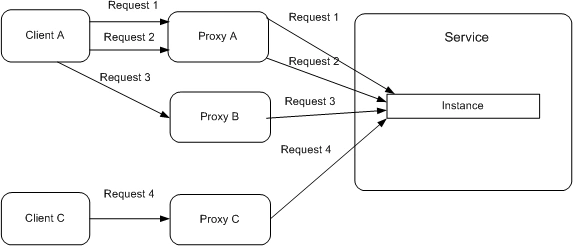
Implementation of Single instance services
To configure a service type as a single instance service, we need to apply the 'ServiceBehavior'
attribute with the 'InstanceContextMode' property set to
InstanceContextMode.Single.
InstanceContextMode.Single.
- Service code -
- [ServiceContract]
- interface IMyContract
- {
- [OperationContract]
- int MyMethod( );
- }
- [ServiceBehavior(InstanceContextMode = InstanceContextMode.PerCall)]
- class MyService : IMyContract,IDisposable
- {
- static int m_Counter = 0;
- public int MyMethod( )
- {
- m_Counter++;
- return m_Counter;
- }
- }
- Client code -
Possible Output
- Console.WriteLine("Client 1 making call to service.");
- Console.WriteLine("Counter: " + proxy1.MyMethod());
- Console.WriteLine("Counter: " + proxy1.MyMethod());
- Console.WriteLine("Counter: " + proxy1.MyMethod());
- Console.WriteLine("Client 2 making call to service.");
- MyContractClient proxy2 = new MyContractClient( );
- Console.WriteLine("Counter: " + proxy2.MyMethod());
- Console.WriteLine("Counter: " + proxy2.MyMethod());
- Console.ReadLine();
Client 1 making call to service....
Counter: 1
Counter: 2
Counter: 3
Client 2 making call to service....
Counter: 4
Counter: 5
Important points of Single instance mode
- Only one service instance is created. It is created when the service host is created.
- This service instance lives forever and is only destroyed when service host shuts down.
- Only one service instance is created. It doesn't matter whether the requests coming from different endpoints or different proxies.
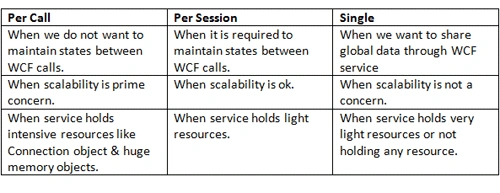
When to use per-call, per-session and single
instance mode
Rakesh kumarPosted Jul 13, 2015, 7:39 AM
I think, No need to declare static variable because it is giving unexpected output.otherwise u have to call Dispose() method.
SAMir NigamPosted Apr 2, 2015, 4:43 AM
good work in past Nitin!.
ShantanuPosted Jul 11, 2013, 2:12 AM
When i use static variable the counter increases like using singleton mode. even though i am using PerCall or PerSession mode.
ShantanuPosted Jul 11, 2013, 2:09 AM
When i use "static int m_Counter = 0" with PerCall mode the o/p is 1234 and when i use "int m_Counter = 0" with PerCall mode the o/p is 1111. Does this because of static variable(shared among all instances) the o/p is 1234? plz guide
subhashis beheraeditedPosted Feb 11, 2013, 9:38 AMEdited Feb 11, 2013, 9:43 AM
Error Correction------------------------------------------------------------------------------------------------------Implementation of Per-Session servicesTo configure a service type as a per-session service, we need to apply the 'ServiceBehavior' attribute with the 'InstanceContextMode' property set to InstanceContextMode.PerSession.---------------------------- Service code ---------------------------- [ServiceContract] interface IMyContract { [OperationContract] int MyMethod( ); } [ServiceBehavior(InstanceContextMode = InstanceContextMode.PerSession)] class MyService : IMyContract,IDisposable {static int m_Counter = 0;public int MyMethod( ){ m_Counter++; return m_Counter; }} ----------------------------- Client code --------------------------MyContractClient proxy = new MyContractClient( );Console.WriteLine("Counter: " + proxy.MyMethod());Console.WriteLine("Counter: " + proxy.MyMethod());Console.WriteLine("Counter: " + proxy.MyMethod());Console.WriteLine("Counter: " + proxy.MyMethod());Console.ReadLine();--Possible OutputCounter: 1 Counter: 2 Counter: 3 Counter: 4
Ilkin EastPosted Feb 29, 2012, 12:56 AM
Hello,Can I ask questions on C#/WCF?
jeya arunPosted Sep 15, 2011, 5:30 AM
Would you give a some more brief exapmle.........
Dinesh BeniwalPosted Sep 14, 2011, 11:56 PM
Good work Nitin, Welcome to the Mindcracker Community.