ARTICLE

How to Create a Picture of a WPF Control

Posted by Benjamin Kemner Articles | WPF July 15, 2011
WPF has some simple methods to render a control in a picture format like jpeg, png, bitmap etc. In this article we will see how to do that.
Reader Level:
Download Files:
 

Say cheese! Sometimes it is necessary to export something you can see in your program to a picture file. Maybe you want to simplify creation of documentation or improve bug tracking. WPF has some simple methods to render a control in a picture format like jpeg, png, bitmap etc.

Example:

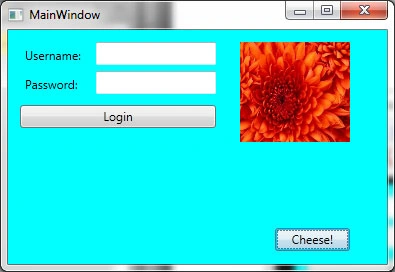
Here is a small window with some standard controls.

Create Picture of WPF Control
 
Click "Cheese!" and the following methods will render your interface to a jpg file.

private void WriteFile(string path)
{
    byte[] data = null;
    data = GetJpgImage(gridMain, 1, 100);
    FileStream stream = new FileStream(path, FileMode.OpenOrCreate);
    foreach (byte digit in data)
    {
       stream.WriteByte(digit);
    }
    stream.Close();
}

public static byte[] GetJpgImage(UIElement source, double scale, int quality)
{
    Byte[] imageArray;
    double actualHeight = source.RenderSize.Height;
    double actualWidth = source.RenderSize.Width;
    double renderHeight = actualHeight * scale;
    double renderWidth = actualWidth * scale;
    RenderTargetBitmap renderTarget = new RenderTargetBitmap((int)renderWidth, (int)renderHeight, 96, 96, PixelFormats.Pbgra32);
    VisualBrush sourceBrush = new VisualBrush(source);
    DrawingVisual drawingVisual = new DrawingVisual();
    DrawingContext drawingContext = drawingVisual.RenderOpen();
    using (drawingContext)
    {
        drawingContext.PushTransform(new ScaleTransform(scale, scale));
        drawingContext.DrawRectangle(sourceBrush, null, new Rect(new Point(0, 0), new Point(actualWidth, actualHeight)));
    }
    renderTarget.Render(drawingVisual);
    JpegBitmapEncoder jpgEncoder = new JpegBitmapEncoder();
    jpgEncoder.QualityLevel = quality;
    jpgEncoder.Frames.Add(BitmapFrame.Create(renderTarget));
    using (MemoryStream outputStream = new MemoryStream())
    {
        jpgEncoder.Save(outputStream);
        imageArray = outputStream.ToArray();
    }
    return imageArray;
}
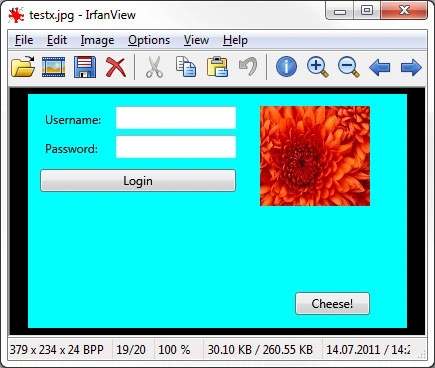

Output: 

WPFControlPicture2.jpg
 
Look at this beautiful picture!

Happy Coding.

Login to add your contents and source code to this article
Article Extensions
Contents added by Boris Salnikov on Jul 20, 2011
Hello
I like these codes exept these

stream.Write(data, 0, data.Length);  this is simpler

//foreach (byte digit in data)

//{

// stream.WriteByte(digit);

//}
Boris

post comment
     

public static byte[] GetJpgImage(UIElement source, double scale, int quality) giving error for UIElement source;

Posted by sayali nagawade Nov 11, 2011

very helpful,thanks

Posted by Lana Jul 15, 2011

Welcome to the Mindcracker Community, thanks for sharing

Posted by Dinesh Beniwal Jul 15, 2011

Good Job Benjamin

Posted by Angelina Erin Jul 15, 2011
COMMENT USING
PREMIUM SPONSORS
Over-C is a holistic consortium of communications and technology specialists. We build, deploy and market both business as well as consumer products and solutions.
SPONSORED BY
  • PDF reports have never been easier to create. With our included WYSIWYG Designer, you can layout your reports, set up your data source and let DynamicPDF ReportWriter do the rest.
Get Career Advice from Experts