

Introduction:
3-Tier architecture is a very well know buzz word in the world of software
development whether it web based or desktop based. In this article I am going to
show how to design a web application based on 3-tier architecture.
3-Tier architecture generally contains UI or Presentation Layer, Business Access
Layer (BAL) or Business Logic Layer and Data Access Layer (DAL) and sometimes
property layer.
Presentation Layer (UI)
Presentation layer contains pages like .aspx or windows form where data is
presented to the user or input is taken from the user.
Business Access Layer (BAL) or Business Logic Layer
BAL contains business logic, validations or calculations related with the data,
if needed. I will call it Business Access Layer in my demo.
Data Access Layer (DAL)
DAL contains methods that helps business layer to connect the data and perform
required action, might be returning data or manipulating data (insert, update,
delete etc). For this demo application, I have taken a very simple example. I am
assuming that I have to play with record of persons (First Name, Last Name, and
Age) and I will refer only these data throughout this article.
Property layer.
Generally it contains the entire variable those need to pass from presentation
to bal, bal to dal and vice versa so instead of writing those each and every
time we can create property layer.
Typical structure will look like this.
It contains one solution with three class library and one website.
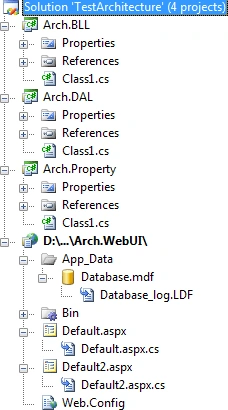
Now to create above structure first create new project and add one visual studio
blank solution.
Now add 3 class libraries and one website in it give the relative name to them.
For the code purpose or what to write in which layer please download the source
code.
SubashPosted Sep 10, 2016, 11:27 AM
Nice one
Anurag SarkareditedPosted Dec 16, 2012, 4:55 PMEdited Dec 16, 2012, 4:55 PM
hey have you done something or some special code for sql server 2005 ? because it does not demands for sql server version on my system stills it runs o my pc
Niravkumar VaghelaPosted Jul 5, 2012, 7:38 AM
It will help me a lot. Thanks
B M SuchitraPosted Nov 16, 2011, 12:31 AM
Hi.. My project has same structure as you have shown here.. i want to add the Businesslayer reference to the website.. I have added the reference by right clicking the website and using add reference.. Also in the web page where i want to use the objects of the business layer i have added the refernce like this Using BusinessLayer; but still i get the error that namespace could not be found. What could be the error? can you please help me?
kashif shaikheditedPosted Jun 16, 2011, 5:21 PMEdited Jun 16, 2011, 5:22 PM
Harshit this is the most easiest method which you have specified for 3 tier architecture its the best
Yogendra KumarPosted Mar 25, 2011, 4:57 AM
its clear my confusion about implementation of 3-Tier Arch... good work....!
Jiteendra SampathiraoPosted Nov 11, 2010, 3:55 AM
Good work Harshit.....
Nagashyam KumarPosted Nov 8, 2010, 2:23 AM
Hi, Every thing is good and easy code to understand, Small suggesting instead of class1 in all the layers little more resonalble name would have made things little easier. Nice work man, Keep it up. Thanks, Shyam.
Ange BERTHOLINIPosted Nov 3, 2010, 11:59 AM
Hello, This was a very short description of the "Tire" system in software developement and mainly in the separation of concerns. But if you really want to go beyond the limit I can suggest you a great book : Professional ASP.NET Design Pattens Here is the link