

In windows application for performing drag and drop operation we need to understand working of DragEnter, DragDrop, MouseDown and Dragleave events. With the help of these events we can perform drag and drop functionality very easily.
There are two steps first is dragging and second is dropping.
For better understanding we can take an example:
In this example there are two list box on window from names with ListBoxA and ListBoxB , ListBoxA contains some city's name New York, New Delhi, Bombay, London, Paris, Berlin etc..
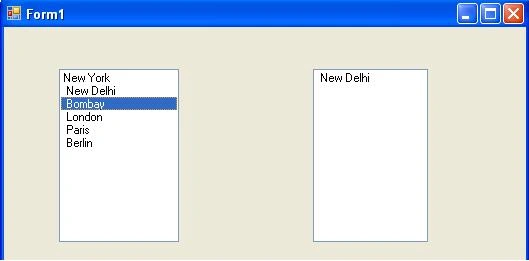
Now we have to drag item from ListBoxA and Drop to ListBoxB
We can divide all task in two steps
Step 1: Perform Drag Operation
First the MouseDown event is used to start the drag operation.
In the MouseDown event for the control where the drag will begin, use the DoDragDrop method to set the data to be dragged and the allowed effect dragging will have.
private void listBoxA_MouseDown(object sender, MouseEventArgs e)
{
listBoxA.DoDragDrop(listBoxA.SelectedItem, DragDropEffects.Copy)
}
Step 2: Perform Drop Operation
- Set the AllowDrop property of ListBoxB to true.
- In the DragEnter event for the ListBoxB where the drop will occur, ensure that the data being dragged is of an acceptable type (in this case of Listbox- Text). The code then sets the effect that will happen when the drop occurs to a value in the DragDroeffects enumeration that has these option:
All
Copy
Link
Move
Scroll
private void listBoxB_DragEnter(object sender, DragEventArgs e)
{
if (e.Data.GetDataPresent(DataFormats.Text))
e.Effect = DragDropEffects.Copy;
else
e.Effect = DragDropEffects.None;
} - In the DragDrop event for the control where the drop will occur, use the GetData method to retrieve the data being dragged.
private void listBoxB_DragDrop(object sender, DragEventArgs e)
{
listBox2.Items.Add(e.Data.GetData(DataFormats.Text).ToString());
}
Sreejesh SPPosted Jan 30, 2013, 4:24 AM
how to work in web applicaion
Juan NeufeldPosted Jan 25, 2013, 2:51 PM
Clear, short, very useful as an introduction. Thank you.
Kamlesh Kumar SatiPosted Aug 9, 2010, 1:30 AM
how to save data from windows form to database using drag and drop operation reply as soon as possible its very urgent please...
kim sung jineditedPosted Jul 12, 2010, 11:19 AMEdited Jul 12, 2010, 11:26 AM
would you mind examine my c# source? please, help me. i don't know why don't working drag & drop my c# source if you send e-mail me , i will send my source that i don't understand. [email protected] <- i'll waiting your message
mohit mahajanPosted Jul 6, 2010, 7:24 AM
hii nicee article,but i hav one small question if u drag and drop same city twoo times its drop in second listbox.but i want if i drag same city two times its displayy message (its already in listt u want to replace )how itss do will u plzz tell me??