

Updated 8/29/2018 - Formatted
This is the next article of the 'How to make Image editing tool' project. In the first article we learned how to show or open image file in our C# application with a very professional look.
Now in this article we will learn about resizing the image.
Design the right panel with the help of a tabcontrol and a DomainUpDown control, so that the user can input a percentage of the original size of image.
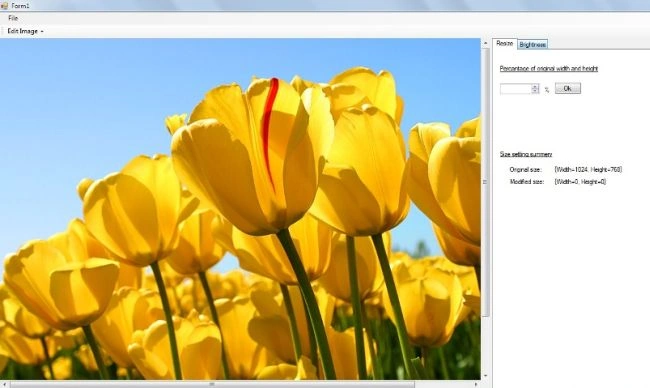
Put the values 1 to 1000 in domainupdown control
- private void BindDomainIUpDown()
- {
- for (int i = 1; i <= 999; i++)
- {
- DomainUpDown1.Items.Add(i);
- }
- DomainUpDown1.Text = "100";
- }
We declare the two variables ModifiedImageSize and OriginalImageSize; OriginalImageSize refers to the original width and height of the image and ModifiedImageSize refers to the width and height of the image after the DomainUpDown control's value selection.
- private Size OriginalImageSize;
- private Size ModifiedImageSize;
We can calculate original size of the image like this:
- int imgWidth = Img.Width;
- int imghieght = Img.Height;
- OriginalImageSize = new Size(imgWidth, imghieght);
And modifiedSize
- private void DomainUpDown1_SelectedItemChanged(object sender, EventArgs e)
- {
- int percentage = 0;
- try
- {
- percentage = Convert.ToInt32(DomainUpDown1.Text);
- ModifiedImageSize = new Size((OriginalImageSize.Width * percentage) / 100, (OriginalImageSize.Height * percentage) / 100);
- SetResizeInfo();
- }
- catch (Exception ex)
- {
- MessageBox.Show("Invalid Percentage");
- return;
- }
- }
Resizing image
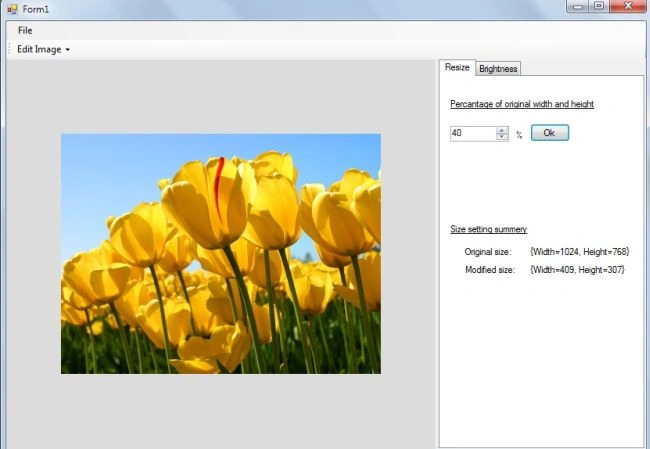
Now we have to resize an image according to it's ModifiedImageSize:
- private void btnOk_Click(object sender, EventArgs e)
- {
- Bitmap bm_source = new Bitmap(PictureBox1.Image);
- // Make a bitmap for the result.
- Bitmap bm_dest = new Bitmap(Convert.ToInt32(ModifiedImageSize.Width), Convert.ToInt32(ModifiedImageSize.Height));
- // Make a Graphics object for the result Bitmap.
- Graphics gr_dest = Graphics.FromImage(bm_dest);
- // Copy the source image into the destination bitmap.
- gr_dest.DrawImage(bm_source, 0, 0, bm_dest.Width + 1, bm_dest.Height + 1);
- // Display the result.
- PictureBox1.Image = bm_dest;
- PictureBox1.Width = bm_dest.Width;
- PictureBox1.Height = bm_dest.Height;
- PictureBoxLocation();
- }
The Picturebox will show the image after resizing.
So this is very easy to do. You can download the source code for better understanding.
Jignesh KumarPosted Aug 29, 2018, 2:15 AM
Good article thanks
Purushottam RathorePosted Mar 23, 2011, 12:27 AM
hi harendra.. Good article. keep it up... Thanks