

Win32_PortConnector Class:
It represents physical connection port Like Parallel Port ECP/EPP, Serial Port
XT/AT Compatible SCSI Port,MIDI Port, Joy Stick Port, Keyboard Port, Mouse Port.
See the structure of Win32_PortConnector Class
class Win32_PortConnector : CIM_PhysicalConnector
{
string Caption;
string ConnectorPinout;
uint16 ConnectorType[];
string CreationClassName;
string Description;
string ExternalReferenceDesignator;
datetime InstallDate;
string InternalReferenceDesignator;
string Manufacturer;
string Model;
string Name;
string OtherIdentifyingInfo;
string PartNumber;
uint16 PortType;
boolean PoweredOn;
string SerialNumber;
string SKU;
string Status;
string Tag;
string Version;
};
You can understand property easily by its name.
Example: Serial Number represents the serial number of particular.
Here we basically explain the type of Port using property PortType.
And it returns the value of type uint16.
So the return value and its meaning is given in following table:
| Values | Meaning |
| 0 | None |
| 1 | Parallel Port XT/AT Compatible |
| 2 | Parallel Port PS/2 |
| 3 | Parallel Port ECP |
| 4 | Parallel Port EPP |
| 5 | Parallel Port ECP/EPP |
| 6 | Serial Port XT/AT Compatible |
| 7 | Serial Port 16450 Compatible |
| 8 | Serial Port 16550 Compatible |
| 9 | Serial Port 16550A Compatible |
| 10 | SCSI Port |
| 11 | MIDI Port |
| 12 | Joy Stick Port |
| 13 | Keyboard Port |
| 14 | Mouse Port |
| 15 | SSA SCSI |
| 16 | USB |
| 17 | FireWire (IEEE P1394) |
| 18 | PCMCIA Type II |
| 19 | PCMCIA Type II |
| 20 | PCMCIA Type III |
| 21 | CardBus |
| 22 | Access Bus Port |
| 23 | SCSI II |
| 24 | SCSI Wide |
| 25 | PC-98 |
| 26 | PC-98-Hireso |
| 27 | PC-H98 |
| 28 | Video Port |
| 29 | Audio Port |
| 30 | Modem Port |
| 31 | Network Port |
| 32 | 8251 Compatible |
| 33 | 8251 FIFO Compatible |
Here is your code:
private void
button1_Click(object sender,
EventArgs e)
{
Dictionary<UInt16,
string> dict = new
Dictionary<ushort,
string>();
dict.Add(0,"None");
dict.Add(1,"Parallel Port XT/AT
Compatible");
dict.Add(2,"Parallel Port PS/2");
dict.Add(3,"Parallel Port ECP");
dict.Add(4,"Parallel Port EPP");
dict.Add(5,"Parallel Port ECP/EPP");
dict.Add(6,"Serial Port XT/AT
Compatible");
dict.Add(7,"Serial Port 16450
Compatible");
dict.Add(8,"Serial Port 16550
Compatible");
dict.Add(9,"Serial Port 16550A
Compatible");
dict.Add(10,"SCSI Port");
dict.Add(11,"MIDI Port");
dict.Add(12,"Joy Stick Port");
dict.Add(13,"Keyboard Port");
dict.Add(14,"Mouse Port");
dict.Add(15,"SSA SCSI ");
dict.Add(16,"USB");
dict.Add(17,"FireWire (IEEE P1394)");
dict.Add(18,"PCMCIA Type II");
dict.Add(19,"PCMCIA Type II");
dict.Add(20,"PCMCIA Type III");
dict.Add(21,"CardBus");
dict.Add(22,"Access Bus Port");
dict.Add(23,"SCSI II");
dict.Add(24,"SCSI Wide");
dict.Add(25,"PC-98");
dict.Add(26,"PC-98-Hireso");
dict.Add(27,"PC-H98");
dict.Add(28,"Video Port");
dict.Add(29,"Audio Port");
dict.Add(30,"Modem Port");
dict.Add(31,"Network Port");
dict.Add(32,"8251 Compatible");
dict.Add(33,"8251 FIFO Compatible");
var mos = new
ManagementObjectSearcher();
mos.Query = new ObjectQuery("SELECT
* FROM Win32_PortConnector");
foreach (ManagementObject
mo in mos.Get())
{
listBox1.Items.Add(dict[Convert.ToUInt16(mo["PortType"])]);
}
}
Dictionary is used to give meaning to the result with some messages.
The output will be as:
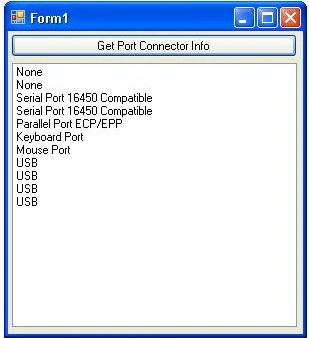
From above you can easily find the available ports. You can see that there is 4
usb ports, 1 for keyboard, 1 for mouse and etc.
Hope you understand it.
Thank you.
Join the conversation! Your thoughts help the community grow.