

Here I will show how to change the size of tooltip:
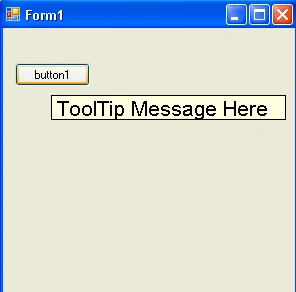
Here I can see tooltip control text size is bigger than the normal text
Here is code:
public
partial class
Form1 : Form
{
string buttontooltip =
"ToolTip Message Here";
public Form1()
{
InitializeComponent();
toolTip1.SetToolTip(button1, buttontooltip);
toolTip1.OwnerDraw = true;
toolTip1.Draw += new
DrawToolTipEventHandler(toolTip1_Draw);
toolTip1.Popup += new
PopupEventHandler(toolTip1_Popup);
}
void toolTip1_Popup(object
sender, PopupEventArgs e)
{
// on popip set the size of tool tip
e.ToolTipSize = TextRenderer.MeasureText(buttontooltip,
new Font("Arial",
16.0f));
}
void toolTip1_Draw(object
sender, DrawToolTipEventArgs e)
{
Font f =
new Font("Arial",
16.0f);
e.DrawBackground();
e.DrawBorder();
buttontooltip = e.ToolTipText;
e.Graphics.DrawString(e.ToolTipText, f,
Brushes.Black, new
PointF(2, 2));
}
}
Draw event raised when tooltip is drawn.
The DrawToolTipEventArgs class contains all the information needed to paint the
ToolTip, including the ToolTip text, the Rectangle, and the Graphics object on
which the drawing should be done.
With the Draw event,we can also customize the appearance of the ToolTip.
void
toolTip1_Draw(object sender,
DrawToolTipEventArgs e)
{
Font f =
new Font("Arial",
16.0f);
e.DrawBackground();
e.DrawBorder();
e.Graphics.DrawString(e.ToolTipText, f,
Brushes.Black, new
PointF(2, 2));
}
}
Here if you want to select another font. You can easily do by this way:
Just change statement
Font
f = new Font("Arial",
16.0f);
By this one:
Font
f = new Font("Verdana",
16.0f);
Then it will print font in verdant.
ToolTip.Popup Event
Occurs before a ToolTip is initially displayed.
In this event. We set the size of popup balloon tooltip text and font size that
we have assigned.
e.ToolTipSize =
TextRenderer.MeasureText(buttontooltip,
new Font("Arial",
16.0f));
This line of code, measure text from tooltip text and from the font.
Hope you understand it!!!
Thank you,
Hemant SrivastavaPosted Sep 5, 2014, 2:19 PM
It helped me. Thanks.
John QPosted May 21, 2012, 2:49 PM
Never mind, I see you can see the buttontooltip string to assing it.
John QPosted May 21, 2012, 2:30 PM
So how can I make it to work on all controls in the popup? Thanks.
Dorababu MekaeditedPosted Sep 9, 2010, 7:37 AMEdited Sep 9, 2010, 7:41 AM
Can i change the background color of tooltip which was designed at run time