

New Create Database name BCSForSharePoint2010
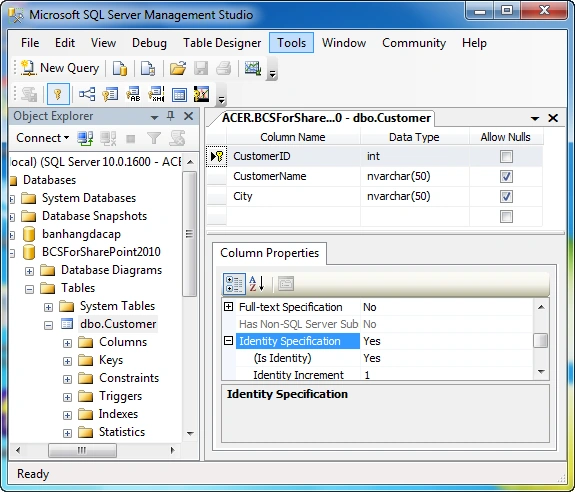
- Create a new table name: Customer with the following columns:
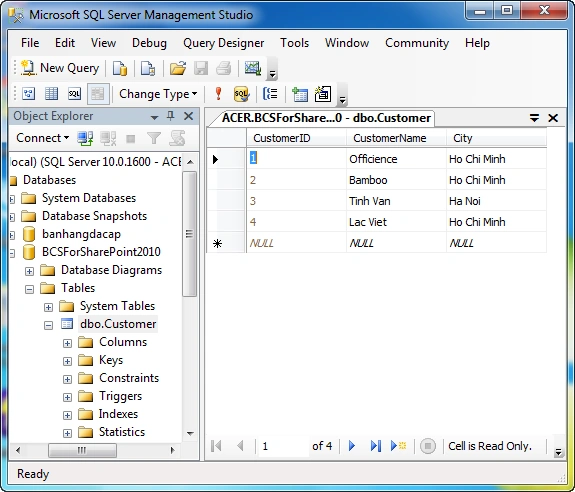
- Enter new customer data
Open Visual Studio 2010 to create a new BCS
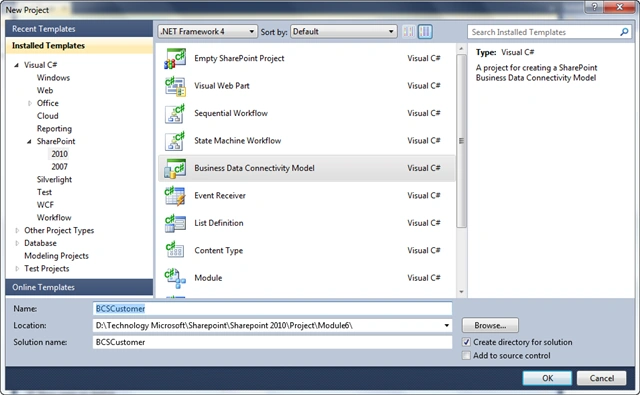
- File | New Project | SharePoint | 2010 | Select Data Connectivity
Business Model and name BCSCustomer
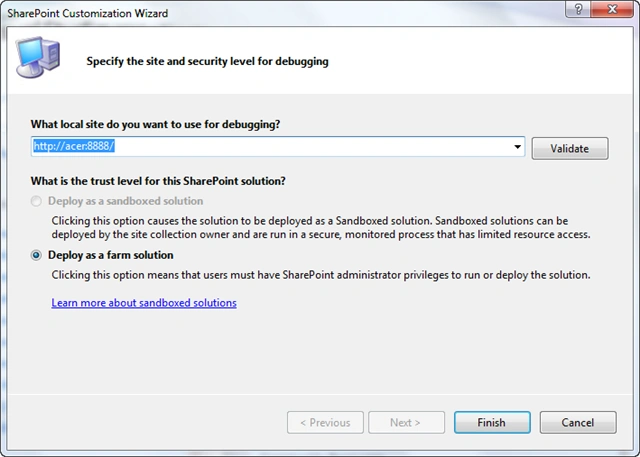
- Select Site and click Finish to Dubugging
Interface creates the following new
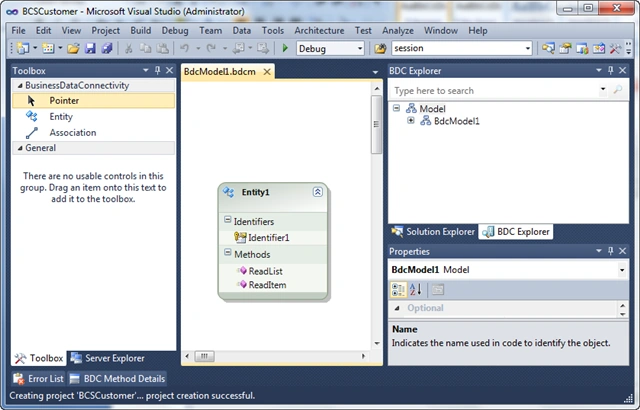
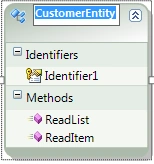
- Rename the Class Entity1 CustomerEntity
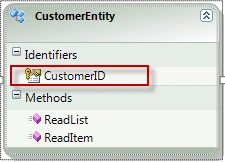
- Rename the primary key of CustomerID from Identifier1
- In the Properties window of the CustomerID, Name Type: select
System.Int32
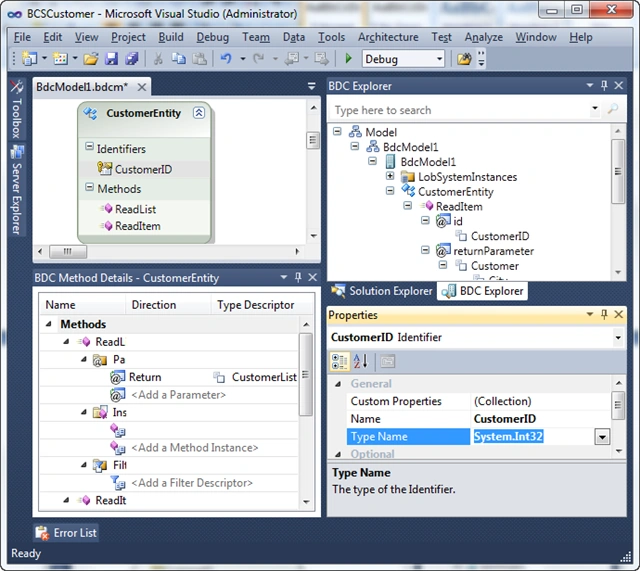
BDC Explorer window
- Expand Model | Expand BdcModel1 | Expand CustomerEntity | Expand
ReadItem | Expand id and choose Identifier
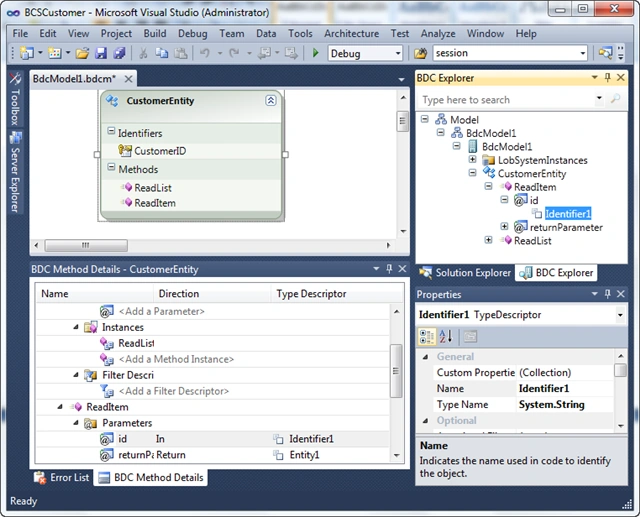
-Rename the primary key of CustomerID from Identifier1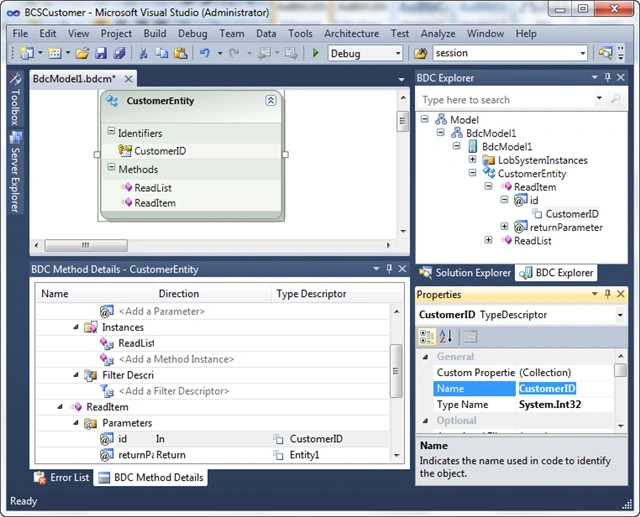
-In the Properties window of the CustomerID, Name Type: select System.Int32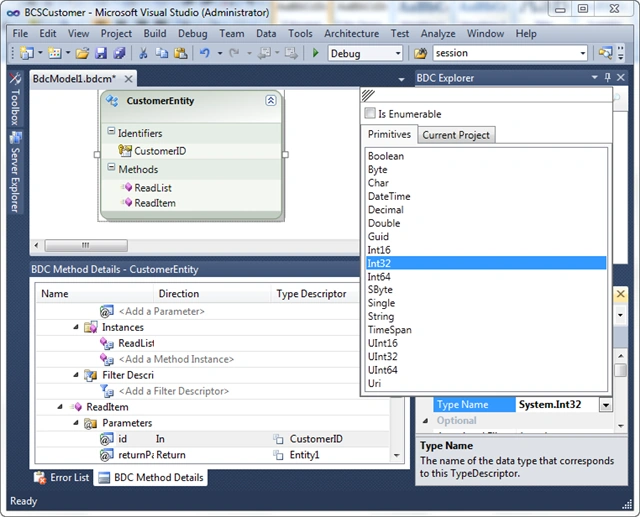
-Selected the following image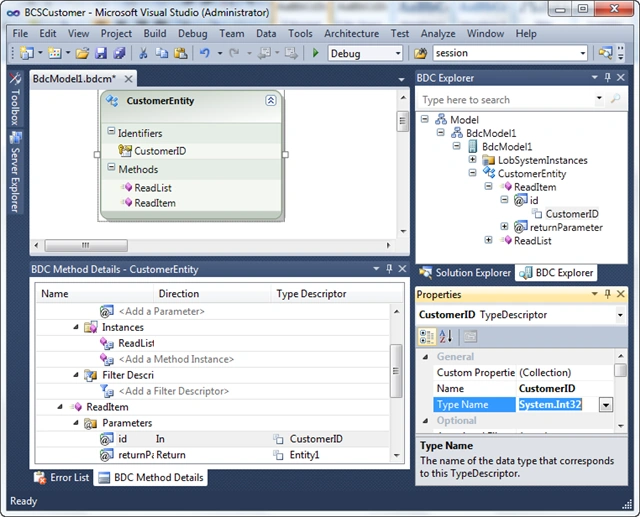
- Expand Model | Expand BdcModel1 | Expand CustomerEntity | Expand
ReadItem | Expand returnParameter and select Entity1
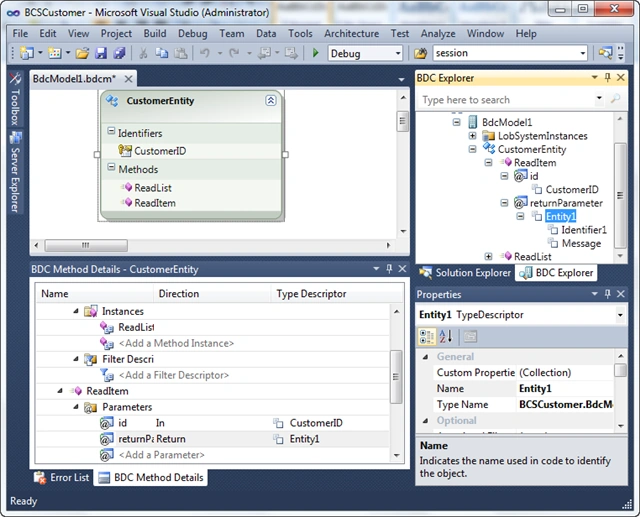
-Change from the Customer Entity1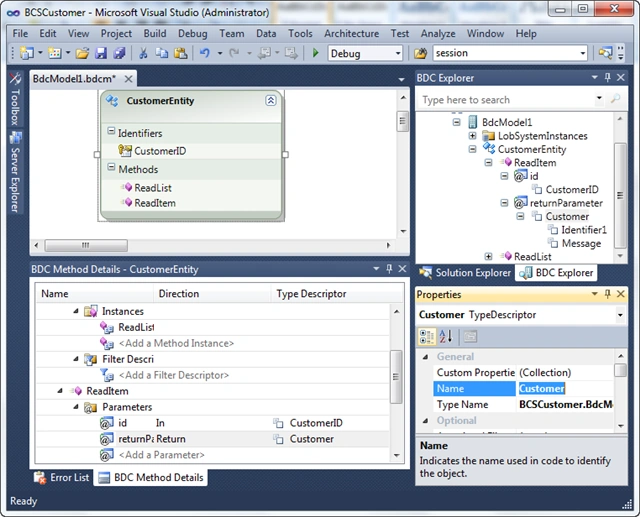
-In the customer select the CustomerID and choose Identifier1 Name Type: select System.Int32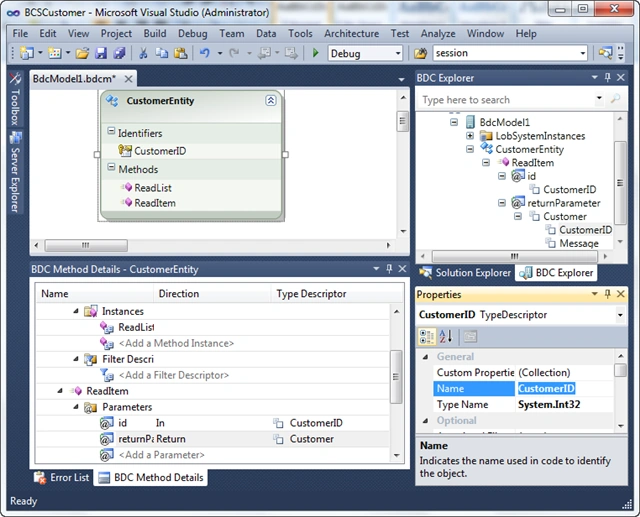
-Select Message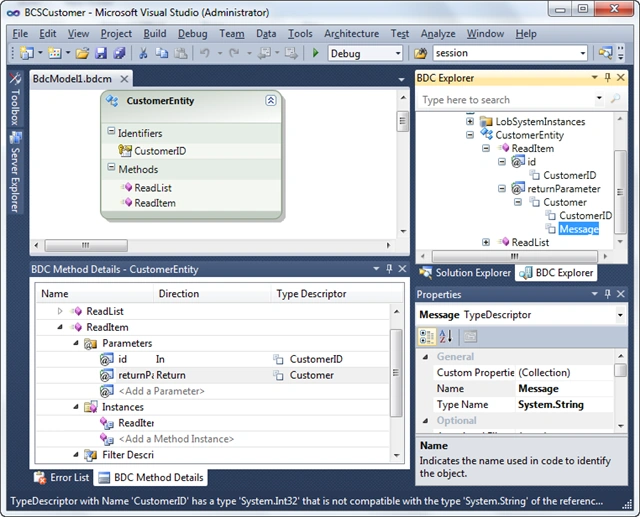
-Renamed CustomerName, Type Name: System.String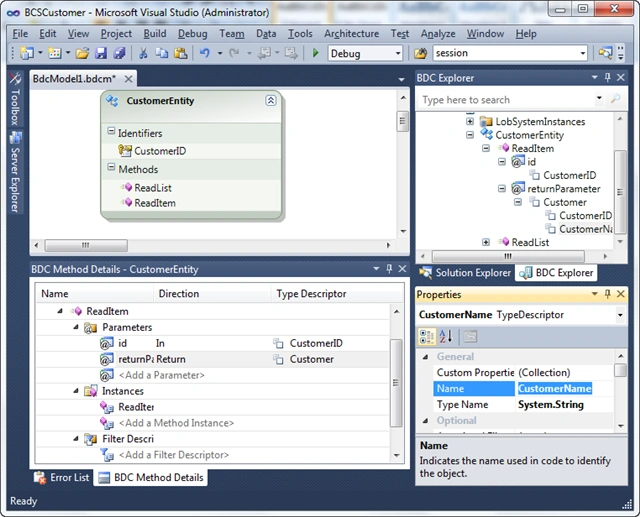
-Click to Customer | Add Type Descriptor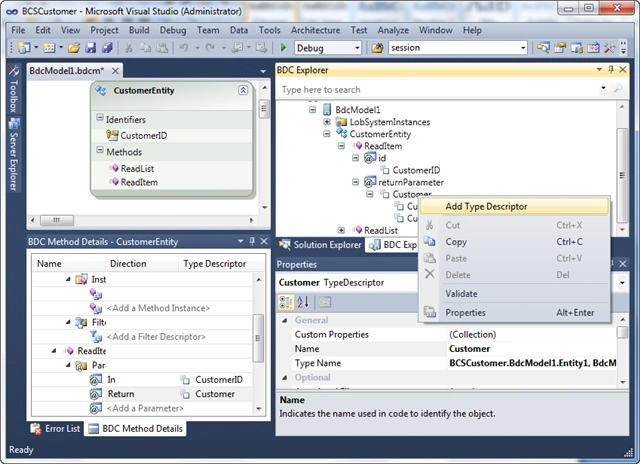
-Named the City, the Type Name: System.String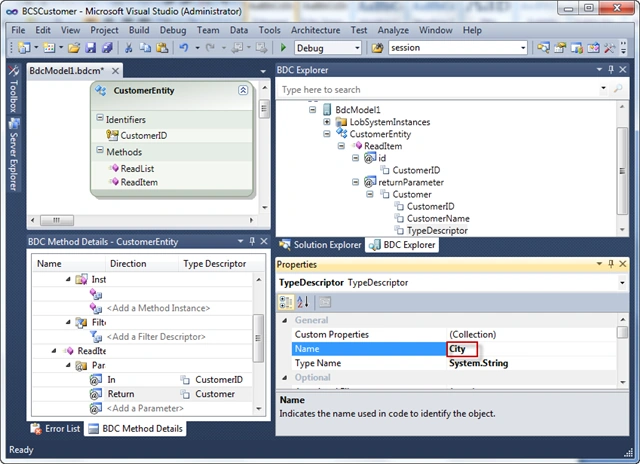
-Expand Model | Expand BdcModel1 | Expand CustomerEntity | Expand ReadList | Expand returnParameter and select Entity1List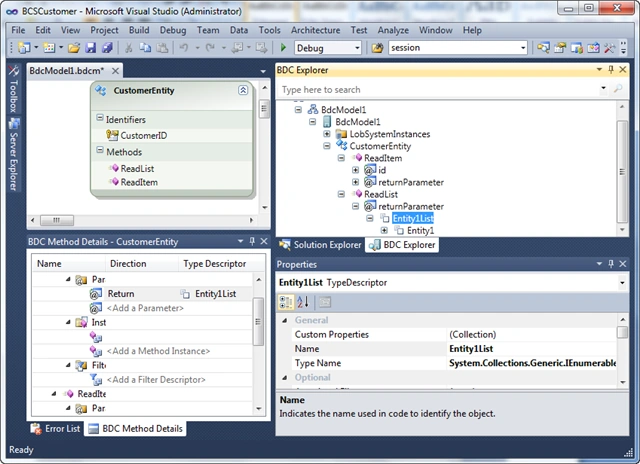
-CustomerList changed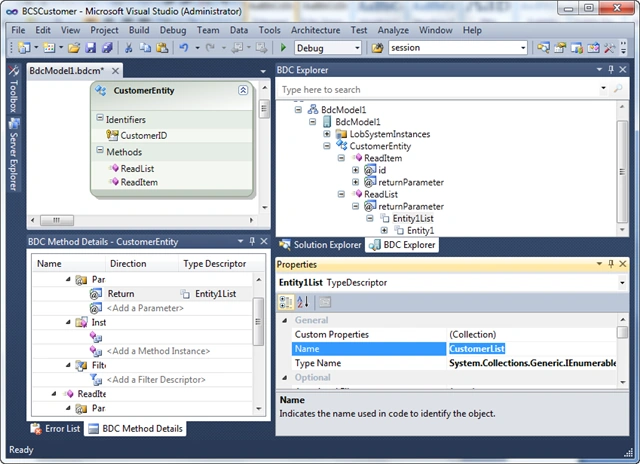
-Expand Model | Expand BdcModel1 | Expand CustomerEntity | Expand ReadList | Expand returnParameter | Expand CustomerList | Choose Entity1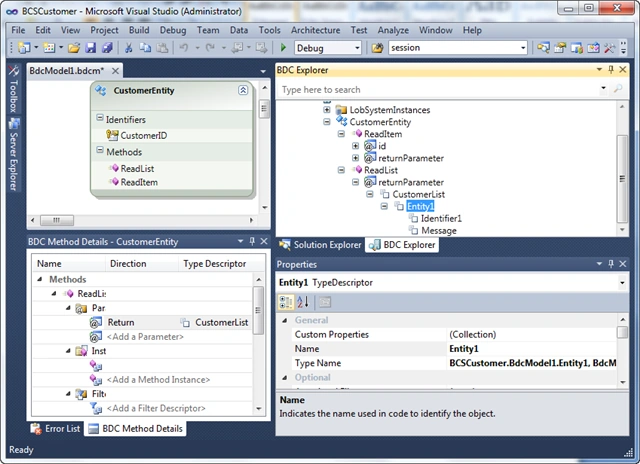
-Customer changed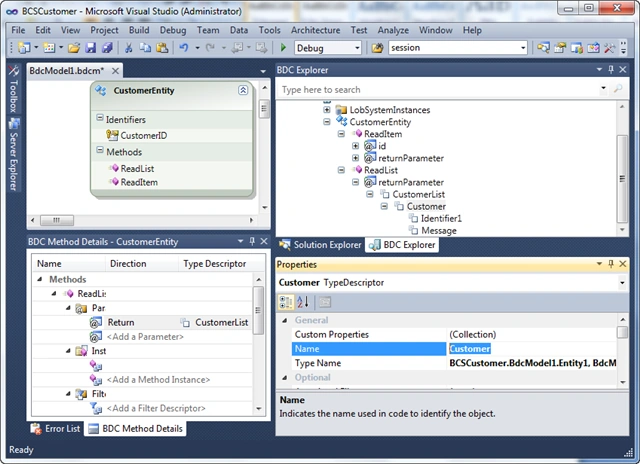
-Expand Customer | Change Identifier1 the CustomerID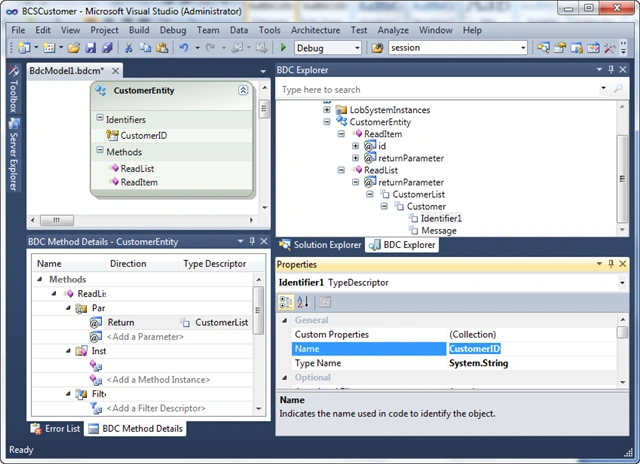
-In the Properties window of the CustomerID, Name Type: select System.Int32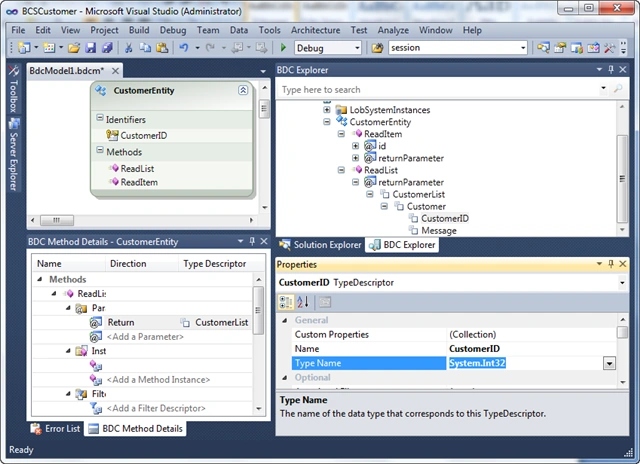
-Select Message and renamed CustomerName, Type Name: System.String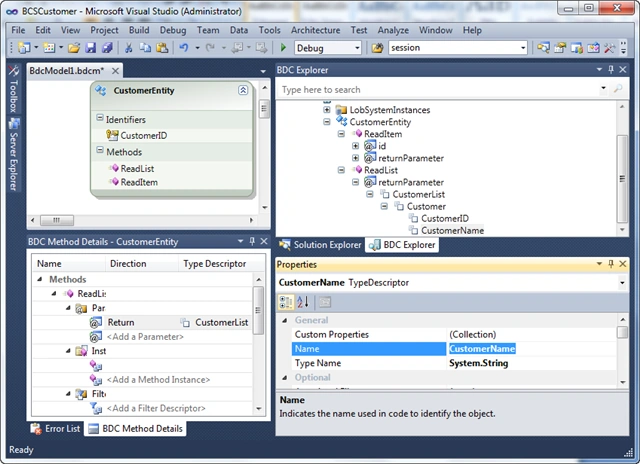
-Click to Customer | Add Type Descriptor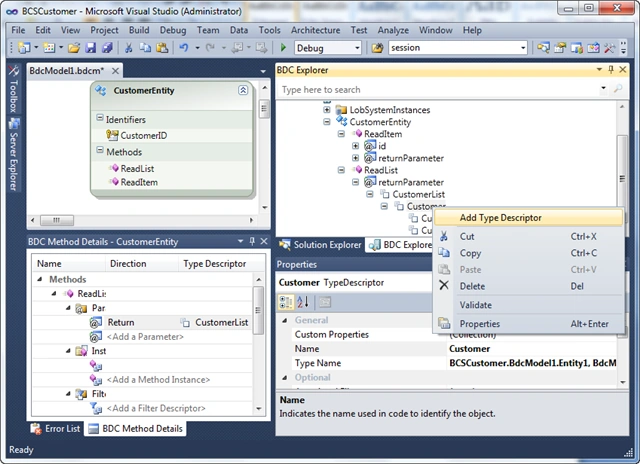
-Named the City, the Type Name: System.String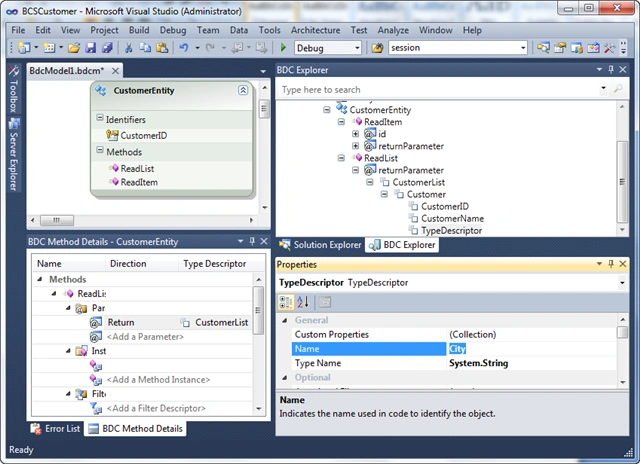
Solution Explorer window | Select Class Entity1
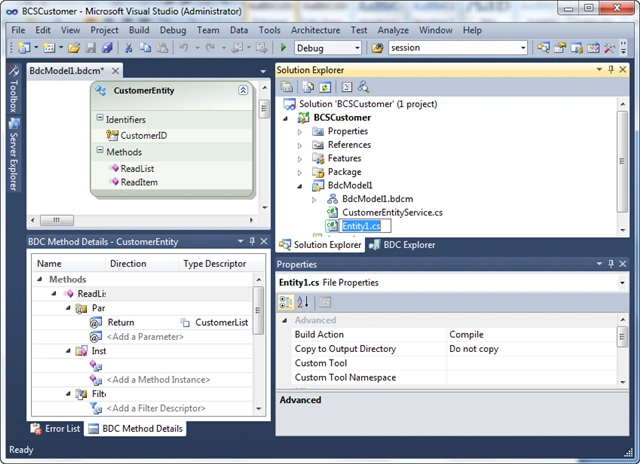
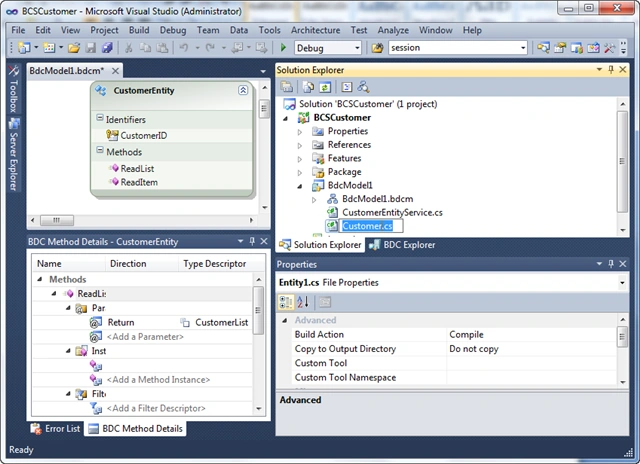
- Renamed Customer
- Declare the following code
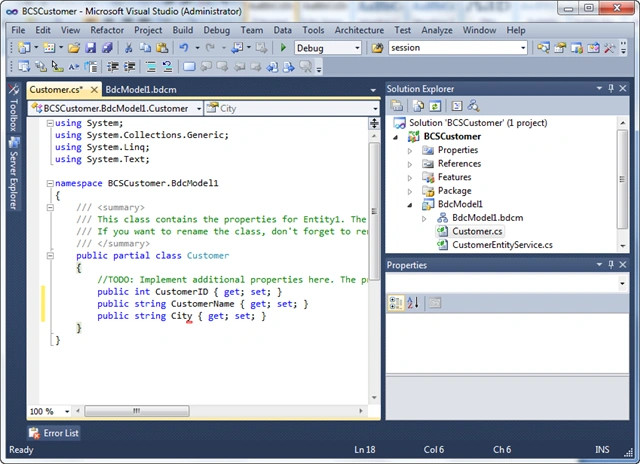
public partial class Customer
{
/ / TODO: Implement Additional properties here.
/ / The Message property is just a sample how a property could look like.
public int CustomerID {get; set;}
public string CustomerName {get; set;}
public string City {get; set;}
}
Method Details window BDC - CustomerEntity | collap ReadItem method, ReadList
- Click the Add method in the combobox and select the Create Delete Method
Member
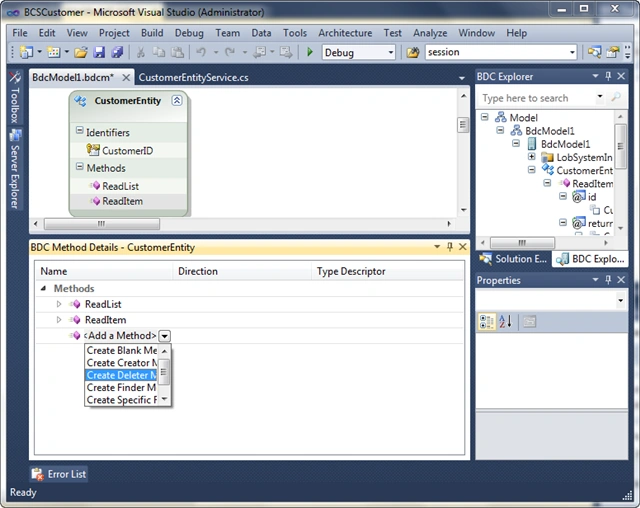
- Interface as follows
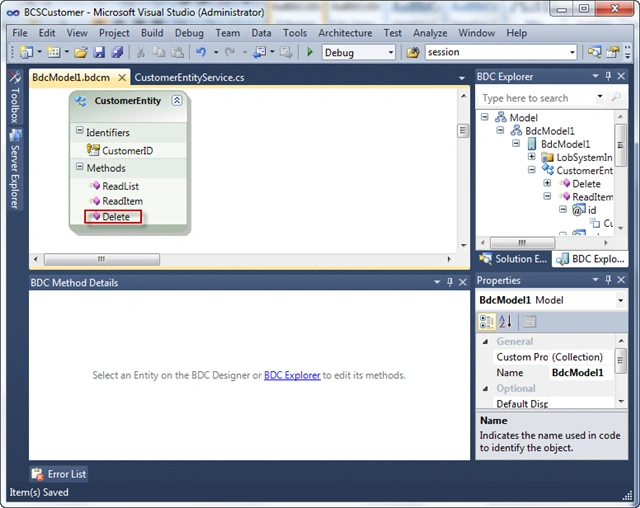
- Double click on the file and found ReadItem method appears CustomerEntityService.cs
- Using the following declaration code
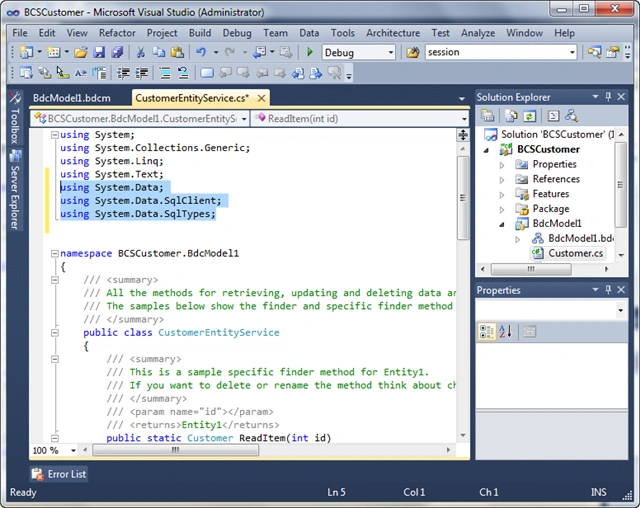
using System.Data;
using System.Data.SqlClient;
using System.Data.SqlTypes;
- Declare the SqlConnection method returns the name GetSqlConnection
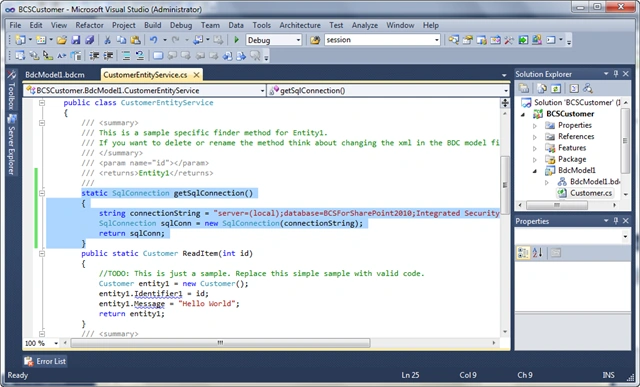
GetSqlConnection static SqlConnection ()
{
string ConnectionString = "server = (local) database = BCSForSharePoint2010; Integrated Security = true";
SqlConn SqlConnection = new SqlConnection (ConnectionString);
sqlConn return;
}
- In the alternative method ReadItem error code with the following code:
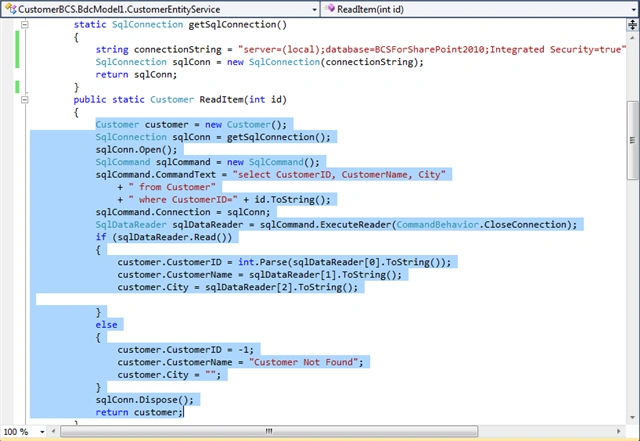
public static ReadItem Customer (int id)
{Customer customer = new Customer ();
SqlConn = GetSqlConnection SqlConnection ();
sqlConn.Open ();
SqlCommand SqlCommand = new SqlCommand ();
sqlCommand.CommandText = "select CustomerID, CustomerName, City"
+ "From Customer"
+ "WHERE CustomerID =" + id.ToString ();
sqlCommand.Connection = sqlConn;
SqlDataReader SqlDataReader = sqlCommand.ExecuteReader (CommandBehavior. CloseConnection);
if (sqlDataReader.Read ())
{
customer.CustomerID = int. Parse (SqlDataReader [0]. ToString ());
customer.CustomerName = SqlDataReader [1]. ToString ();
Customer.City = SqlDataReader [2]. ToString ();
}
else
{
customer.CustomerID = -1;
customer.CustomerName = "Customer Not Found";
Customer.City = "";
}
sqlConn.Dispose ();
return customer;
}
- In the method declaration code ReadList
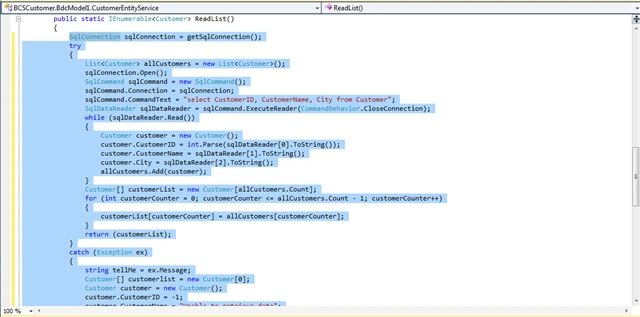
/ / / <summary>
/ / / This is a sample method for Entity1 finder.
/ / / If You Want to delete or rename the method to think about changing the xml file in the BDC model as well.
/ / / </ Summary>
/ / / <returns> IEnumerable of Entities </ returns>
public static IEnumerable <Customer> ReadList ()
{SqlConnection SqlConnection = GetSqlConnection ();
try
{
List <Customer> allCustomers = new List <Customer> ();
sqlConnection.Open ();
SqlCommand SqlCommand = new SqlCommand ();
sqlCommand.Connection = SqlConnection;
sqlCommand.CommandText = "select CustomerID, CustomerName, City from Customer";
SqlDataReader SqlDataReader = sqlCommand.ExecuteReader (CommandBehavior. CloseConnection);
while (sqlDataReader.Read ())
{
Customer customer = new Customer ();
customer.CustomerID = int. Parse (SqlDataReader [0]. ToString ());
customer.CustomerName = SqlDataReader [1]. ToString ();
Customer.City = SqlDataReader [2]. ToString ();
allCustomers.Add (customer);
}
Customer [] = new Customer customerList [allCustomers.Count];
for (int customerCounter = 0; customerCounter <= allCustomers.Count - 1; customerCounter + +)
{
customerList [customerCounter] = allCustomers [customerCounter];
}
return (customerList);
}
catch (Exception ex)
{
Tellme String = ex.Message;
Customer [] customerlist = new Customer [0];
Customer customer = new Customer ();
customer.CustomerID = -1;
customer.CustomerName = "Unable to retrieve data";
Customer.City = "";
customerlist [0] = customer;
return (customerlist);
}
finally
{
sqlConnection.Dispose ();
}
} - In the Delete method declaration code
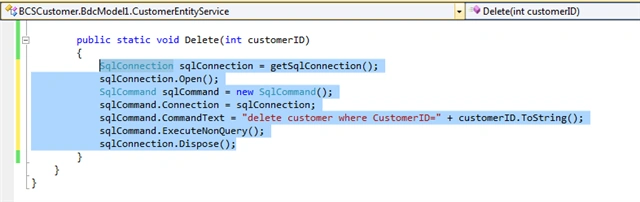
public static void Delete (int CustomerID)
{
SqlConnection SqlConnection = GetSqlConnection ();
sqlConnection.Open ();
SqlCommand SqlCommand = new SqlCommand ();
sqlCommand.Connection = SqlConnection;
sqlCommand.CommandText = "delete customer WHERE CustomerID =" + customerID.ToString ();
sqlCommand.ExecuteNonQuery ();
sqlConnection.Dispose ();
}
After completion code hi build and Deploy project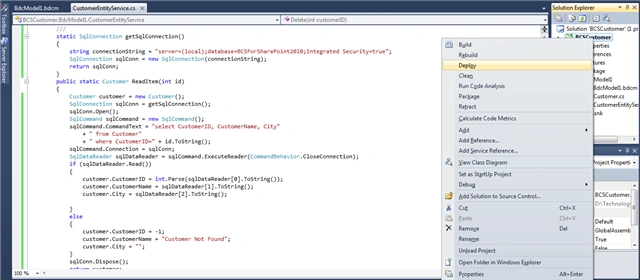
Open Central Administration | Application Management | Manage service selected
applications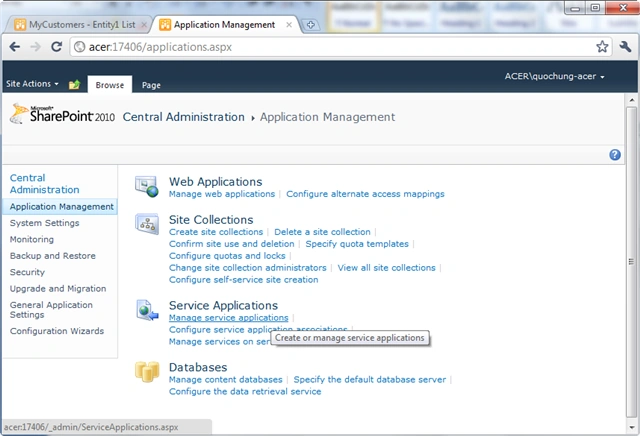
You choose to Business Data Connectivity Service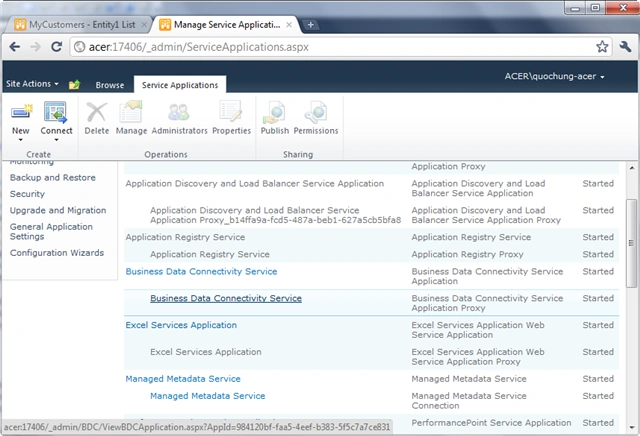
You check CustomerEntity BCSCustomer.BdcModel1 with namespace and select Icon
Set Object Permissions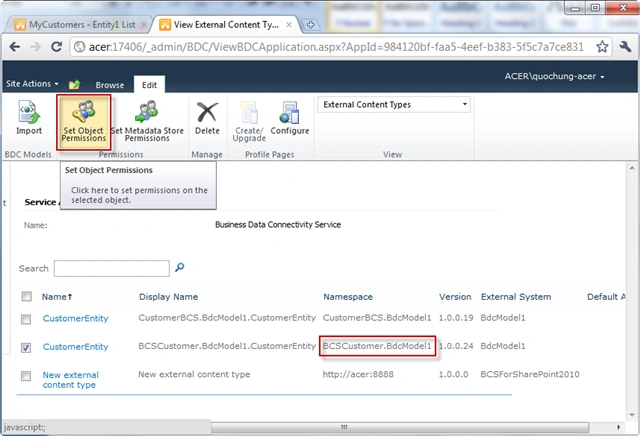
Add your user rights for that user and select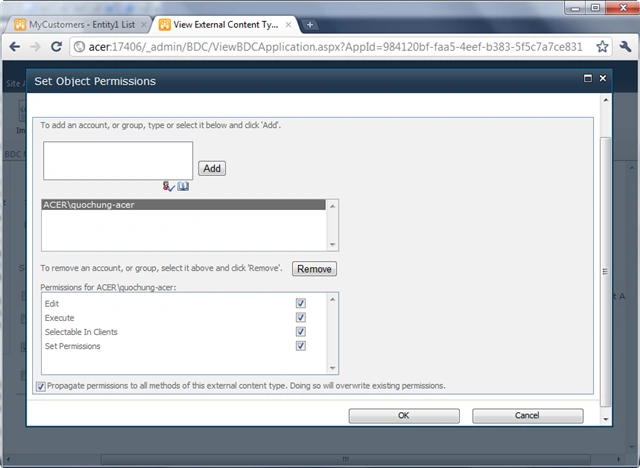
Open the site with the port as was at first Debungging ( http://acer:8888 )
and select All Site Content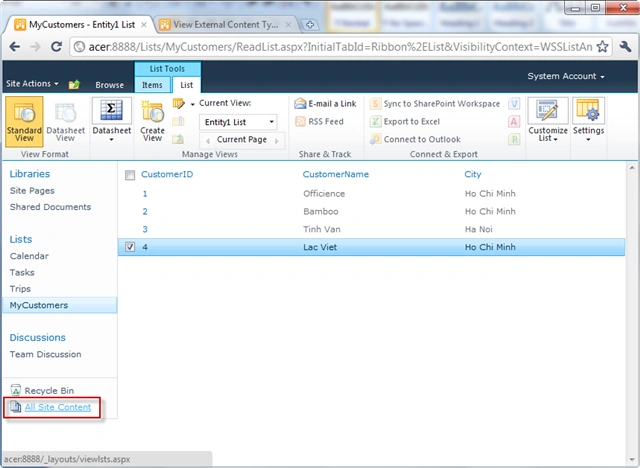
Choose Create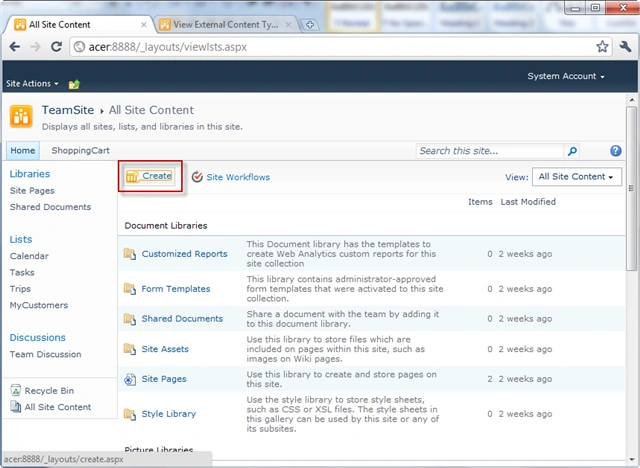
Data at the category | select External List | select Create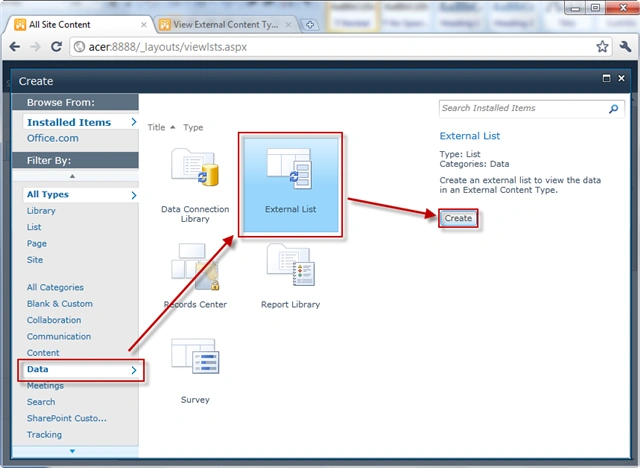
BCSCustomer named below and select the icon to add External Content Type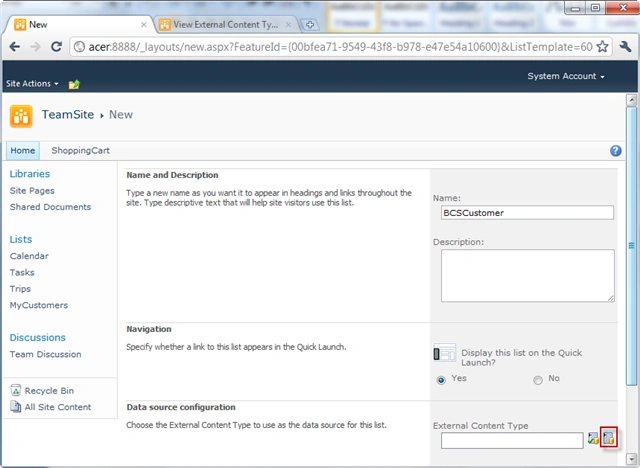
Choose BdcModel1 with External Content Type and select OK
BCSCustomer.BdcModel1.CustomerEntity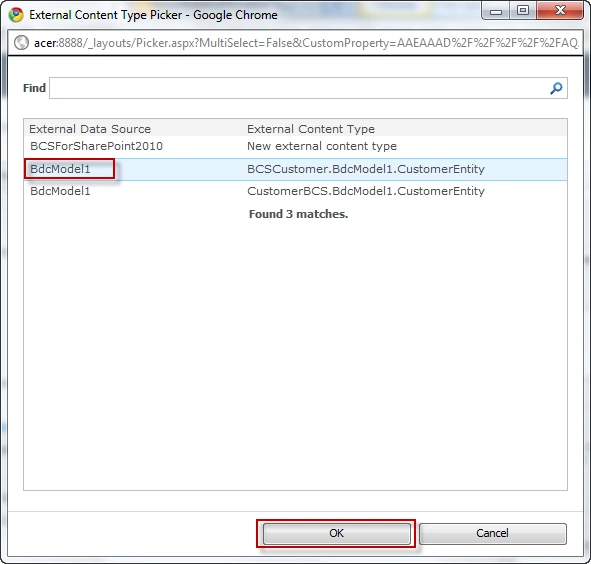
Choose Create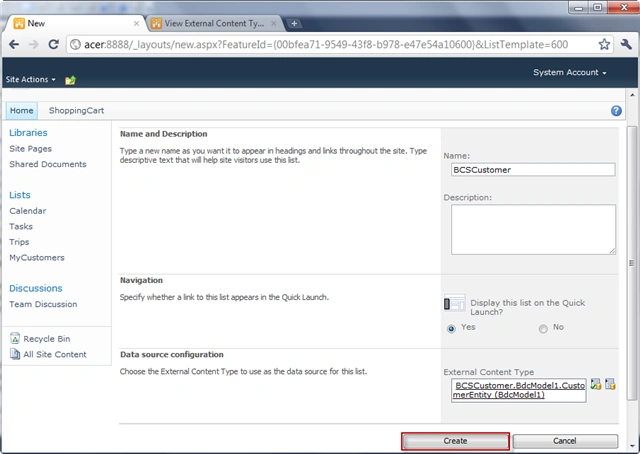
Thus BCSCustomer List has been shown to Method ReadList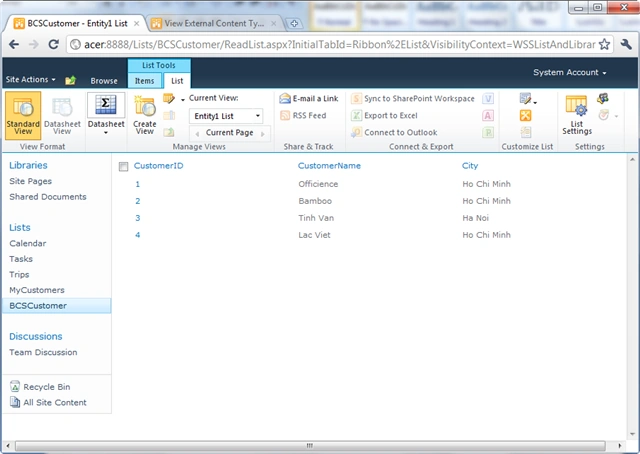
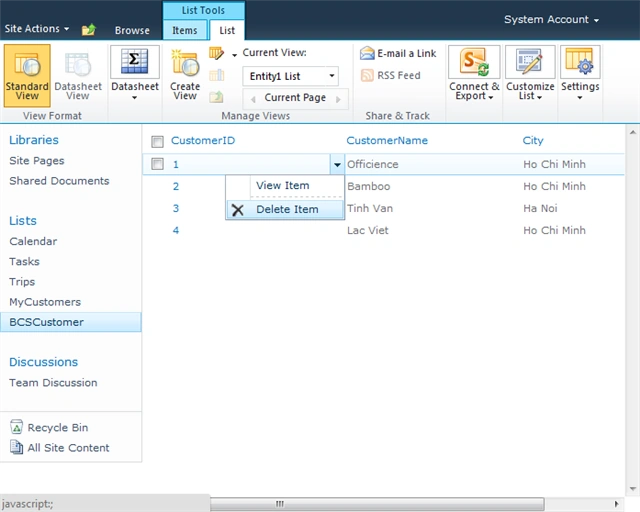
Item can Delete | Click on a Combobox Item | Add Delete
OK
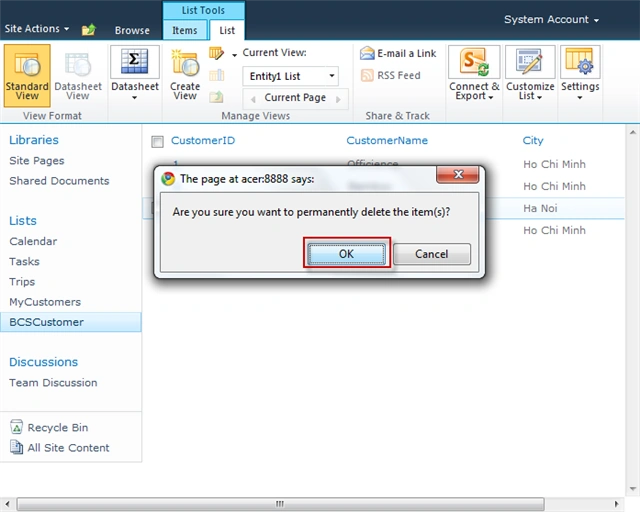
Item removed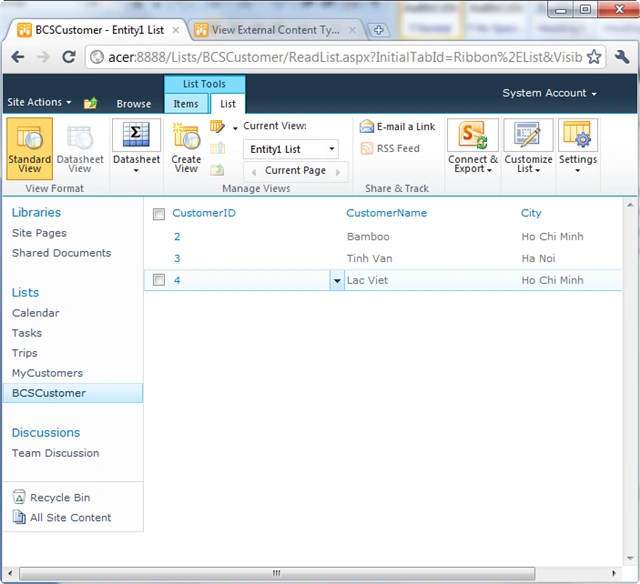
Back to SQL Server to see the old data as follows and select Execute SQL Icon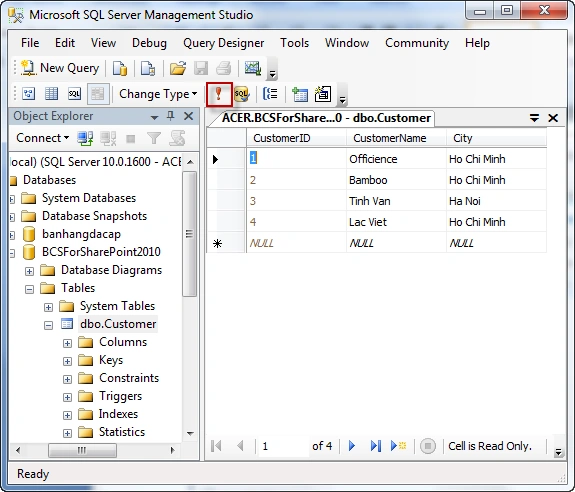
Result Row Item deleted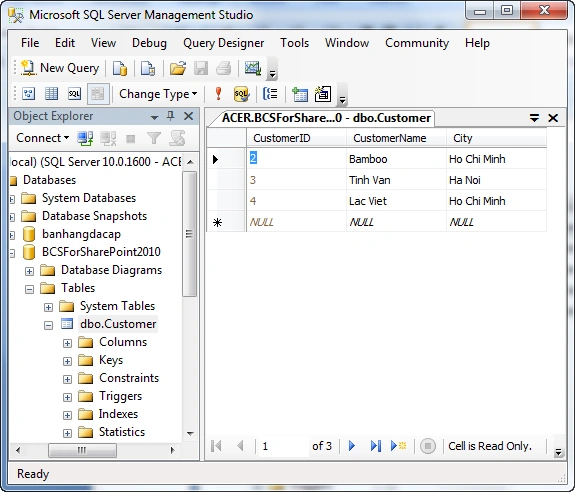
So we finished creating the VS 2010 BCS method ReadItem, ReadList, Delete, and
other similar methods
chandan guptaPosted Dec 9, 2013, 7:38 AM
public static void Delete(int empId) { SqlConnection SqlConnection = GetSqlConnection(); SqlConnection.Open(); SqlCommand SqlCommand = new SqlCommand(); SqlCommand.Connection = SqlConnection; SqlCommand.CommandText = "delete from EmployeeTab WHERE EmpId =" empId.ToString(); SqlCommand.ExecuteNonQuery(); SqlConnection.Dispose(); }
chandan guptaPosted Dec 9, 2013, 7:37 AM
public static IEnumerable<Employee> ReadList() { //TODO: This is just a sample. Replace this simple sample with valid code. SqlConnection SqlConnection = GetSqlConnection(); try { List<Employee> allCustomers = new List<Employee>(); SqlConnection.Open(); SqlCommand SqlCommand = new SqlCommand(); SqlCommand.Connection = SqlConnection; SqlCommand.CommandText = "select EmpId, FirstName, LastName from EmployeeTab"; SqlDataReader SqlDataReader = SqlCommand.ExecuteReader(CommandBehavior.CloseConnection); while (SqlDataReader.Read()) { Employee customer = new Employee(); customer.EmpId = int.Parse(SqlDataReader[0].ToString()); customer.FirstName = SqlDataReader[1].ToString(); customer.LastName = SqlDataReader[2].ToString(); allCustomers.Add(customer); } Employee[] customerList1 = new Employee[allCustomers.Count]; for (int customerCounter = 0; customerCounter <= allCustomers.Count - 1; customerCounter ) { customerList1[customerCounter] = allCustomers[customerCounter]; } return (customerList1); } catch (Exception ex) { //throw ex; Employee[] customerlist = new Employee[0]; Employee customer = new Employee(); customer.EmpId = -1; customer.FirstName = "Unable to retrieve data"; customer.LastName = ""; customerlist[0] = customer; return (customerlist); } finally { SqlConnection.Dispose(); } }
chandan guptaPosted Dec 9, 2013, 7:37 AM
public static Employee ReadItem(int id) { //TODO: This is just a sample. Replace this simple sample with valid code. Employee customer = new Employee(); SqlConnection sqlConn = GetSqlConnection(); sqlConn.Open(); SqlCommand SqlCommand = new SqlCommand(); SqlCommand.CommandText = "select EmpId, FirstName, LastName From EmployeeTab WHERE EmpId =" id.ToString(); SqlCommand.Connection = sqlConn; SqlDataReader SqlDataReader = SqlCommand.ExecuteReader(CommandBehavior.CloseConnection); if (SqlDataReader.Read()) { customer.EmpId = int.Parse(SqlDataReader[0].ToString()); customer.FirstName = SqlDataReader[1].ToString(); customer.LastName = SqlDataReader[2].ToString(); } else { customer.EmpId = -1; customer.FirstName = "Customer Not Found"; customer.LastName = ""; } sqlConn.Dispose(); return customer; }
chandan guptaPosted Dec 9, 2013, 7:37 AM
static SqlConnection GetSqlConnection() { string ConnectionString = @"Data Source=chandan-ltp\Sqlexpress;Initial Catalog=ABC;Integrated Security=True"; SqlConnection SqlConn = new SqlConnection(ConnectionString); return SqlConn; }
chandan guptaPosted Dec 9, 2013, 7:35 AM
Correct code of class EmployeeEntityService is...
chandan guptaPosted Dec 9, 2013, 7:30 AM
lot of error in this article..you guys can only follow..for basic creation of BCS using VS 2010
ridhvi pPosted Dec 5, 2012, 2:07 AM
Also can you please post some article related to creating associations in bcs
ashok meditedPosted Sep 5, 2012, 6:14 AMEdited Sep 5, 2012, 6:17 AM
nice article ,but getting error MethodInstance with Name 'ReadList' on Entity (External Content Type) with Name 'CustomerEntity' in Namespace 'BCS_Customer.BdcModel1' failed unexpectedly. The failure occurred in method 'ReadList' defined in class 'BCS_Customer.BdcModel1.CustomerEntityService' with the message 'Index was outside the bounds of the array
Harsh KapoorPosted Aug 27, 2012, 8:17 AM
Very good article, very nice
Saurabh GuptaPosted Feb 21, 2012, 5:01 AM
Nice Article, it Really covers all parts of the topic Thanks
Yemi EmmanuelPosted Jan 23, 2012, 6:29 AM
Hello Hung, thank you very much for this article. Its very much detailed and has proved useful. When you created the data configurations for sql server, it was quite a drag and drop experience which was nice. Do you have a similar path or article / idea in creating the connectivity for MySql databases?
Hung HungPosted Nov 2, 2011, 10:41 AM
Thanks. Ok, you can connect to oracle. but i am not expert about it. i am sorry but i can share to link for you: http://msdn.microsoft.com/en-us/library/ff464424(office.14).aspx Regard.
scot daleeditedPosted Nov 2, 2011, 6:38 AMEdited Nov 2, 2011, 6:39 AM
Very Good Article, thanks, can i follow same steps for oracle instead of sql? Thanks Scot