
Nowadays, most of the developers are trying to migrate from Microsoft SQL Server to MYSQL Server. This is because MYSQL server is freely downloadable version of the world's most popular open source database that is supported by an active community of open source developers. Meanwhile, there are many developers who are trying to migrate from MYSQL to Microsoft SQL Server. Here I will discuss in the easiest way to connect your asp.net web application with MYSQL Server and also how you can migrate from Microsoft SQL to MYSQL.
Before creating the connection string, we need to install some MySQL and some components for connection. The following are the components and link to download (All are free) that need to be installed.
-
Microsoft Data Access Components (MDAC) 2.8 (or above)
http://www.microsoft.com/downloads/details.aspx?FamilyID=6c050fe3-c795-4b7d-b037-185d0506396c&displaylang=en
After successful installation of MYSQL, run your MSQL server and create a Database, than a Table. You can use the following command to create a database and a table:
mysql> create database mydataBase;
Query OK, 1 row affected (0.03 sec)
mysql> use mydataBase;
Database changed
mysql> creat table mytable(Name varchar(10),Number varchar(10));
Query OK, 0 rows affected (0.11 sec)
Now we can move to our project.
Go to Visual Studio >> Solution Explorer >> Add references and add a reference to MySQL.DATA from .net components.(check the image for detail).
MYSQL.DATA will not shown in your Add Reference window until you have installed the MYSQL Connector and MDAC.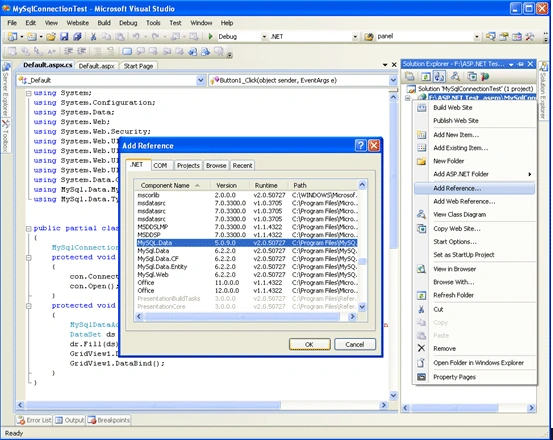
Then the following code can be included in our C# code for the connection.
public partial class _Default : System.Web.UI.Page
{
MySqlConnection con = new MySqlConnection();
protected void Page_Load(object sender, EventArgs e)
{
con.ConnectionString = "Data Source=localhost;Database= mydataBase;User ID=root;Password=root";
//Default User ID and password is 'root' as 'sa' for Microsoft SQL Server
con.Open();
}
protected void Button1_Click(object sender, EventArgs e)
{
//Let us just get connect and display the table in a GridView.
MySqlDataAdapter dr = new MySqlDataAdapter("select * from mytable",con);
DataSet ds = new DataSet();
dr.Fill(ds);
GridView1.DataSource = ds;
GridView1.DataBind();
}
}
And we also need the following namespace to import.
using System.Data.Odbc;
using MySql.Data.MySqlClient;
using MySql.Data.Types;
Again these namespace won't come until you have added the Reference for MYSQL.DATA.
For migrating Microsoft SQL to MySQL can be easily done with MYSQL Migration Tools. You can download it from the below link
http://dev.mysql.com/downloads/gui-tools/5.0.html
If still migration is not working, then you can check this forum link below.
http://www.codeproject.com/answers/56469/Asp-net-Mysql.aspx
Happy Connection!
Joko BintartoPosted Mar 1, 2011, 12:24 AM
why from the aplikasi new added record not found in the table of mysql.
Shrikanth HallikhedPosted Feb 11, 2010, 6:57 AM
Hi, I have a small question, as I used the same method what u have given above, and I get the result. but the thing is by missing a simple thing we wont be get it. so, can we use any other method for connections like linq or etc., please reply