

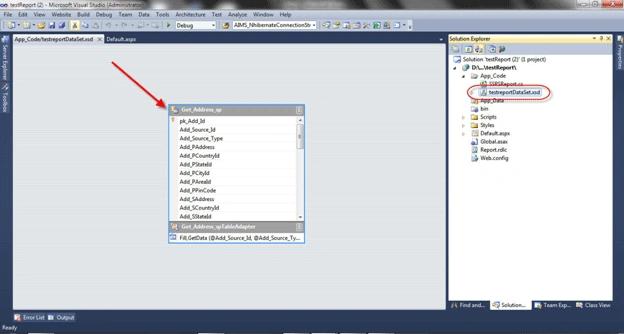
Step 2: Create and Bind .rdlc file with Dataset.
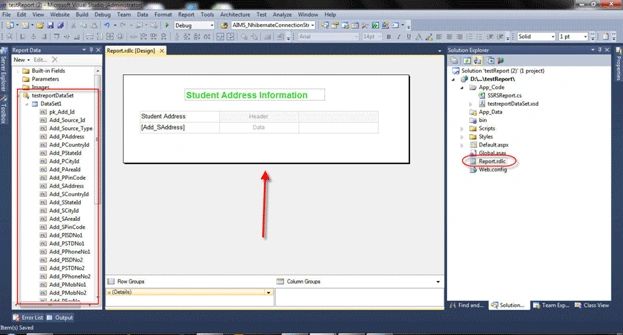
Step 3: Add ReportViewer and call your .rdlc file.
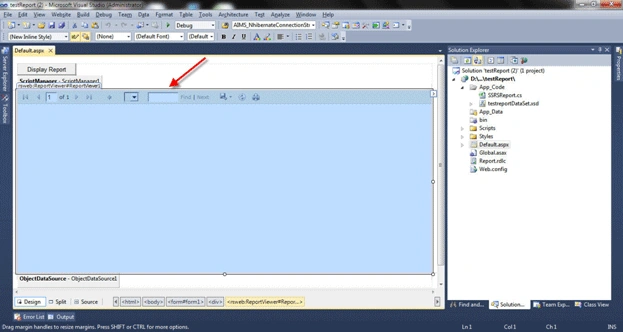
So your .aspx file looks like this.
<%@ Page Language="C#" AutoEventWireup="true" CodeFile="Default.aspx.cs" Inherits="_Default" %>
<%@ Register Assembly="Microsoft.ReportViewer.WebForms, Version=10.0.0.0, Culture=neutral, PublicKeyToken=b03f5f7f11d50a3a"
Namespace="Microsoft.Reporting.WebForms" TagPrefix="rsweb" %>
<!DOCTYPE html PUBLIC "-//W3C//DTD XHTML 1.0 Transitional//EN" "http://www.w3.org/TR/xhtml1/DTD/xhtml1-transitional.dtd">
<html xmlns="http://www.w3.org/1999/xhtml">
<head runat="server">
<title>Test SSRS Demo by Jayendrasinh Gohil</title>
</head>
<body>
<form id="form1" runat="server">
<div>
<asp:Button ID="btndisplay" runat="server" Text="Display Report" OnClick="btndisplay_Click" />
<asp:ScriptManager ID="ScriptManager1" runat="server">
</asp:ScriptManager>
<rsweb:ReportViewer ID="ReportViewer1" runat="server" Font-Names="Verdana" Font-Size="8pt"
InteractiveDeviceInfos="(Collection)" WaitMessageFont-Names="Verdana" WaitMessageFont-Size="14pt"
Width="908px" Visible="false">
<LocalReport ReportPath="Report.rdlc">
<DataSources>
<rsweb:ReportDataSource DataSourceId="ObjectDataSource1" Name="DataSet1" />
</DataSources>
</LocalReport>
</rsweb:ReportViewer>
<asp:ObjectDataSource ID="ObjectDataSource1" runat="server" SelectMethod="GetData"
TypeName="testreportDataSetTableAdapters.Get_Address_spTableAdapter"></asp:ObjectDataSource>
</div>
</form>
</body>
</html>
Step 4: New bind your report upon the button click event.
using System;
using System.Collections.Generic;
using System.Linq;
using System.Web;
using System.Web.UI;
using System.Web.UI.WebControls;
using System.Data;
using System.Configuration;
using System.Data.SqlClient;
public partial class _Default : System.Web.UI.Page
{
string Connectionstring = ConfigurationManager.ConnectionStrings["ConnectionString"].ToString();
protected void Page_Load(object sender, EventArgs e)
{
if (!IsPostBack)
{
}
}
protected void btndisplay_Click(object sender, EventArgs e)
{
BindReport("Employee", 14);
}
private void BindReport(string p, int p_2)
{
SSRSReport report = new SSRSReport();
SqlParameter[] sqlParams = new SqlParameter[] {
new SqlParameter("@Add_Source_Id", 25) ,
new SqlParameter("@Add_Source_Type", "Employee")
};
string ReportDataSource = "DataSet1";
bool bind = report.CreateReport(Connectionstring, "Get_Address_sp", sqlParams, ref ReportViewer1, ReportDataSource);
if (bind)
{
ReportViewer1.Visible = true;
}
}
}
I created a class for binding the report, which is very important.
using System;
using System.Collections.Generic;
using System.Linq;
using System.Web;
using System.Data;
using System.Configuration;
using System.Data.SqlClient;
using System.Web.UI.WebControls;
using Microsoft.Reporting.WebForms;
/// <summary>
/// Summary description for SSRSReport
/// </summary>
public class SSRSReport
{
public SSRSReport()
{
//
// TODO: Add constructor logic here
//
}
public bool CreateReport(String Connectionstring,string StoreProcedureName ,SqlParameter[] Parameter,ref Microsoft.Reporting.WebForms.ReportViewer ReportViewer,string ReportDataSource)
{
bool reportbind = false;
using (SqlConnection con = new SqlConnection(Connectionstring))
{
SqlCommand com = new SqlCommand();
com.Connection = con;
com.CommandType = CommandType.StoredProcedure;
com.CommandText = StoreProcedureName;
com.Parameters.AddRange(Parameter);
DataSet ds = new DataSet();
SqlDataAdapter da = new SqlDataAdapter(com);
da.Fill(ds);
ReportDataSource datasource = new ReportDataSource(ReportDataSource, ds.Tables[0]);
if ( ds.Tables[0].Rows.Count > 0)
{
ReportViewer.LocalReport.DataSources.Clear();
ReportViewer.LocalReport.DataSources.Add(datasource);
reportbind = true;
}
}
return reportbind;
}
}
If you want to create a SSRS report then just copy and call this.
Ashish TiwariPosted Sep 6, 2016, 7:55 AM
This code is not working in my desktop it is throwing an error "Could not load file or assembly 'Oracle.Web, Version=4.121.2.1, Culture=neutral, PublicKeyToken=89b483f429c47342' or one of its dependencies. The system cannot find the file specified." what should i do
Yatin SinghPosted Nov 6, 2015, 4:31 AM
Hello Gohil, Your post is really helpful for me and my developer group who are working for the company. Thanks
Weston BurrPosted Oct 14, 2015, 7:01 AM
What about passing Params to analysis services report?
rahulPosted Jun 4, 2013, 5:43 AM
Thank You So Much
jatineditedPosted May 13, 2013, 8:34 AMEdited May 13, 2013, 8:36 AM
Good , ref concept is good , report viewer id is good using method..
max paPosted Nov 25, 2012, 5:22 AM
okay thanks, are u able to upload the database. i would like to know what is employe 14 is and add_source_id 25 protected void btndisplay_Click(object sender, EventArgs e) { BindReport("Employee", 14); } private void BindReport(string p, int p_2) { SSRSReport report = new SSRSReport(); SqlParameter[] sqlParams = new SqlParameter[] { new SqlParameter("@Add_Source_Id", 25) , new SqlParameter("@Add_Source_Type", "Employee") };
Gohil JayendrasinhPosted Nov 22, 2012, 3:25 PM
In web config file Add reportviewer details like my code. or simply drag drop ReportViewer on the page so assembly and version information add automatically in the web config file.
max paeditedPosted Nov 21, 2012, 10:58 AMEdited Nov 21, 2012, 10:59 AM
Hi, I have followed you example and even downloaded the code. by I get this error message The name 'ReportViewer1' does not exist in the current context in the default.aspx page please assist Thanks
anil babuPosted Aug 31, 2012, 5:36 AM
How to create reports in Windows Azure SQL Reporting for Application developers
Erickson FigueroaPosted Jun 10, 2011, 4:04 PM
Congrats!!! is very very good Brother very tks you!