

You can create Excel file using
- OpenXML
- Microsoft.Office.Interop.Excel
1. OpenXML
For more information about OpenXML
http://excelpackage.codeplex.com/
- For this you can create One Template file
and One Source file.
Here I create ErrorListtemplate.xlsx (Template file) and ErrorList.xlsx
- You must add
- ExcelPackage.dll
- ExcelPackage.pdb
- ExcelPackageXmlDocumentationFile.xml
- GacReg.bat
Your .aspx file like:
<%@
Page Language="C#"
AutoEventWireup="true"
CodeFile="OpenXml.aspx.cs"
Inherits="OpenXml"
%>
<!DOCTYPE html PUBLIC "-//W3C//DTD XHTML 1.0 Transitional//EN" "http://www.w3.org/TR/xhtml1/DTD/xhtml1-transitional.dtd">
<html
xmlns="http://www.w3.org/1999/xhtml">
<head
runat="server">
<title></title>
</head>
<body>
<form
id="form1"
runat="server">
<div>
<asp:Button
ID="btn_Excel"
runat="server"
Text="Excel"
onclick="btn_Excel_Click"
/>
</div>
</form>
</body>
</html>
using
System;
using
System.Collections.Generic;
using
System.Linq;
using System.Web;
using
System.Web.UI;
using
System.Web.UI.WebControls;
using
System.Data;
using
System.Reflection;
using System.IO;
using
OfficeOpenXml;
public
partial class
OpenXml : System.Web.UI.Page
{
DataTable Dt =
new DataTable();
object[] query;
protected void
Page_Load(object sender,
EventArgs e)
{
if (!IsPostBack)
{
}
}
private void
GetRecoredForExcelfile()
{
using (OpenXmlDataDataContext
db = new
OpenXmlDataDataContext())
{
var info =
from p in db.userinfos
select p;
if (info !=
null)
{
query = info.ToArray();
Dt = ConvertToDatatable(query);
}
}
}
///
<summary>
/// Convert
Object Array to DataTable
///
</summary>
///
<param name="array"></param>
///
<returns></returns>
public
static DataTable ConvertToDatatable(Object[]
array)
{
PropertyInfo[] properties =
array.GetType().GetElementType().GetProperties();
DataTable dt =
CreateDataTable(properties);
if (array.Length != 0)
{
foreach (object
o in array)
FillData(properties, dt, o);
}
return dt;
}
#region Private
Methods
///
<summary>
/// Creates
total column of datatable.
///
</summary>
///
<param name="properties"></param>
///
<returns></returns>
private
static DataTable CreateDataTable(PropertyInfo[]
properties)
{
DataTable dt =
new DataTable();
DataColumn dc =
null;
foreach (PropertyInfo
pi in properties)
{
dc = new
DataColumn();
dc.ColumnName = pi.Name;
dt.Columns.Add(dc);
}
return dt;
}
/// <summary>
/// Fills
data in Datatable
///
</summary>
///
<param name="properties"></param>
///
<param name="dt"></param>
private
static void FillData(PropertyInfo[]
properties, DataTable dt,
Object o)
{
DataRow dr = dt.NewRow();
foreach (PropertyInfo
pi in properties)
{
dr[pi.Name] = pi.GetValue(o, null);
}
dt.Rows.Add(dr);
}
#endregion
protected void
btn_Excel_Click(object sender,
EventArgs e)
{
GetRecoredForExcelfile();
string newFilePath = Server.MapPath("ExcelFile/ErrorList.xlsx");
string templateFilePath =
Server.MapPath("ExcelFile/ErrorListtemplate.xlsx");
FileInfo newFile =
new FileInfo(newFilePath);
FileInfo template =
new FileInfo(templateFilePath);
using (ExcelPackage
xlPackage = new
ExcelPackage(newFile, template))
{
foreach (ExcelWorksheet
aworksheet in xlPackage.Workbook.Worksheets)
{
aworksheet.Cell(1, 1).Value = aworksheet.Cell(1, 1).Value;
}
ExcelWorksheet worksheet =
xlPackage.Workbook.Worksheets["Sheet1"];
int startrow = 5;
int row = 0;
int col = 0;
for
(int j = 0; j < Dt.Columns.Count; j++)
{
col++;
for (int
i = 0; i < Dt.Rows.Count; i++)
{
row = startrow + i;
ExcelCell cell =
worksheet.Cell(row, col);
cell.Value = Dt.Rows[i][j].ToString();
xlPackage.Save();
}
}
}
}
}
2. Microsoft.Office.Interop.Excel
You must Add reference Microsoft Excel 12.0 Object Library from .NET COM .
Your .aspx code like:
<%@
Page Language="C#"
AutoEventWireup="true"
CodeFile="MicrosoftOfficeIntrupt.aspx.cs"
Inherits="MicrosoftOfficeIntrupt"
%>
<!DOCTYPE html PUBLIC "-//W3C//DTD XHTML 1.0 Transitional//EN" "http://www.w3.org/TR/xhtml1/DTD/xhtml1-transitional.dtd">
<html
xmlns="http://www.w3.org/1999/xhtml">
<head
runat="server">
<title></title>
</head>
<body>
<form
id="form1"
runat="server">
<div>
<asp:Button
ID="btn_Excel"
runat="server"
Text="Excel"
onclick="btn_Excel_Click"
/>
</div>
</form>
</body>
</html>
Your .cs file like:
using
System;
using
System.Collections.Generic;
using
System.Linq;
using System.Web;
using
System.Web.UI;
using
System.Web.UI.WebControls;
using
System.Data;
using
System.Reflection;
using System.IO;
using Microsoft.Office.Interop.Excel;
public
partial class
MicrosoftOfficeIntrupt : System.Web.UI.Page
{
System.Data.DataTable dtCustmer =
new System.Data.DataTable();
object[] query;
protected void
Page_Load(object sender,
EventArgs e)
{
if (!IsPostBack)
{
}
}
private void GetRecoredForExcelfile()
{
using (OpenXmlDataDataContext
db = new
OpenXmlDataDataContext())
{
var info =
from p in db.userinfos
select p;
if (info != null)
{
query = info.ToArray();
dtCustmer = ConvertToDatatable(query);
//Session["dtlist"] =Dt;
}
}
}
/// <summary>
/// Convert
Object Array to DataTable
///
</summary>
///
<param name="array"></param>
///
<returns></returns>
public
static System.Data.DataTable
ConvertToDatatable(Object[] array)
{
PropertyInfo[] properties =
array.GetType().GetElementType().GetProperties();
System.Data.DataTable dt =
CreateDataTable(properties);
if (array.Length != 0)
{
foreach (object
o in array)
FillData(properties, dt, o);
}
return dt;
}
#region Private Methods
/// <summary>
/// Creates
total column of datatable.
///
</summary>
///
<param name="properties"></param>
///
<returns></returns>
private
static System.Data.DataTable
CreateDataTable(PropertyInfo[] properties)
{
System.Data.DataTable dt =
new System.Data.DataTable();
DataColumn dc =
null;
foreach (PropertyInfo
pi in properties)
{
dc = new
DataColumn();
dc.ColumnName = pi.Name;
//dc.DataType = pi.PropertyType;
dt.Columns.Add(dc);
}
return dt;
}
/// <summary>
/// Fills
data in Datatable
///
</summary>
///
<param name="properties"></param>
///
<param name="dt"></param>
private
static void FillData(PropertyInfo[]
properties, System.Data.DataTable dt,
Object o)
{
DataRow dr = dt.NewRow();
foreach (PropertyInfo
pi in properties)
{
dr[pi.Name] = pi.GetValue(o, null);
}
dt.Rows.Add(dr);
}
#endregion
protected void
btn_Excel_Click(object sender,
EventArgs e)
{
GetRecoredForExcelfile();
string newFilePath = Server.MapPath("ExcelFile/OfficeErrorList.xlsx");
ApplicationClass objExcel =
null;
Workbooks objBooks =
null;
_Workbook objBook =
null;
Sheets objSheets =
null;
_Worksheet objSheet =
null;
Range objRange =
null;
int row = 1, col = 1;
try
{
// System.Data.DataTable dtCustmer =
GetAllCustomers();
//System.Data.DataTable
dtCustmer = Dt.Clone();
objExcel = new
ApplicationClass();
objBooks = objExcel.Workbooks;
objBook = objBooks.Add(XlWBATemplate.xlWBATWorksheet);
//Print column heading in the
excel sheet
int j = col;
foreach (DataColumn
column in dtCustmer.Columns)
{
objSheets = objBook.Worksheets;
objSheet = (_Worksheet)objSheets.get_Item(1);
objRange = (Range)objSheet.Cells[row,
j];
objRange.Value2 = column.ColumnName;
// objRange.Font.Color =
System.Drawing.ColorTranslator.ToOle(System.Drawing.Color.DarkBlue);
//objRange.Interior.Color
= System.Drawing.ColorTranslator.ToOle(System.Drawing.Color.Maroon);
j++;
}
row++;
int count = dtCustmer.Columns.Count;
foreach (DataRow dataRow
in dtCustmer.Rows)
{
int k = col;
for (int
i = 0; i < count; i++)
{
objRange = (Range)objSheet.Cells[row,
k];
objRange.Value2 = dataRow[i].ToString();
k++;
}
row++;
}
//Save Excel document
objSheet.Name =
"Sample Sheet";
object objOpt = Missing.Value;
objBook.SaveAs(newFilePath, objOpt, objOpt, objOpt,
objOpt, objOpt, XlSaveAsAccessMode.xlNoChange,
objOpt, objOpt, objOpt, objOpt, objOpt);
objBook.Close(false,
objOpt, objOpt);
}
catch
{
}
finally
{
objExcel = null;
objBooks = null;
objBook = null;
objSheets = null;
objSheet = null;
objRange = null;
ReleaseComObject(objExcel);
ReleaseComObject(objBooks);
ReleaseComObject(objBook);
ReleaseComObject(objSheets);
ReleaseComObject(objSheet);
ReleaseComObject(objRange);
}
}
//Release COM objects from memory
public void
ReleaseComObject(object reference)
{
try
{
while (System.Runtime.InteropServices.Marshal.ReleaseComObject(reference)
<= 0)
{
}
}
catch
{
}
}
}
If you have some Error like
Exception from HRESULT: 0x800A03EC - Excel, .Net, SQL and Windows Server
Then you have to give iis or server permission
-
Login to the server as a administrator.
-
Go to "Start" -> "Run" and enter "taskmgr"
-
Go to the process tab in task manager and check "Show Processes from all
users" -
If there are any "Excel.exe" entries on the list, right click on the entry and select "End Process"
-
Close task manager.
-
Go to "Start" -> "Run" and enter "services.msc"
-
Stop the service automating Excel if it is running.
-
Go to "Start" -> "Run" and enter "dcomcnfg"
-
This will bring up the component services window, expand out "Console Root" -> "Computers" -> "DCOM Config"
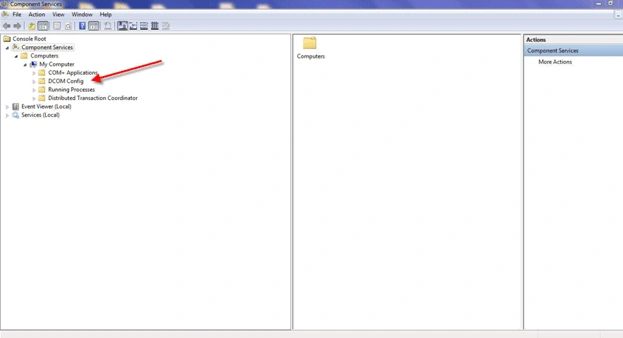
-
Find "Microsoft Excel Application" in the list of components.
-
Right click on the entry and select "Properties"
-
Go to the "Identity" tab on the properties dialog.
-
Select "The interactive user."
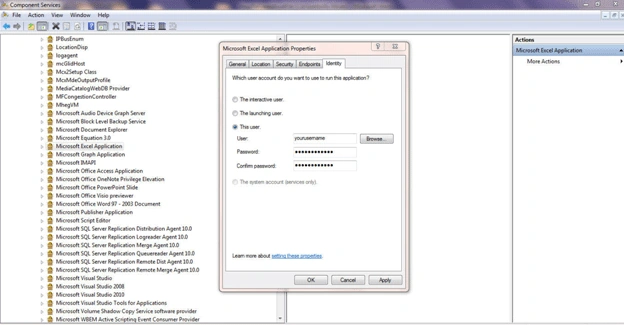
-
Click the "OK" button.
-
Switch to the services console
-
Start the service automating Excel
-
Test you application again.
For more information
http://www.hagrin.com/319/exception-hresult-0x800a03ec-excel-net-sql-and-windows-server-2008
And Add in configuration
<identity
impersonate="true"
userName="yourusername"
password="yourpassword"/>
You must add assembly in your web.config file.
<compilation
debug="true"
targetFramework="4.0">
<assemblies>
<add
assembly="microsoft.office.interop.excel,
version=12.0.0.0, culture=neutral, publickeytoken=71e9bce111e9429c"/>
<add
assembly="DocumentFormat.OpenXml,
Version=2.0.5022.0, Culture=neutral, PublicKeyToken=31BF3856AD364E35"/>
</assemblies>
</compilation>
AMOL AHIREPosted May 30, 2024, 12:06 PM
Using (XLWorkbook wb = new XLWorkbook()) { wb.Worksheets.Add(dsAnalysis.Tables[1], "Partner_Details"); wb.Style.Alignment.Horizontal = XLAlignmentHorizontalValues.Center; wb.Style.Font.Bold = true; string Bank_Statement_Analysis_Server_Path = ConfigurationManager.AppSettings["Bank_Statement_Analysis_path"].ToString(); string FileName = Server.MapPath(Bank_Statement_Analysis_Server_Path) + "Bank_Statement_" + dsAnalysis.Tables[1].Rows[0]["ENTITY_NAME"] + "_" + RefrenceID + ".xlsx"; wb.SaveAs(FileName); Response.Clear(); Response.ContentType = @"application\octet-stream"; System.IO.FileInfo file = new System.IO.FileInfo(FileName); Response.AddHeader("Content-Disposition", "attachment; filename=" + file.Name); Response.AddHeader("Content-Length", file.Length.ToString()); Response.ContentType = "application/octet-stream"; Response.WriteFile(file.FullName); Response.Flush(); }
anil rajakPosted Aug 6, 2018, 5:34 AM
I trying your DCOM Config" steps for resolve "Exception from HRESULT: 0x800A03EC - Excel, .Net, SQL and Windows Server" but issue not resolve.
Dilip JangidPosted Feb 24, 2016, 11:56 PM
sir can you provide code for creating excel file in window store (C#, Xaml)
Tina DesPosted Feb 24, 2016, 4:52 PM
I do not see Excel in DCOM config. what do I do? Thanks. Tina
Naman JoshiPosted Feb 20, 2016, 3:27 PM
hi, i have used 'This User' and added a account, it seems somethings wrong, i'm not able to download files. Am i missing something ? i cannot user interactive user as somebody will have to be connected to the server in order to launch the ms excel on the server, using this user is the only option. Please help me out
Rahul ParabPosted Jun 17, 2015, 8:05 AM
Nice post. However this requires Excel to be installed in the server.
LeelaMohanPosted Feb 20, 2015, 7:41 AM
How to remove a comment from the cell.
Gaurang ParikhPosted Sep 19, 2013, 5:29 AM
Sir, Can i do fill color in particular cell, please advice, thanks
Former memberPosted Sep 17, 2013, 5:06 AM
to avoid the errors you should use .NET Excel applications like Aspose.Cells for .NET it also uses c#, .net, vb.net to create excel file and you don't have to do the coding it will do everything for you. Here is the link of the API: http://www.aspose.com/.net/excel-component.aspx
Mudassar ChandlePosted Mar 1, 2012, 1:17 AM
Indeed a very helpful post. I have a query and a requirement too, if you can provide me with some suggesstion. This article will work great for both cases as specified, but when we try to implement either of the solution forvery huge data, will not be very time consuming? as we are wrting data cell by cell. Also problem will arise if we have to implement a formatting change, say changing cell color based on some criteria? What would you suggest in such case? Regards, Mudassar Software Specialist EntechUSB Pvt. Ltd.
sadheesh pPosted Feb 1, 2012, 8:24 AM
Hi, I am getting error when use this code.I think you have used using (OpenXmlDataDataContext db = new OpenXmlDataDataContext()) in the section option(Microsoft.Office.Interop.Excel). can you please suggest me what should i do. Thanks, Sadheesh
John GlenneditedPosted Nov 2, 2011, 5:01 AMEdited Nov 2, 2011, 5:10 AM
with GemBox.Spreadsheet component (http://www.gemboxsoftware.com/spreadsheet/overview). Take a look here how easy it is to create Excel file from DataTable in ASP.NET application: http://www.gemboxsoftware.com/support/articles/asp-net-excel.
Vishal WhawalPosted Mar 9, 2011, 11:20 AM
Hi Jayendra, First of all thanks for this article.. It will be help me a lot. Now I had added reference Microsoft Excel 14.0 Object Library from .NET COM and not found 12.0. So in code I am not able to get class OpenXmlDataDataContext that you had written in GetRecoredForExcelfile(). And I am using VS .net 2005 and framework 2.0 and My main requirement is I want to create .xlsx file using datatable and in this excel file I can save more than 1,00,000 records. So "Microsoft.Office.Interop.Excel" is work for this?
thuong HoangPosted Feb 25, 2011, 9:00 PM
thank you, but i don't know add ExcelPackage.dll ExcelPackage.pdb ExcelPackageXmlDocumentationFile.xml GacReg.bat can you help me steps add in solution? thanh you!