

Introduction
I will show you how to insert the data into the data table from the user interface page using Stored Procedures and view the data in GridView in SQL Server.
The UI page seems to be like this.
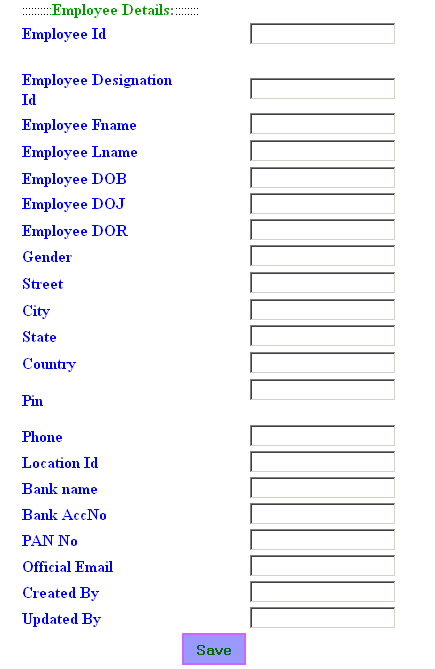
Designing code (.aspx) and Code-behind page (.aspx.cs) are given in below code snippets or you can download the project from the top of this article.
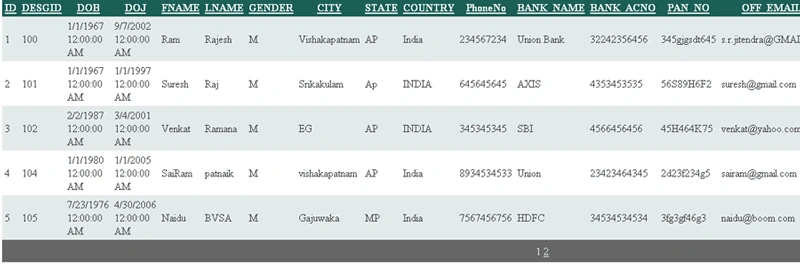
Once you've entered all the fields, click on the "Save" button to display all the records in the GridView.
Now I will tell you the process. After clicking on the "Save" button, then the Button Click Event Fires.
protected void Button1_Click(object sender, EventArgs e)
{
    if (Session["update"].ToString() == ViewState["update"].ToString())
    {
        InsertingtheData();
        Clearall();
        Session["update"] = Server.UrlEncode(System.DateTime.Now.ToString());
    }
    first(1);
}
public void InsertingtheData()
{
    //creating a variable and insert the field values into it.
    int employee_id= Convert.ToInt32(txtEmployeeId.Text);
    SqlConnection sqlconn;
    SqlCommand sqlcomm;
    sqlconn = new SqlConnection(ConfigurationManager.AppSettings["Sql_server"]);
    sqlconn.Open();
    sqlcomm = new SqlCommand();
    sqlcomm.Connection = sqlconn;

    //Here I am definied command type is Stored Procedure.
    sqlcomm.CommandType = CommandType.StoredProcedure;

    //Here I mentioned the Stored Procedure Name.
    sqlcomm.CommandText = "EMP_MASTER_TESTING_I";

    //Here I fix the variable values to Stored Procedure Parameters. You can easily understand if you can see the Stored Procedure Code.
    sqlcomm.Parameters.Add(new SqlParameter("@emp_id", SqlDbType.Int)).Value = employee_id;
    sqlcomm.Parameters.Add(new SqlParameter("@emp_desg_id", SqlDbType.Int)).Value = employee_designation_id;
    sqlcomm.Parameters.Add(new SqlParameter("@emp_dob",SqlDbType.DateTime)).Value = employee_dob;
    sqlcomm.ExecuteNonQuery();
    sqlcomm.Dispose();
    sqlconn.Close();
}

//Clear all fields values like this.
public void Clearall()
{
  txtBankaccNo.Text = "";
  txtBankname.Text = "";
}
Now make a store procedure using the below SQL query. To learn more about how to create Stored Procedures in SQL Server.
CREATE PROCEDURE dbo.EMP_MASTER_TESTING_I (
  @emp_id int,
  @emp_desg_id int,
  @emp_dob Datetime,
  @emp_doj Datetime,
  @emp_fname varchar(100),
  @emp_lname varchar(100),
  @emp_gender varchar(1),
  @emp_p_city varchar(50),
  @emp_p_state varchar(50),
  @emp_p_country varchar(50),
  @emp_p_pin Varchar(50),
  @emp_phone varchar(50),
  @emp_loc_id int,
  @emp_bank_name varchar(20),
  @emp_bank_acno varchar(20),
  @pan_no varchar(20),
  @emp_off_email varchar(50),
  @emp_dor Datetime,
  @created_by int
)
AS
Begin
 Insert into EMP_MASTER_TESTING (
  EMP_ID, EMP_DESG_ID, EMP_DOB, EMP_DOJ,
  EMP_FNAME, EMP_LNAME, EMP_GENDER,
  EMP_P_CITY, EMP_P_STATE, EMP_P_COUNTRY,
  EMP_P_PIN, EMP_Phone, EMP_LOC_ID,
  EMP_BANK_NAME, EMP_BANK_ACNO, PAN_NO,
  EMP_OFF_EMAIL, EMP_DOR, CREATED_ON,
  CREATED_BY
)
Values
  (
    @emp_id,
    @emp_desg_id,
    @emp_dob,
    @emp_doj,
    @emp_fname,
    @emp_lname,
    @emp_gender,
    @emp_p_city,
    @emp_p_state,
    @emp_p_country,
    @emp_p_pin,
    @emp_phone,
    @emp_loc_id,
    @emp_bank_name,
    @emp_bank_acno,
    @pan_no,
    @emp_off_email,
    @emp_dor,
    convert(Datetime,getdate(),103),
    @created_by
  )
End
 RETURN
After that first () method calls. GridView will show all the columns.
public void first(int a)
{
    if (a == 0)
    {
        tblInsertPage.Visible = true;
        tblgv.Visible = false;
    }
    if (a == 1)
    {
        tblgv.Visible = true;
        tblInsertPage.Visible = false;
    }
}
When page Refresh occurs the values are again inserted into the database. So to avoid that I wrote these lines in the Pageload event, ButtonClick event, and PreRender event as written in below code snippet.
Pageload event
//In Page_Load Event

if (Session["update"]==null)
{
    Session["update"] = Server.UrlEncode(System.DateTime.Now.ToString());
}
ButtonClick Event
if (Session["update"].ToString() == ViewState["update"].ToString())
  {
    InsertingtheData();
    Clearall();
    Session["update"] = Server.UrlEncode(System.DateTime.Now.ToString());
  }
PreRender Event
private void Page_PreRender(object sender, EventArgs e)
{
    ViewState["update"] = Session["update"];
}
Before you write a Stored Procedure you have the Data table that you are using in the SP. So I wrote an insert command. Insert command values are Stored Procedure input parameters. And Run the Stored Procedure.
I wrote a single command in a Stored Procedure, but you can write as many commands as you like. We can write conditional statements like if, while etc, and looping statements like for-loop and switch case, etc.
We can see GridView like this.
Conclusion
In this article, we learned about SQL Server Stored Procedure with C#.Net with the example code snippet.
More JumpPosted Oct 2, 2015, 4:03 AM
thanx sir useful to me :))
sachin dateyPosted Oct 8, 2014, 2:57 AM
Help me a lot... thanks sir, help us ever like this
Santosh YadavPosted Mar 31, 2013, 11:23 AM
Nice example. It is helpful.
Ankit HapaniPosted Mar 23, 2013, 5:52 AM
i use this code
Akhterul MustafaPosted Jan 31, 2011, 10:39 AM
The DB logic should not be visible in the UI. This will give new developers bad ideas.
Priyank PatelPosted Jan 31, 2011, 12:52 AM
Good
SapnaPosted Jan 30, 2011, 11:51 PM
Good work by you and thanks.