

Introduction
Model View Presenter (MVP) design pattern is the evolution of the MVC design pattern and it's aimed at providing a cleaner separation of concerns between the view, the model, and the controller improving the architecture (you can use several UI technologies without recompiling the business logic components) and testability of the enterprise solution. The pattern was originally developed at Taligent in the 1990s.
In this article, I will explain the principles and how to use the MVP design pattern along with data binding with an example using C# language in Microsoft.NET.
The Model View Presenter (MVP) design pattern
Starting from the Model View Controller (MVC) design pattern, creators of MVP neatly separated the model from the view/controller pair. The core of MVP is the strictly regulated interaction taking place between the view and the controller. In MVP, this controller is renamed to presenter.
In the Figure 1, you can see an overview of the MVP design pattern.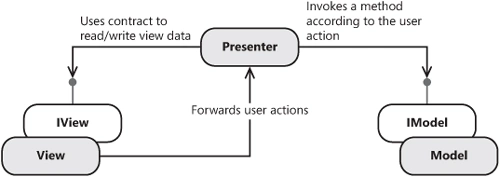
Figure 1
As you can see in the Figure 1, the view and model are neatly separated (they don't know each other) and the view exposes an interface for the communication of the presenter with the view and in this way the presenter doesn't know the underlying UI technology and the view is mockable for testing purposes. As well as the presenter knows the model and can invoke its operations.
Note that each Presenter object has exactly one reference to a View object, and each View object has exactly one reference to a Presenter object. There is one Model object for the whole application. As you can see it's required to define an interface and a presenter for every View object of your application (each Web form in ASP.NET and form in Windows).
Let's explain the MVP triad at a glance.
The Model represents the business objects of the domain problem. That is business entities encapsulating the data, business services implementing the business logic and rules of your solution. It's a domain object and should have no knowledge of the user interface, unlike previous design patterns such as MVC (Model-View-Controller) where the model implements the user interface to manipulate it which is a big design error if you try to separate the concerns of the domain.
The View is responsible to display the content of the model and interact with the user's events regarding the UI technology of the solution.
The Presenter is responsible to interpret the user's events and the communication with the model objects. It implements the main workflow of the application. This is where the heart of the application lies.
It's remarkable to say that Martin Fowler has extended the original MVP design pattern with Passive View and Supervising Controller/Presenter.
In the case of the Passive View pattern, the main idea is to have no dependencies between the View and the Model concerns and the view is dumb. The Supervising Controller is a flexible interpretation of the original MVP design pattern and the view is not completely dumb and has some responsibilities.
Now well, my approach, to architect an enterprise-class application for being implemented using Microsoft technologies, is to separate concerns in multiple layers and follow the MVP design patter along with data binding (data binding using BindingSource support in Windows applications and data binding with ObjectDataSource support in ASP.NET applications). The View has some responsibilities such as displaying, formatting and gathering data as well as handling user interaction's events. The Presenter has the responsibility to interpret the messages sent and received from the View as well as to invoke the underlying business objects in the business logic layer in the Model. Now, the communication between the layers of the application is through Data Transfer Objects (DTO). The use of DTO is trade-off because we create new DTO, we're increasing the cost of the complexity of the solution and this cost is justified in large enterprise applications. For small and medium application, it makes sense to reference the business objects directly from the View concern (and bind the data represented by the business object in the controls) in order to avoid the definition of new DTO. The idea is to use the data model represented by the business object as the DTO. But it's not correct to invoke operations and business logic directly from the View (data access methods, calculation, invocation of external services, etc).
The solution, which I will explain in this article, will be based on the MVP design pattern along with data binding for small enterprise application.
Implementing the Model View Presenter (MVP) design pattern
Now let's go and implement the principles and concepts of the Model View Presenter (MVP) design pattern along with data binding in a multi-layer enterprise application using C# in Microsoft.NET.
Let's open the Visual Studio.NET 2008 IDE and create an example solution (see Figure 2).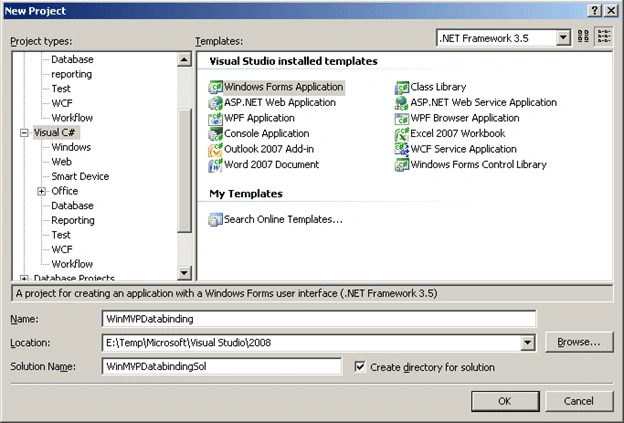
Figure 2
For this example, we're going to create an application which enables managing the contacts of one enterprise. The data source is the Person.Contact table in the AdventureWorks database shipped with SQL Server 2005.
Let's add the business logic layer using a Class Library project (see Figure 3).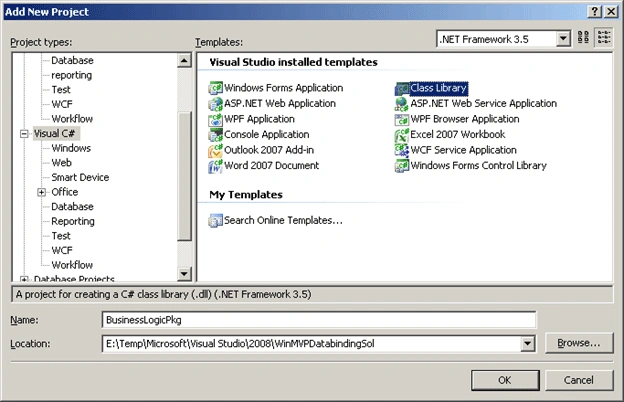
Figure 3
Next step is to add the business entities and objects which model your problem domain (see Listing 1). For the definition of the business entities we're going to use strongly typed Data Set and for the data access code we're going to rely on the underlying table adapters.
Let's add a DataSet to the project named DSContactManager as shown in the Figure 4.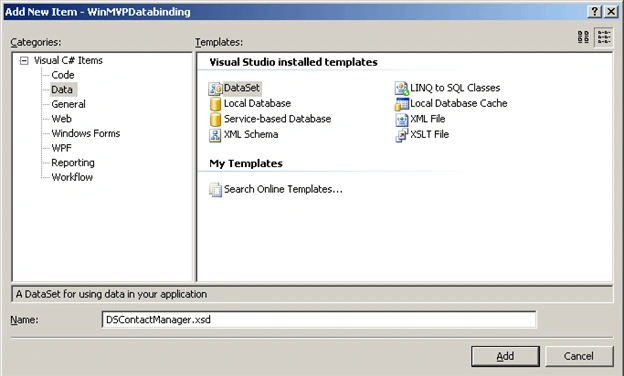
Figure 4
Let's add a Contact data table and its underlying table adapter (see Figure 5).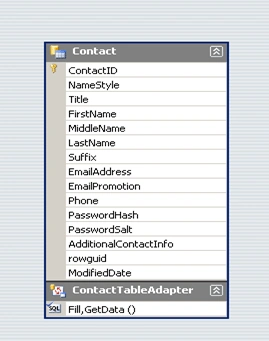
Figure 5
Now let's add the business service objects to implement the business logic concerning the Contact business entity (see Figure 6).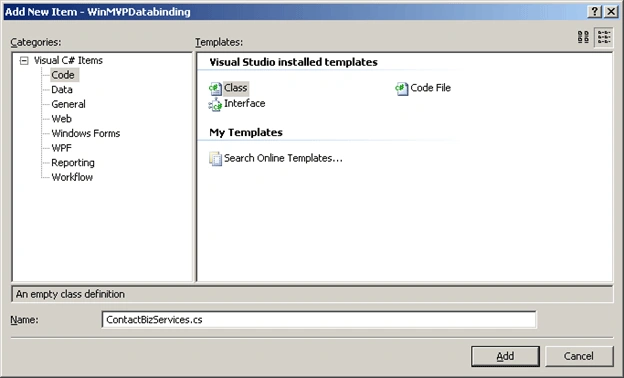
Figure 6
The code definition for the business services regarding the contact entity is the Listing 1.
using System;
using System.Collections.Generic;
using System.Linq;
using System.Text;
namespace BusinessLogicPkg
{
public class ContactBizServices
{
private DSContactManager m_dsContact;
public ContactBizServices(DSContactManager dsContact)
{
this.m_dsContact = dsContact;
}
public void Load()
{
DSContactManagerTableAdapters.ContactTableAdapter taContact = new BusinessLogicPkg.DSContactManagerTableAdapters.ContactTableAdapter();
taContact.Fill(this.m_dsContact.Contact);
}
public void Save()
{
DSContactManagerTableAdapters.ContactTableAdapter taContact = new BusinessLogicPkg.DSContactManagerTableAdapters.ContactTableAdapter();
taContact.Update(this.m_dsContact.Contact);
}
}
}
Listing 1
Now let's add the Presentation layer where the presenter objects lies using a Class Library project (see Figure 7).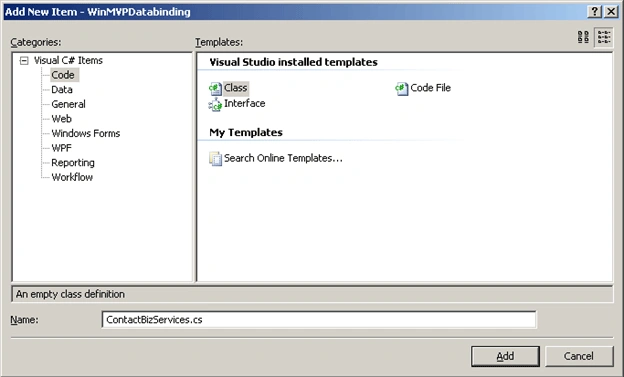
Figure 7
We need to add a reference to the business logic layer in the PresentationLayer as in the Figure 8.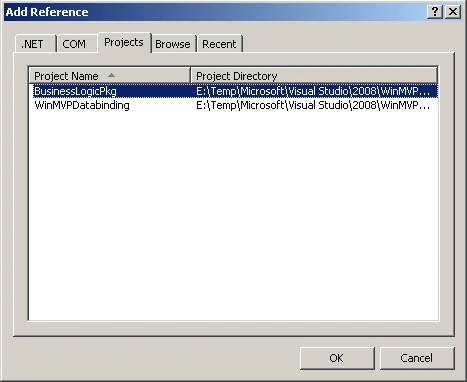
Figure 8
Next step is to add the ContactManagerPresenter class to handle the workflow for the communication between the UI controls and the model objects as well as to add the IContactManagerView interface to define the interface to be implemented by the underlying UI artifacts which need to communicate with the Presenter artifact.
In order to define the IContactManagerView interface, we deal with the user stories and requirements and in this case, we want to load contact data, to be changed and then save the changes. We need to access to the data model (the strongly typed Data Set DSContactManager) as the DTO and send a message to the user notifying the status of the performed operation (see Listing 2).
using System;
using System.Collections.Generic;
using System.Linq;
using System.Text;
using BusinessLogicPkg;
namespace PresentationLayerPkg
{
public interface IContactManagerView
{
DSContactManager ContactManager { get; }
void SendMessageInfo(string strMessage);
}
}
Listing 2
Now let's define the workflow of the presenter object as shown in Listing 3.
using System;
using System.Collections.Generic;
using System.Linq;
using System.Text;
using BusinessLogicPkg;
namespace PresentationLayerPkg
{
public class ContactManagerPresenter
{
private IContactManagerView m_objContactManagerView = null;
public ContactManagerPresenter(IContactManagerView objContactManagerView)
{
this.m_objContactManagerView = objContactManagerView;
}
public void LoadContact()
{
ContactBizServices objContactBizServices = new ContactBizServices(this.m_objContactManagerView.ContactManager);
objContactBizServices.Load();
this.m_objContactManagerView.SendMessageInfo("Operation has successfully ended");
}
public void SaveContact()
{
ContactBizServices objContactBizServices = new ContactBizServices(this.m_objContactManagerView.ContactManager);
objContactBizServices.Save();
this.m_objContactManagerView.SendMessageInfo("Operation has successfully ended");
}
}
}
Listing 3
Now let's go to the Windows Forms project to define the user interface and communication with the Presenter artifact.
Fist step is to add a reference to the PresentationLayerPkg library as shown in Figure 9.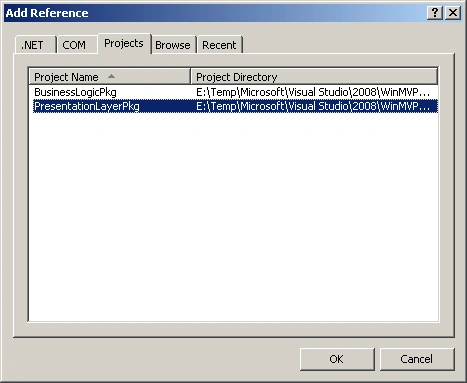
Figure 9
We need to a reference to the BusinessLogicPkg library as well because we're going to use the data model as our Data Transfer Object (DTO) (see Figure 10).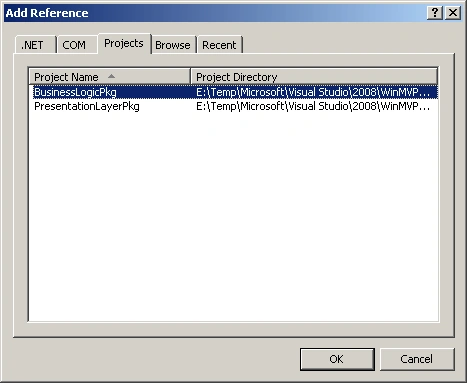
Figure 10
Now let's add a data source object. Open the Data Sources window and click on the Add New Data Source link to open the Data Source Configuration Wizard. Then select the DSContactManager object in the BusinessLogicPkg library (see Figure 11).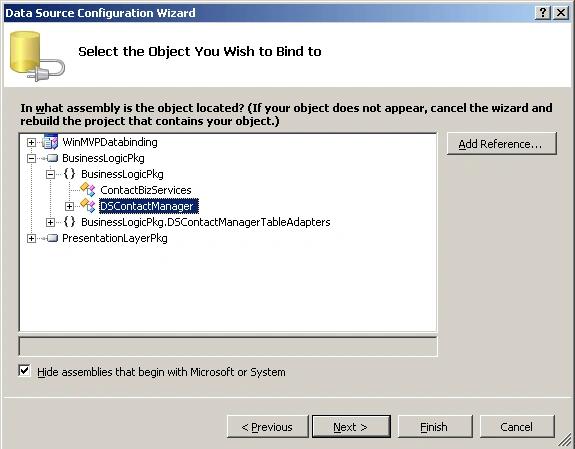
Figure 11
Then drag and drop the defined data source onto the form as a grid control. This action adds a DataGrid control and a binding navigator control in the form. Delete the save icon on the binding navigator to do the load and save actions manually.
Next step is to drag and drop two buttons on the form (one to load the data and the other to save the date after changes) and the underlying event handlers.
Next step is to implement the view interface defined in the presenter library. We need to return an instance of the DSContactManager and show an information message (see Listing 4).
#region IContactManagerView Members
public BusinessLogicPkg.DSContactManager ContactManager
{
get
{
return this.dSContactManager;
}
}
public void SendMessageInfo(string strMessage)
{
System.Windows.Forms.MessageBox.Show(strMessage, "Information Message", MessageBoxButtons.OK, MessageBoxIcon.Information);
}
#endregion
Listing 4
And the implementation of the event handlers is done by invoking the underlying methods in the presenter artifact (see Listing 5).
private void btnLoad_Click(object sender, EventArgs e)
{
ContactManagerPresenter objContactManagerPresenter = new ContactManagerPresenter(this);
objContactManagerPresenter.LoadContact();
}
private void btnSave_Click(object sender, EventArgs e)
{
ContactManagerPresenter objContactManagerPresenter = new ContactManagerPresenter(this);
objContactManagerPresenter.SaveContact();
}
Listing 5
The complete code for the Windows forms is shown in the Listing 6.
using System;
using System.Collections.Generic;
using System.ComponentModel;
using System.Data;
using System.Drawing;
using System.Linq;
using System.Text;
using System.Windows.Forms;
using PresentationLayerPkg;
namespace WinMVPDatabinding
{
public partial class Form1 : Form, IContactManagerView
{
public Form1()
{
InitializeComponent();
}
private void btnLoad_Click(object sender, EventArgs e)
{
ContactManagerPresenter objContactManagerPresenter = new ContactManagerPresenter(this);
objContactManagerPresenter.LoadContact();
}
private void btnSave_Click(object sender, EventArgs e)
{
ContactManagerPresenter objContactManagerPresenter = new ContactManagerPresenter(this);
objContactManagerPresenter.SaveContact();
}
#region IContactManagerView Members
public BusinessLogicPkg.DSContactManager ContactManager
{
get
{
return this.dSContactManager;
}
}
public void SendMessageInfo(string strMessage)
{
System.Windows.Forms.MessageBox.Show(strMessage, "Information Message", MessageBoxButtons.OK, MessageBoxIcon.Information);
}
#endregion
}
}
Listing 6
The Figure 12 shows when you run the application.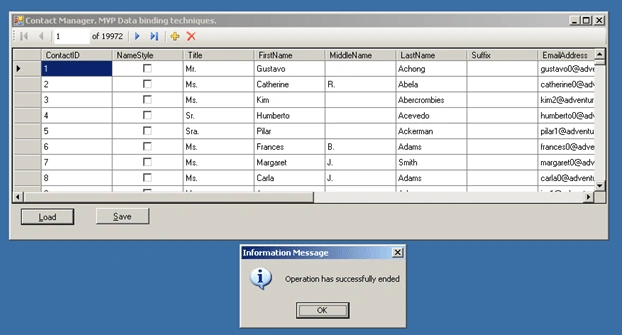
Figure 12
Conclusion
In this article, I've explained the concepts of the Model View Presenter (MVP) design pattern along with data binding through an example.
Anand kannanPosted Feb 21, 2013, 8:27 AM
Initially the concept explanation was simple.But when i enter into the example i can't understand.Because i create 2 different project "WinMVPDatabinding","BusinessLogicPkg" in two different solution and i create table,then i was link the table with dataset .here i have added the "dataset" and "ContactBizServices" in winMVPDatabinding project.so i did have the reference of the table,dataset in "BusinessLogicPkg" class library.In the Above explanation after Figure 6 there was some code written in the class library project,in that code i don't have reference for the dataset,eventhough they create object for dataset and perform some operation. This was the problem for me.Any one can explain me as simple.
Dee AllenPosted Jul 19, 2012, 12:48 AM
is there no solution file download? wanted to checkout a solution file and see how the projects/tiers (view,model,presenter) are physically organized
Gary DuxPosted Aug 30, 2010, 5:26 AM
"It's a domain object and should have no knowledge of the user interface, unlike previous design patterns such as MVC (Model-View-Controller) where the model implements the user interface to manipulate it which is a big design error if you try to separate the concerns of the domain." I don't agree with you in that case. Model do not know about view but it is Observable/Notifier in MVC. But of course there is a assosiation between view and model view to model in MVC what is perhaps not good.
j cPosted Aug 5, 2010, 6:50 AM
Where can I download the source code?
J AnderseditedPosted Mar 15, 2010, 4:50 PMEdited Mar 15, 2010, 5:01 PM
Doesn't adding a reference to the BusinessLogicPkg library in the view violate MVP?
Kenny SaelenPosted Sep 19, 2009, 4:23 AM
Hi, First of all , nice article. but I have a small question... When you create the datasource on your view (form) then you add the property on your form that returns the instance of the dataset variable to the presenter. When I create a datasource and point to the DSContactManager object, visual studio creates the datasource and a bindingsource , ... but I do not have a variable for the dscutomer dataset. I only see the property in my intellisense but not a variable of the dataset... any ideas??? thx
Mads LarseneditedPosted Sep 10, 2009, 3:05 AMEdited Sep 10, 2009, 3:07 AM
First of all, I like this MVP implementation due to its simplicity. However, I have a question regarding multiple views. Let's say we want to add a ContactDetailView (and therefore also a ContactDetailPresenter) which should be shown when double-clicking a contact in the grid. Whos responsibility is it to show the ContactDetailView and how should we pass parameters to the view? I would think that the ContactManagerView would handle the double-click event, then calling a method in the ContactManagerPresenter. This method would then call an interface-defined method in the ContactManagerView, which would then show the ContactDetailView. I'm not sure if that's the right way to do it and also what about passing a contact id or contact entity to the ContactDetailView so that it can populate its controls with contact data?