
Blue Theme Orange Theme Green Theme Red Theme
 
6 Months Free & No Setup Fees ASP.NET Hosting!
Home | Forums | Videos | Advertise | Certifications | Downloads | Blogs | Interviews | Jobs | Beginners | Training
 | Consulting  
Submit an Article Submit a Blog 
 Jump to
Skip Navigation Links
TechnologyExpand Technology
WebsiteExpand Website
Discover the top 5 tips for understanding .NET Interop
Search :       Advanced Search »
Home » Learn .NET » REST Fundamentals

REST Fundamentals

REST stands for Representational State Transfer, is an architectural style where you can build the software system in which clients (user agents) can make requests to the services [end points]. REST one of the ways to implement the client\server architectural style. REST can be used to build software applications in which clients can make requests of services.

Page Views : 3307
Downloads : 0
Rating :
 Rate it
Level : Beginner
   Print Read/Post comments Post a comment  Similar Articles  
   Email to a friend  Bookmark  Author's other articles  
 
Nevron Chart
Become a Sponsor
 Tag Cloud
 Latest Jobs
More ... 
 Latest Interview Questions
More ... 


Introduction

REST stands for Representational State Transfer, is an architectural style where you can build the software system in which clients (user agents) can make requests to the services [end points]. REST one of the ways to implement the client\server architectural style. REST can be used to build software applications in which clients can make requests of services.

You can read WCF vs Web services article to better understand this article.
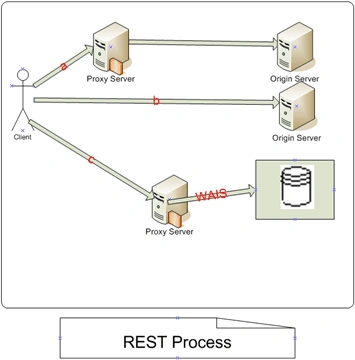

 
In the above figure client interacting services using three named a, b and c requests. Each request has been routed through the resource origin server.

Request a has been sent to a local proxy, which in turn can access a caching gateway[not represented in the figure] for DNS lookup and forwards the request to an origin server whose internal resources are defined by an encapsulated object in the request itself.

Request b is sent directly to an origin server, which is able to satisfy the request from its own cache.

Request c is sent to a proxy that is capable of accessing WAIS[wide area information system] which is outside the Web architecture, and translates the WAIS response into a format recognized by the generic connector interface.

REST systems are built on following principles:

  • Clients[User Agents] interact with resources via Uniform Resource Identifier (URI).
  • Interaction with Resources is accomplished with HTTP standard protocol and with the HTTP media type(XHTML, XML,JPG,PNG etc).
  • Resources are self-descriptive. All information about resource is contained inside the request itself.
  • Resources are interconnected through the links.

Example

Imagine I needed to build a service which tells all of the years and article names that techbubbles has published.

Follow the steps to build the RESTful service,

  1. What are your resources going to be?
  2. What are the URIs that represent those resources?
  3. What parts of the HTTP verbs is each URI going to support?
  4. How you are going to manage the Resource state?

Here the resources are all of the years and articles that techbubbles has been published. You can use any media type to represent the resources. Here i am using XML mediatype.

Next, I am going to determine the URI's for each resource, we need to determine relative URI's of the service. The list of years will be the root URI of the service.

Example: /{year}/ and /{year}/Articles

Resource      URI      Verbs
All years       "/"       GET

If we want to consume the January 2009 articles as a client, we would do an HTTP GET to /2006/January.

Why should we use REST?

As a developer you probably can ask this question and why can not we use the Remote procedure call (RPC) such as Remoting or Interoperable technologies such as SOAP or WCF.

According to Microsoft there are two main reasons

  1. REST offers some significant features and benefits over RPC in many cases.
  2. Microsoft is moving many of its own implementations away from RPC technologies and toward REST.

Even if you are not convinced to use REST to build software systems, as more frameworks and technologies from Microsoft move to REST, you'll need to know how to interact with them.

REST Advantages

Caching RESTful endpoints can implement caching to improve speed and scalability.

Scale-Out REST encourages each resource to contain all of the states necessary to process a request.

Interoperability SOAP achieves the interoperability but still some languages and environments don't have SOAP toolkits. REST only requires an HTTP library to be available for most of the operations.

Simplicity REST relates resources to URI's and the uniform interface. You can type different URIs for accessing different resources which much similar to typing URLs in browser.

Comment Request!
Thank you for reading this post. Please post your feedback, question, or comments about this post Here.
Login to add your contents and source code to this article
 [Top] Rate this article
 
 About the author
 
Kalyan Bandarupalli
My name is Kalyan Bandarupalli and I currently live and work in London, UK. I was born in 1980 and i got my first computer when am studying my graduation. I am graduate in Computer Applications and I have done my masters degree in Information Systems. My Professional career started as software engineer and then senior software developer and Software Architect. I am Microsoft Tetchier use .NET technologies to develop the applications. Since 2003 i am working as .NET Developer.
Looking for C# Consulting?
C# Consulting is founded in 2002 by the founders of C# Corner. Unlike a traditional consulting company, our consultants are well-known experts in .NET and many of them are MVPs, authors, and trainers. We specialize in Microsoft .NET development and utilize Agile Development and Extreme Programming practices to provide fast pace quick turnaround results. Our software development model is a mix of Agile Development, traditional SDLC, and Waterfall models.
Click here to learn more about C# Consulting.
 
Introducing MaxV - one click. infinite control. Hyper-V Hosting from MaximumASP.
Finally – a virtual platform that delivers next-generation Windows Server 2008 Hyper-V virtualization technology from a managed hosting partner you can truly depend on. Visit www.maximumasp.com/max for a FREE 30 day trial. Hurry offer ends soon. Climb aboard the MaxV platform and take advantage of High Availability, Intelligent Monitoring, Recurrent Backups, and Scalability – with no hassle or hidden fees. As a managed hosting partner focused solely on Microsoft technologies since 2000, MaximumASP is uniquely qualified to provide the superior support that our business is built on. Unparalleled expertise with Microsoft technologies lead to working directly with Microsoft as first to offer IIS 7 and SQL 2008 betas in a hosted environment; partnering in the Go Live Program for Hyper-V; and product co-launches built on WS 2008 with Hyper-V technology.
Dynamic PDF
ceTE software specializes in components for dynamic PDF generation and manipulation. The DynamicPDF™ product line allows you to dynamically generate PDF documents, merge PDF documents and new content to existing PDF documents from within your applications.
Discover the Top 5 .NET Memory Management Fundamentals
To write the best .NET code, you need to know exactly how the .NET framework really manages memory. Ricky Leeks presents the Top 5 fundamental facts of .NET memory management. Learn more.
Nevron Chart for .NET 2010.1 Now Available
The leading .NET charting control now features PDF, Flash and Silverlight export, visualization of large datasets and more. Deliver true charting functionality to your BI, Scorecard, Presentation or Scientific apps. Download evaluation now.
ASP.NET 4 Hosting
Get 2 Months Free of ASP.NET Hosting for Only $4.95/month! Receive FREE MS SQL and MySQL Databases Including ASP.NET 4/3.5, MVC 3.0, Silverlight 4, Windows 2008/IIS 7.0 Plus FREE IIS 7 Modules. Host UNLIMITED ASP.NET Web Sites – Click Here!
 
 Post a Feedback, Comment, or Question about this article
Subject:
Comment:
Discover the top 5 tips for understanding .NET Interop
Become a Sponsor
 Comments
6 Months Free & No Setup Fees ASP.NET Hosting!
 © 2012  contents copyright of their authors. Rest everything copyright Mindcracker. All rights reserved.