SIGN UP MEMBER LOGIN:    
ARTICLE

Compile DLL using Command Line C# Compiler

Posted by Kirtan Patel Articles | Current Affairs February 17, 2010
This article show how to compile dll file in c# using command line C# Compiler of .Net.
Reader Level:
Download Files:
 

Introduction

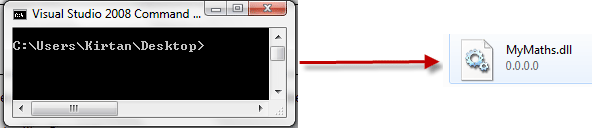
Many users know how to create code library using Visual Studio IDE in GUI environment for making code reusable code so that multiple application can use that dll.but here I am writing something by which after reading this article you will be able to compile DLL using just command line C# compiler without opening Visual Studio IDE.
CompileDll1.gif

Language:

C# .net 2.0/3.5

Prerequisites:

Basic knowledge of DOS(cmd.exe) and C#.

Implementation

First let you tell what is out target is to compile a DLL (reusable code library) using command line c# compiler that is csc.exe.

Fire up Notepad or any other your favorite text editor Program.

As example we will build simple dll that will contain methods like add() , substract() multiply().

using System;
 
namespace SimpleMaths
{
   
public class Operations
    {
 
       
public static int add(int a, int b)
        {
           
return a + b;
        }
 
       
public static int substract(int a, int b)
        {
           
return a - b;
        }
 
       
public static int multiply(int a, int b)
        {
           
return a * b;
        }
    }
}


Save the file with <FileName>.cs

Now open Start>>VisualStudio2005/2008 >> Visual Studio tools>>Visual Studio Command Prompt.

Now in command Prompt Locate the Directory where you have saved the .cs file just created. Using CD command.

Here I have given myfile name "test.cs".

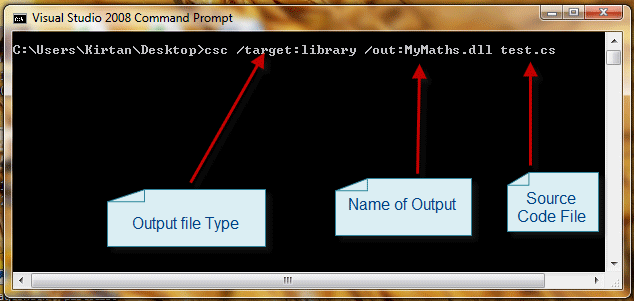
Now for compiling our dll using csc.exe we need to pass arguments you csc.exe like what type of file we want to generate, What will be name of output dll file and source file from which we are building our dll File.

csc /target:library /out:MyMaths.dll test.cs
CompileDll2.gif

Press Enter and you will get your desired DLL file generated!!

You just have created DLL fFile with Command Line C# Compiler. Now use that dll file in any .net project !!

Now you will raise question how do I compile multiple source file (.cs) files?

Well simple just execute commad like below one pass 2 names of source files in command while compiling it.

csc /target:library /out:MyMaths.dll test.cs test2.cs

Conclusion

This article teaches how to compile dll file in c# using command line C# Compiler of .net.

Login to add your contents and source code to this article
share this article :
post comment
 

Thank you but How can i use this dll (when i make dll with this way) in any C# program?

Posted by Mohammad Nour Oct 16, 2011

hi monisha

may be you forgot to add reference by 

Right Click in Solution Explorer on Your Solution>> add Reference

 then you can use namespace in code

Posted by Kirtan Patel May 09, 2010

Hi,

I have created the dll using commandline and a texteditor.

below is the code for my dll

using System;
using System.Collections;

namespace myservice
{
    public class service

    {

public static void Main()
{
}

public ArrayList l_authors()
{
ArrayList ar = new ArrayList();
ar.Add(&quot;xyz&quot;);
ar.Add(&quot;abc&quot;);
return ar;
}
    }

}

the command used to create the dll is csc /t:library authors.cs.
the dll was created successfully, refrence of this dll was added in bin folder of my website.
but the problem is when i am trying to use this dll in one of my screens by using statement it is not showing up.

Please Help.

Thanks,
Monisha.

Posted by Monisha May 05, 2010
Nevron Gauge for SharePoint
Become a Sponsor
PREMIUM SPONSORS
  • Finally – a virtual platform that delivers next-generation Windows Server 2008 Hyper-V virtualization technology from a managed hosting partner you can truly depend on. Visit www.maximumasp.com/max for a FREE 30 day trial. Hurry offer ends soon. Climb aboard the MaxV platform and take advantage of High Availability, Intelligent Monitoring, Recurrent Backups, and Scalability – with no hassle or hidden fees. As a managed hosting partner focused solely on Microsoft technologies since 2000, MaximumASP is uniquely qualified to provide the superior support that our business is built on. Unparalleled expertise with Microsoft technologies lead to working directly with Microsoft as first to offer IIS 7 and SQL 2008 betas in a hosted environment; partnering in the Go Live Program for Hyper-V; and product co-launches built on WS 2008 with Hyper-V technology.
    Finally – a virtual platform that delivers next-generation Windows Server 2008 Hyper-V virtualization technology from a managed hosting partner you can truly depend on. Visit www.maximumasp.com/max for a FREE 30 day trial. Hurry offer ends soon. Climb aboard the MaxV platform and take advantage of High Availability, Intelligent Monitoring, Recurrent Backups, and Scalability – with no hassle or hidden fees. As a managed hosting partner focused solely on Microsoft technologies since 2000, MaximumASP is uniquely qualified to provide the superior support that our business is built on. Unparalleled expertise with Microsoft technologies lead to working directly with Microsoft as first to offer IIS 7 and SQL 2008 betas in a hosted environment; partnering in the Go Live Program for Hyper-V; and product co-launches built on WS 2008 with Hyper-V technology.
Team Foundation Server Hosting
Become a Sponsor