

Introduction
Some time when you download a file from the internet using webclient we need to show progress bar to the user indicating how much task is accomplished. This can be very difficult and cumbersome when using Webclient.DownloadFile() method because it freeze the interface and we need to do extra coding by thread to show progress bar.
Here I am going to show you how to do that task very simply.
Technologies : .NET 2.0/3.5
Language : C#
Prerequisite :
-
.NET Framework 3.5/2.0
-
Visual Studio 2008/2005
Implementation
Lets get started, fist of all let setup the GUI like below:
Take a label, Text Box, Progress bar and a Button.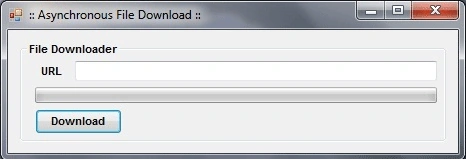
Now in code first of all define the namespace we are going to use
using System.IO;
using System.Net;
Now on the Click Event of the Button write code like below
private void btnDownload_Click(object sender, EventArgs e)
{
WebClient wc = new WebClient();
wc.DownloadProgressChanged += new DownloadProgressChangedEventHandler(wc_DownloadProgressChanged);
wc.DownloadFileAsync(new Uri(textBox1.Text.Trim()), @"c:\Users\Kirtan\Desktop\" + "Downloaded." + Path.GetExtension(textBox1.Text));
}
Here we take one webclient object and simply call download downloadfileasync() method and pass two parameters "url of file to download " and "location at we want to save the downloaded file"
Now main part comes that we want to show progress bar increment when downloading file declare event handler
wc.DownloadProgressChanged += new DownloadProgressChangedEventHandler(wc_DownloadProgressChanged);
And define Declared Event like below
public void wc_DownloadProgressChanged(Object sender, DownloadProgressChangedEventArgs e)
{
pbDownloadStatus.Value = e.ProgressPercentage;
}
What it does assign the e.progresspercentage to the progressbar having maximum value 100.
Conclusion
This article explains about how to download file and showing its progress in progress bar.
Akarsh RaoPosted Jun 24, 2020, 4:02 AM
Can u help with file upload control for uploading files with progress bar?