

In this article we will learn how to create web pages for mobile phones.
Background:
Developing mobile web pages is not the same as developing simple desktop pages. For developing mobile web pages we have to use "System.Web.Mobile" dll which will provide the classes for developing our mobile web pages. This dll contains all about mobile web pages. How to add this dll and how to use we will see here step-by-step.
Step 1:
Start new Website give some name. It will create a website with web.confige and one Default.aspx and Default.aspx.cs files.
Step 2:
Next Goto Website menu and add Reference to "System.Web.Mobile" namespace.
Step 3:
Now just open Default.aspx page in source code view and register our System.Web.Mobile assembly like this.
<%@ Page Language="C#" AutoEventWireup="true" CodeFile="Default.aspx.cs" Inherits="Default" %>
<%@ Register TagPrefix="mobile" Namespace="System.Web.UI.MobileControls" Assembly="System.Web.Mobile" %>
Step 4:
Open the page in Design view and see how the page is looking now. Generally mobile pages are not editable. If we want to design the pages with controls we cannot use our toolbox controls. For creating controls we must write control code in source view.
Step 5:
Now move to source code view and create controls like below. Here we will Create Label, TextBox And Button controls. For creating mobile web controls we must create mobile form for that just replace our Desktop form like and create the controls for our mobile web page.
<html xmlns="http://www.w3.org/1999/xhtml" >
<body>
<mobile:Form id="Form1" runat="server">
<mobile:Label ID="label1" Runat="server">Label1</mobile:Label>
<mobile:TextBox ID="TextBox1" Runat="server"></mobile:TextBox>
<mobile:Command ID="Command1" Runat="server" OnClick="Command1_Click">Command1</mobile:Command>
</mobile:Form>
</body>
</html>
Step 6:
Now go to code view in the aspx.cs file and import the namespace of mobile pages and controls; also derive the Default page from MobilePage.
using System.Web.Mobile;
using System.Web.UI.MobileControls;
public partial class Default : System.Web.UI.MobileControls.MobilePage
{
protected void Page_Load(object sender, EventArgs e)
{
}
protected void Command1_Click(object sender, EventArgs e)
{
}
}
Step 7
Now run the application; the browser pages will look something like the following screen. To test these mobile web pages in mobile screens we have to test in mobile emulators. But here we will see our pages in a desktop browser.
Adding Mobile Web Pages Template To Visual Studio 2008:
Here we will see how to add Deafult template to visual studio 2008. This template actually I got from some website. This template is a special mobile page template which will add mobile page to our project. This will make your work easy for adding the mobile web page. That means here you need not to write the code every time just follow the steps given bellow.
Step 1:
Download the attached zip file and extract it. Which will give two directory namely ASP.NET Web Application CS and ASP.NET Web Site CS respectivelly. Which contains a zip file.
Step 2:
Now open this directory which contains 3 zip files and one text file just open that text file and copy that zip file to the given location in text file. Fallol same procedure for both directory.
Step 3:
Now open Visual Studio and start new website again. Which will give the same web.Confige Default.aspx and Default.aspx.cs files. Now delete these files and say Add new item, which displays Visual Studio template with our mobile web page templates as follows.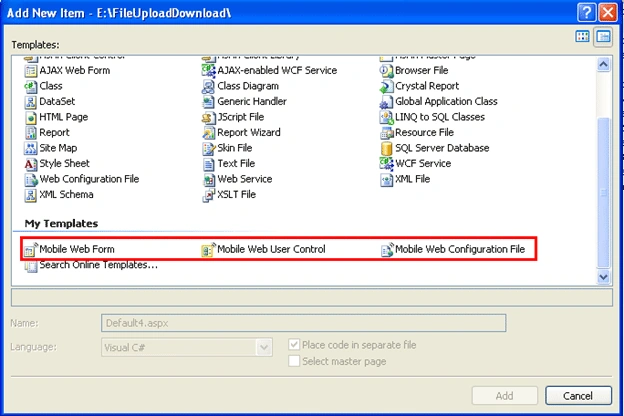
Conclusion:
Here we have seen how to develop mobile web pages.
Yogesh SharmaPosted Oct 7, 2015, 5:15 AM
bt how to run mobile site
priyanka SinghPosted Sep 24, 2015, 10:49 AM
how can show mobile web form in add item
Ramkumar KandappanPosted Aug 12, 2015, 11:30 PM
Initially new form did not show up, I tried next day.. It did show up... Thanks for the article.. It helps
ashwini survePosted Jan 5, 2014, 9:13 AM
i copy all _cs file but in Add new items there is not mobile web form
jasmine nancyPosted May 3, 2013, 7:26 AM
i got a error as Source Error: Line 1: using System.Web.Mobile; Line 2: using System.Web.UI.MobileControls; Line 3: public partial class Default : System.Web.UI.MobileControls.MobilePage Source File: c:\Documents and Settings\JeffreyGunaseelan\Desktop\WebSite1\Default.aspx.cs Line: 3 wt i have to do. reply me to [email protected]
Krishna GaradPosted Sep 4, 2012, 4:41 AM
thanks Palak
palak abrolPosted Sep 4, 2012, 2:23 AM
Very nice.... i am able to do all these steps and thanks a lot for this description.I hope I would be also like you.
Krishna GaradPosted Jun 27, 2012, 8:24 AM
add the reference to system.web.mobile from add reference
Anshuman MishraPosted Jun 27, 2012, 4:16 AM
Could not load file or assembly 'System.Web.Mobile' or one of its dependencies. The system cannot find the file specified. Geting this error
pramod midalwanPosted Jun 13, 2011, 7:16 AM
Hi.... How to set mobile page's view port according to mobile like ipad,iphone etc. Like if u will see m.facebook in different mobiles it looks according to the size of the mobile.
Mohamed AbbassyPosted May 3, 2011, 9:01 AM
but i wanna to ask about asp.net for desktop are equal to asp.net for mobile thank y