

Introduction
In this article, we will see how to host a mobile website under Internet Information Services (IIS).
Background
First, we have to create a mobile web application. For how to create a mobile website see my previous article Developing Mobile Pages.
Once we have created our mobile pages the testing of the mobile pages is not as easy as you think; for testing of mobile pages, you can use desktop browsers as well as Mobile Emulators. With desktop browsers, you can test by direct debugging application but in mobile emulators first we have to host our website under IIS. In my next article, I'll explain how to test mobile pages in mobile emulators. This article is the prerequisite for the next article. For testing mobile pages in an emulator we have to host the website first under IIS.
Hosting website
Check out the following screenshot which will help you to host the website under IIS.
- Open IIS Manager
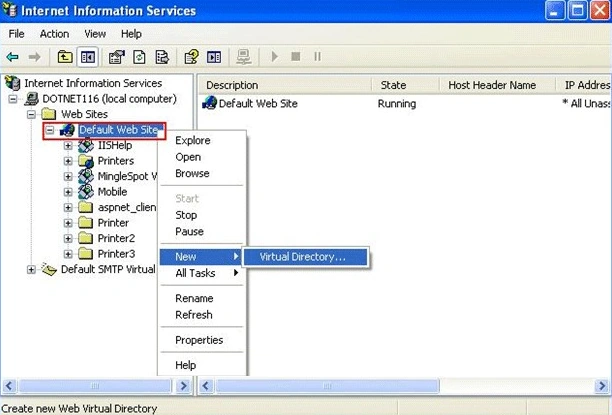
- Right-click on Default Web Site->New->Virtual Directory which will open the following screen.
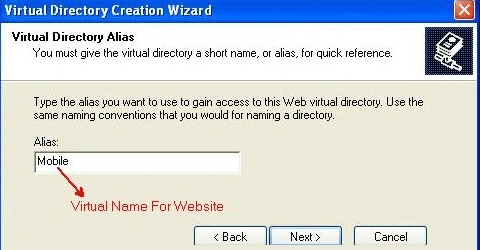
- Provide a virtual name by which you want to access your website while typing the URL. And click on next.
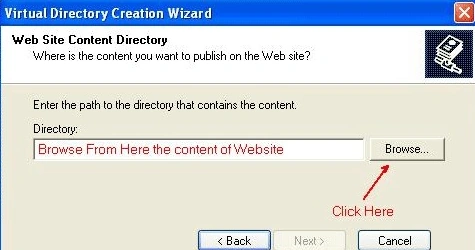
- The next screen will ask you to provide the physical content of your application.
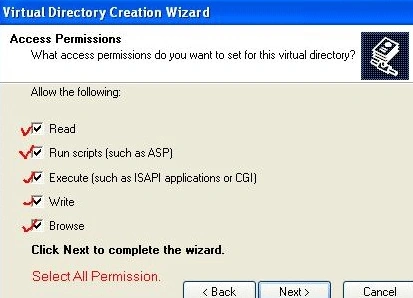
- On the next screen, it will ask you the permission setting for you website. Select all permissions and click on next and then finish.
- After finishing website creation your website is created.
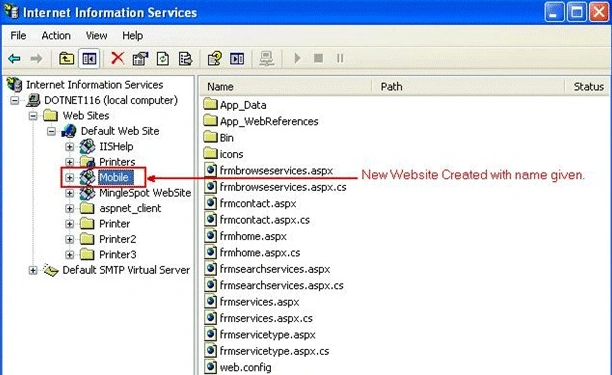
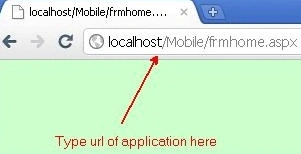
- Now test whether your website is working or not. To do that open your browser and type the url like below or you can type your IP address also instead of localhost.
Conclusion
In this manner, we can host our website under IIS. In the next article, we will see how to display mobile pages in emulators.
Jagwinder WaliaPosted Nov 18, 2013, 1:01 AM
This looks similar as we host web application
Karthikeyan AnbarasanPosted Apr 25, 2011, 2:10 PM
Good article!!!