
Events
When working with an IDE like Visual Studio, most events, particularly those involving Windows Forms applications, are nonlinear. That is, you might need to wait for a user to click a button or press a key to then respond to that event. In server applications, you might need to wait (and listen) for an incoming network request. These capabilities are provided by events in the .NET Framework. Any developer will notice the connection between events and delegates in technical documentation. This article will assume a working knowledge of the .NET Framework 2.0 and Visual Studio 2005 (2008), with the intention of defining both events and delegates. While these subjects are treated separately, they are interrelated and can be welded together to gain a sharper understanding of the overall concept of having a method invoked upon an event or a reference to that method.
This first section will focus on events, what they are, and what they are capable of when defined in a class. The following section will then focus on delegates, what they are, how they are declared, instantiated, and used. Again, the reader should note that the underlying concept is the invocation of a method to perform an action based on an event, and a method that is invoked by a reference to that method other than a function pointer.
One kind of member that a class can define is an event. A type that defines an event member allows that type (or instances of that type (class)) to notify other objects that something special has occurred. For example, the Button class offers an event called Click. When a Button object is clicked, one or more objects in an application may want to receive notification about this event in order to perform some action. Events are types that allow this interaction. Specifically, defining an event member means that the class is offering the following capabilities:
- A type's static method or an object's instance method can register its interest in the type's event.
- A type's static method or an object's instance method can unregister its interest in the type's event.
- Registered methods will be notified when the event occurs.
Types can offer this functionality when defining an event because they maintain a list of the registered methods. When an event occurs, the type notifies all of the registered methods in the list. The CLR's event model is based on delegates. A delegate is a type-safe way to invoke a callback's methods. Callback methods are the means by which objects receive the notifications they subscribe to.
An event is a message sent by an object to signal the occurrence of an action. The action could be caused by user interaction, such as a mouse click, or it could be triggered by some other program logic. The object that raises the event is called the event sender. The object that captures and responds to the event is called the event receiver. In event communication, the event sender class does not know which object or method will receive (or handle) the event it raises. What is needed is an intermediary (or pointer-like mechanism) between the source and the receiver. In other words, the object that receives the event cannot validate the source of the event. The .NET Framework defines a special type (Delegate) that provides the functionality of a function pointer. Here is code to exemplify an event and introduce delegates. It is not expected for the reader to first understand how the code works, since it will be explained through various sections of this article.
using System;
using System.ComponentModel;
namespace EventSample
{
using System;
using System.ComponentModel;
// Class that contains the data for
// the alarm event. Derives from System.EventArgs.
//
public class AlarmEventArgs : EventArgs
{
private readonly bool snoozePressed ;
private readonly int nrings;
//Constructor.
//
public AlarmEventArgs(bool snoozePressed, int nrings)
{
this.snoozePressed = snoozePressed;
this.nrings = nrings;
}
// The NumRings property returns the number of rings
// that the alarm clock has sounded when the alarm event
// is generated.
//
public int NumRings
{
get { return nrings;}
}
// The SnoozePressed property indicates whether the snooze
// button is pressed on the alarm when the alarm event is generated.
//
public bool SnoozePressed
{
get {return snoozePressed;}
}
// The AlarmText property that contains the wake-up message.
//
public string AlarmText
{
get
{
if (snoozePressed)
{
return ("Wake Up!!! Snooze time is over.");
}
else
{
return ("Wake Up!");
}
}
}
}
// Delegate declaration.
//
public delegate void AlarmEventHandler(object sender, AlarmEventArgs e);
// The Alarm class that raises the alarm event.
//
public class AlarmClock
{
private bool snoozePressed = false;
private int nrings = 0;
private bool stop = false;
// The Stop property indicates whether the
// alarm should be turned off.
//
public bool Stop
{
get {return stop;}
set {stop = value;}
}
// The SnoozePressed property indicates whether the snooze
// button is pressed on the alarm when the alarm event is generated.
//
public bool SnoozePressed
{
get {return snoozePressed;}
set {snoozePressed = value;}
}
// The event member that is of type AlarmEventHandler.
//
public event AlarmEventHandler Alarm;
// The protected OnAlarm method raises the event by invoking
// the delegates. The sender is always this, the current instance
// of the class.
//
protected virtual void OnAlarm(AlarmEventArgs e)
{
if (Alarm != null)
{
// Invokes the delegates.
Alarm(this, e);
}
}
// This alarm clock does not have
// a user interface.
// To simulate the alarm mechanism it has a loop
// that raises the alarm event at every iteration
// with a time delay of 300 milliseconds,
// if snooze is not pressed. If snooze is pressed,
// the time delay is 1000 milliseconds.
//
public void Start()
{
for (;;)
{
nrings++;
if (stop)
{
break;
}
else if (snoozePressed)
{
System.Threading.Thread.Sleep(1000);
{
AlarmEventArgs e = new AlarmEventArgs(snoozePressed,
nrings);
OnAlarm(e);
}
}
else
{
System.Threading.Thread.Sleep(300);
AlarmEventArgs e = new AlarmEventArgs(snoozePressed,
nrings);
OnAlarm(e);
}
}
}
}
// The WakeMeUp class that has a method AlarmRang that handles the
// alarm event.
//
public class WakeMeUp
{
public void AlarmRang(object sender, AlarmEventArgs e)
{
Console.WriteLine(e.AlarmText +"\n");
if (!(e.SnoozePressed))
{
if (e.NumRings % 10 == 0)
{
Console.WriteLine(" Let alarm ring? Enter Y");
Console.WriteLine(" Press Snooze? Enter N");
Console.WriteLine(" Stop Alarm? Enter Q");
String input = Console.ReadLine();
if (input.Equals("Y") ||input.Equals("y")) return;
else if (input.Equals("N") || input.Equals("n"))
{
((AlarmClock)sender).SnoozePressed = true;
return;
}
else
{
((AlarmClock)sender).Stop = true;
return;
}
}
}
else
{
Console.WriteLine(" Let alarm ring? Enter Y");
Console.WriteLine(" Stop Alarm? Enter Q");
String input = Console.ReadLine();
if (input.Equals("Y") || input.Equals("y")) return;
else
{
((AlarmClock)sender).Stop = true;
return;
}
}
}
}
// The driver class that hooks up the event handling method of
// WakeMeUp to the alarm event of an Alarm object using a delegate.
// In a forms-based application, the driver class is the
// form.
//
public class AlarmDriver
{
public static void Main (string[] args)
{
// Instantiates the event receiver.
WakeMeUp w= new WakeMeUp();
// Instantiates the event source.
AlarmClock clock = new AlarmClock();
// Wires the AlarmRang method to the Alarm event.
clock.Alarm += new AlarmEventHandler(w.AlarmRang);
clock.Start();
}
}
}
We compile this code, eventsample.cs, with a reference to System.dll: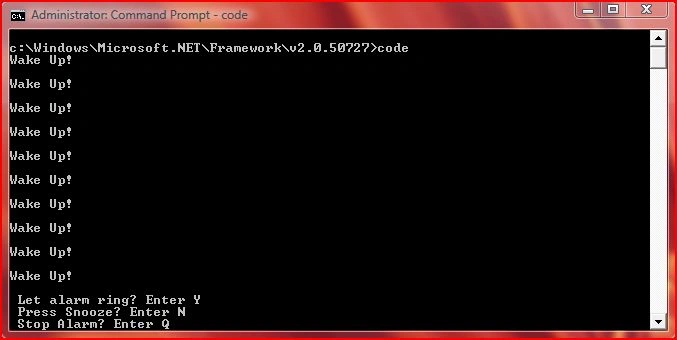
So, What is a Delegate?
A delegate is a class (that uses the delegate keyword) that can hold a reference to a method. Unlike other classes, a delegate class has a signature, and can hold references to methods that match its signature. A delegate is thus equivalent to a type-safe function pointer or a callback. While delegates have many other uses, this section will focus on the event-handling functionality of delegates. A delegate declaration is sufficient to define a delegate class. The declaration supplies the signature of the delegate, and the CLR provides the implementation. The following example shows an event delegate declaration:
public delegate void AlarmEventHandler(object sender, EventArgs e);
The standard signature of an event handler delegate defines a method that does not return a value, whose first parameter is of type Object and refers to the instance that raises the event, and whose second parameter is derived from type EventArgs and holds the event data. So, a delegate in C# is similar to a function pointer in C or C++. Using a delegate allows us to encapsulate a reference to a method inside a delegate object. The delegate object can then be passed to code that can call the referenced method (provided the parameters match), without having to know at compile time which method will be invoked. Unlike function pointers in C or C++, delegates are object-oriented, type-safe, and secure. Just as the CLR does not even need to know which .NET language has been compiled, the CLR knows that managed code emits metadata and IL code. The metadata tables are examined to perform type-safe checking to ensure that proper data is being passed to the proper method, since the IL code is JIT compiled. In short, a delegate declaration defines a type that encapsulates a method with a specific set of arguments and a return type. For static methods, a delegate object encapsulates the method to be called. For instance methods, a delegate object encapsulates both an instance and a method on the methods. Recall that the difference between static and instance methods is that one operates on the type itself and the other operates on an instance of the type. If you have a delegate object and an appropriate set of arguments then you can invoke the delegate with the arguments.
Examine the following code:
using System;
// A set of classes for handling a bookstore:
namespace Bookstore
{
using System.Collections;
// Describes a book in the book list:
public struct Book
{
public string Title; // Title of the book.
public string Author; // Author of the book.
public decimal Price; // Price of the book.
public bool Paperback; // Is it paperback?
public Book(string title, string author, decimal price, bool paperBack)
{
Title = title;
Author = author;
Price = price;
Paperback = paperBack;
}
}
// Declare a delegate type for processing a book:
public delegate void ProcessBookDelegate(Book book);
// Maintains a book database.
public class BookDB
{
// List of all books in the database:
ArrayList list = new ArrayList();
// Add a book to the database:
public void AddBook(string title, string author, decimal price, bool paperBack)
{
list.Add(new Book(title, author, price, paperBack));
}
// Call a passed-in delegate on each paperback book to process it:
public void ProcessPaperbackBooks(ProcessBookDelegate processBook)
{
foreach (Book b in list)
{
if (b.Paperback)
// Calling the delegate:
processBook(b);
}
}
}
}
// Using the Bookstore classes:
namespace BookTestClient
{
using Bookstore;
// Class to total and average prices of books:
class PriceTotaller
{
int countBooks = 0;
decimal priceBooks = 0.0m;
internal void AddBookToTotal(Book book)
{
countBooks += 1;
priceBooks += book.Price;
}
internal decimal AveragePrice()
{
return priceBooks / countBooks;
}
}
// Class to test the book database:
class Test
{
// Print the title of the book.
static void PrintTitle(Book b)
{
Console.WriteLine(" {0}", b.Title);
}
// Execution starts here.
static void Main()
{
BookDB bookDB = new BookDB();
// Initialize the database with some books:
AddBooks(bookDB);
// Print all the titles of paperbacks:
Console.WriteLine("Paperback Book Titles:");
// Create a new delegate object associated with the static
// method Test.PrintTitle:
bookDB.ProcessPaperbackBooks(new ProcessBookDelegate(PrintTitle));
// Get the average price of a paperback by using
// a PriceTotaller object:
PriceTotaller totaller = new PriceTotaller();
// Create a new delegate object associated with the nonstatic
// method AddBookToTotal on the object totaller:
bookDB.ProcessPaperbackBooks(new ProcessBookDelegate(totaller.AddBookToTotal));
Console.WriteLine("Average Paperback Book Price: ${0:#.##}",
totaller.AveragePrice());
}
// Initialize the book database with some test books:
static void AddBooks(BookDB bookDB)
{
bookDB.AddBook("The C Programming Language",
"Brian W. Kernighan and Dennis M. Ritchie", 19.95m, true);
bookDB.AddBook("The Unicode Standard 2.0",
"The Unicode Consortium", 39.95m, true);
bookDB.AddBook("The MS-DOS Encyclopedia",
"Ray Duncan", 129.95m, false);
bookDB.AddBook("Dogbert's Clues for the Clueless",
"Scott Adams", 12.00m, true);
}
}
}
Now, examine the output:
Paperback Book Titles:
The C Programming Language
The Unicode Standard 2.0
Dogbert's Clues for the Clueless
Average Paperback Book Price: $23.97
We instantiated the delegate because once the delegate has been declared, a delegate object must be created and associated with a specific method. Like all other objects, a new delegate object is created with a new expression. Herein lies one principle difference between the object-oriented and the procedural C language: in C, when we declare a variable, we are informing the compiler with the type of data that will function as a variable that will have an assigned value. The compiler then allocates the storage needed for that specific data type. When creating a delegate, however, the argument passed to the new expression is special; it is written like a method call, but without the arguments to the method, as shown in the following statement:
bookDB.ProcessPaperbackBooks(new ProcessBookDelegate(PrintTitle));
When creating a delegate, however, the argument passed to the new expression is special; it is written like a method call, but without the arguments to the method.
bookDB.ProcessPaperbackBooks(new ProcessBookDelegate(PrintTitle));
That statement creates a new delegate object associated with the static method Test.PrintTitle. The following statement:
bookDB.ProcessPaperbackBooks(new ProcessBookDelegate(totaller.AddBookToTotal));
creates a new delegate object associated with the non-static method AddBookToTotal on the object totaller. In both cases, this new delegate object is immediately passed to the ProcessPaperbackBooks method. Note that once a delegate is created, the method it is associated with never changes; delegate objects are immutable.
Responding to an Event
The downloadable file, SystemTimer, is a Windows Forms application that contains a progress bar control. The idea is to control this progress bar control by responding to timer events. Timer objects can be used to throw events after a specified number of milliseconds. You simply create a Windows Forms project, drag and drop a progress bar control onto the form's surface, and then declare a Timer object. Download the code into a folder named TimerEvents in the Projects folder of your edition of Visual Studio. Do not try to run the solution file from the Zip archive. When these files are extracted to this new subfolder of the Projects folder, double-click the solution file to see how the progress bar reacts after a certain number of milliseconds pass.
The following is referenced code from Jeffrey Richter's Book "CLR via C#". This code is exemplary, and a student of .NET development should refer to this code continually in order to demystify delegates:
using System;
using System.Windows.Forms;
using System.IO;
// Declare a delegate type; instances refer to a method that
// takes an Int32 parameter and returns void.
internal delegate void Feedback(Int32 value);
public sealed class Program {
public static void Main() {
StaticDelegateDemo();
InstanceDelegateDemo();
ChainDelegateDemo1(new Program());
ChainDelegateDemo2(new Program());
}
private static void StaticDelegateDemo() {
Console.WriteLine("----- Static Delegate Demo -----");
Counter(1, 3, null);
Counter(1, 3, new Feedback(Program.FeedbackToConsole));
Counter(1, 3, new Feedback(FeedbackToMsgBox)); // "Program." is optional
Console.WriteLine();
}
private static void InstanceDelegateDemo() {
Console.WriteLine("----- Instance Delegate Demo -----");
Program p = new Program();
Counter(1, 3, new Feedback(p.FeedbackToFile));
Console.WriteLine();
}
private static void ChainDelegateDemo1(Program p) {
Console.WriteLine("----- Chain Delegate Demo 1 -----");
Feedback fb1 = new Feedback(FeedbackToConsole);
Feedback fb2 = new Feedback(FeedbackToMsgBox);
Feedback fb3 = new Feedback(p.FeedbackToFile);
Feedback fbChain = null;
fbChain = (Feedback) Delegate.Combine(fbChain, fb1);
fbChain = (Feedback) Delegate.Combine(fbChain, fb2);
fbChain = (Feedback) Delegate.Combine(fbChain, fb3);
Counter(1, 2, fbChain);
Console.WriteLine();
fbChain = (Feedback) Delegate.Remove(fbChain,
new Feedback(FeedbackToMsgBox));
Counter(1, 2, fbChain);
}
private static void ChainDelegateDemo2(Program p) {
Console.WriteLine("----- Chain Delegate Demo 2 -----");
Feedback fb1 = new Feedback(FeedbackToConsole);
Feedback fb2 = new Feedback(FeedbackToMsgBox);
Feedback fb3 = new Feedback(p.FeedbackToFile);
Feedback fbChain = null;
fbChain += fb1;
fbChain += fb2;
fbChain += fb3;
Counter(1, 2, fbChain);
Console.WriteLine();
fbChain -= new Feedback(FeedbackToMsgBox);
Counter(1, 2, fbChain);
}
private static void Counter(Int32 from, Int32 to, Feedback fb) {
for (Int32 val = from; val <= to; val++) {
// If any callbacks are specified, call them
if (fb != null)
fb(val);
}
}
private static void FeedbackToConsole(Int32 value) {
Console.WriteLine("Item=" + value);
}
private static void FeedbackToMsgBox(Int32 value) {
MessageBox.Show("Item=" + value);
}
private void FeedbackToFile(Int32 value) {
StreamWriter sw = new StreamWriter("Status", true);
sw.WriteLine("Item=" + value);
sw.Close();
}
}
When you compile and execute this code, notice the command line display lines that correspond with the Windows Forms buttons. Now, recall that a delegate indicates the signature of a callback method. The code starts with the declaration of the internal delegate, Feedback. Feedback identifies a method that takes a parameter (an Int32) and returns a void. Now, the Program class defines a private static method named Counter. This method counts integers from the from argument to the to argument. The Counter also takes an fb, which is a reference to a Feedback delegate object. Recall or understand that the CLR requires that any object must be created by calling the new operator. For instance, a Patient object will be created like so:
Patient p = new Patient();
The new operator performs a series of underlying operations, not to mention using the variable (in this case, p) as a reference where the constructor's parameters are stored. The Counter loops through all of the integers, and for each integer, if the fb variable is not null, the callback method (specified by the fb variable) is called. This callback method is passed the value of the item being processed, the item number. The callback method can be designed and implemented to process each item in any manner deemed appropriate.
Former memberPosted Jun 12, 2012, 9:53 AM
Great post!
Sudhakar ChaudharyPosted Mar 22, 2012, 8:22 AM
nice post. thanks for sharing.
abas shahenPosted Aug 16, 2009, 5:37 PM
very good