

Introduction
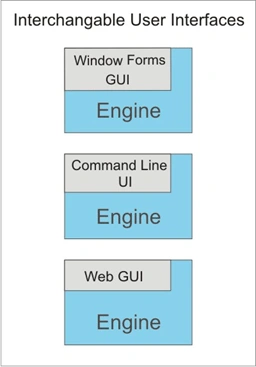
Your application's user interface may be a Windows Form, a Web Form, or maybe just a command line. This article is about separating the user interface from the rest of your application's code.
Here are some reasons this is a good idea:
- User interfaces become interchangable. A Windows Form version, a web version, and a command line version of the same application can share the same working code.
- You can easily create a special user interface to use as a test driver to exercise your code.
- Good object oriented design involves structuring your code into sets of interacting classes. With many Windows Forms applications, the form code itself can get quite large. Pulling the working code out of the form can make your application easier to understand and work on.
The Engine Class
The first thing to do is move your working code into a class I often name Engine, unless I can think of a better name. This class has methods to respond to all the UI events, and completely separates all the application's funtionality from the UI. Put this class in a separate library project, along with all the other classes it uses, and then reference the library from each UI project. Your UI projects should contain only UI code.
Information flows two ways between the UI and the Engine class.
- UI to Engine - UI events call the corresponding Engine class methods directly.
- Engine to UI - Things get a little trickier. The first idea that comes to mind is to give the engine a reference to the form and call methods on it directly. But notice that to describe this, I had to use the word "form". Already, I've made an assumption that will not always be true. What's needed is something to represent the UI in a generic way to the engine so it can make calls to it. An interface will work nicely.
Let's see some code
This demonstration project implements an imaginary process of listing the machine names on a network. To keep things simple, it doesn't actually scan the network, it just makes up names: Machine1, Machine2, etc.
This is the interface definition the Engine class will use to send information back to the UI to report progress events.
public interface IUI
{
void Started();
void Progress(string progress);
void Complete();
}
Here's the Engine class. There is a static interface property that will be set to point to the class that implements the interface.
public class Engine
{
static IUI _iui;
static bool _cancel;
public static IUI Iui
{
set { Engine._iui = value; }
}
public static void ScanNetwork()
{
_iui.Started();
_cancel = false;
for (int i = 1; i < 15;i++)
{
if (_cancel) break;
_iui.Progress("Machine" + i.ToString());
}
_iui.Complete();
}
}
The ScanNetwork method will be called by the UI when the ScanNetwork button is clicked. See the calls to the interface to report progress.
The Form1 class inherits from IUI and defines the interface methods.
public partial class Form1 : Form, IUI
{
public Form1()
{
InitializeComponent();
Engine.Iui = this;
}
private void buttonScanNetwork_Click(object sender, EventArgs e)
{
Engine.ScanNetwork();
}
private void buttonCancel_Click(object sender, EventArgs e)
{
Engine.Cancel();
}
public void Started()
{
listBoxMachines.Items.Clear();
labelStatus.Text = "Started";
}
public void Progress(string progress)
{
listBoxMachines.Items.Add(progress);
}
public void Complete()
{
labelStatus.Text = "Complete";
}
}
The Engine.Iui property is set to point to the class that implements the IUI interface. In this case it's the form class, but when writing a console application I create a separate class.
This code will work as it is, but there's a problem. In this example the imaginary network scan occurs instantly. In real life it takes time, and the user will have to wait for the whole scan to complete before the machine names will appear in the list. There is a line with a Sleep call in the project code that you can uncomment to see what I mean.
The machine names should be added to the list as they are found (or made up in this case) so the user can see progress. It would also be nice to have a way to cancel the potentially time consuming scan. To keep the UI "alive", the scanning process needs to run on a separate thread. There's more than one way to do this, but here's a way that's quick and easy.
Adding a background worker
From the Visual Studio toolbox, drag a BackgroundWorker component onto the form. In the Properties pane for the BackGroundWorker, select the Events view and double click the DoWork event to create an event handler. The event handler code should call Engine.Scan
private void backgroundWorker1_DoWork(object sender,DoWorkEventArgs e)
{
Engine.ScanNetwork();
}
Call RunWorkerAsync from the buttonScanNetwork_Click event
private void buttonScanNetwork_Click(object sender, EventArgs e)
{
listBoxMachines.Items.Clear();
backgroundWorker1.RunWorkerAsync();
}
There's a restriction that form control methods and properties can only be accessed from the thread that created them. The way around the restriction is to use Invoke, and the code below shows how.
Create the method that will manipulate the control and define a delegate with the same signature.
public delegate void UpdateStatusCallback(string status);
public void UpdateStatus(string status)
{
labelStatus.Text = status;
}
This helper method simplifies the task of creating an object array with one string in it to supply as a parameter for theh Invoke calls.
private object[] StringToObjectArray(string str)
{
object[] args = new object[1];
args[0] = str;
return args;
}
All that's left is to fill in the implementor for the IUI Started method. The project code does this for the other methods as well.
public void Started()
{
UpdateStatusCallback callback
= new UpdateStatusCallback(this.UpdateStatus);
labelStatus.Invoke(callback, StringToObjectArray("Started"));
}
Adding a command line interface
We've explored the details of implementing a Windows Forms interface for the Engine class. Because of the necessity to keep the GUI alive, this is the most complicated UI to implement.
The included solution code has a Console application that implements a command line interface for the Engine class, and it's very simple.
Conclusion
I've shown an easy way to get the flexibility of interchangable user interfaces and, at the same time, add structure to your code. Next time someone asks "can we make a web version?" you'll be ready to go.
chris dickeyPosted Jan 19, 2013, 2:28 AM
A clean solution. I just redid my code and it is much nicer.
mhbceduPosted Jun 11, 2009, 3:59 PM
Nice one
oziPosted Dec 28, 2008, 6:00 PM
The beginings of MVC.