

In this application, we use TextBox(textBox1) for showing the result and buttons for calculator buttons.
In this example we use TextBoxes to get and store some value like textBox3(div,mul...), textBox4(for dot) and textBox2 for store some values for calculation. These textboxes are not visible, as we set the property: Visibility="Collapsed"
<TextBox Height="72" Visibility="Collapsed" HorizontalAlignment="Left" Margin="26,417,0,0" Name="textBox2" Text="TextBox" VerticalAlignment="Top" Width="79" />
Now we create a simple calculator:
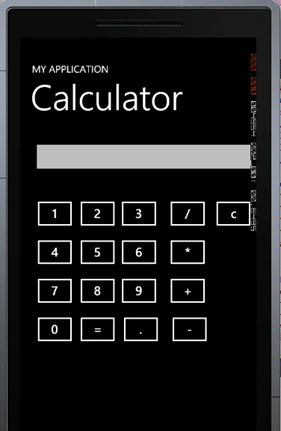
We write the following code for digit (1). Here we create a button(btnone) for digit 1 and write the following code.
private void btnone_Click(object sender, RoutedEventArgs e)
{
textBox1.Text = textBox1.Text+"1";
}
Now we look the clear Button(btnclear).
private void btnclear_Click(object sender, RoutedEventArgs e)
{
textBox1.Text = "";
}
Now we look at the dot (.) button. This is use as the decimal like 21.3...
private void btndot_Click(object sender, RoutedEventArgs e)
{
textBox1.Text = textBox1.Text + ".";
textBox4.Text = "dot";
}
Here we save the "dot" value in the textBox4 which is used for calculation.
Now we look at the operators button (div,mul,sum,minus)
private void btndiv_Click(object sender, RoutedEventArgs e)
{
if (textBox4.Text == "dot")
{
Decimal a = Convert.ToDecimal(textBox1.Text);
textBox2.Text = Convert.ToString(a);
}
else
{
Int16 a = Convert.ToInt16(textBox1.Text);
textBox2.Text = Convert.ToString(a);
}
textBox1.Text = "";
textBox3.Text = "div";
}
private void btnplus_Click(object sender, RoutedEventArgs e)
{
if (textBox4.Text == "dot")
{
Decimal a = Convert.ToDecimal(textBox1.Text);
textBox2.Text = Convert.ToString(a);
}
else
{
Int16 a = Convert.ToInt16(textBox1.Text);
textBox2.Text = Convert.ToString(a);
}
textBox1.Text = "";
textBox3.Text = "sum";
}
private void btnminus_Click(object sender, RoutedEventArgs e)
{
if (textBox4.Text == "dot")
{
Decimal a = Convert.ToDecimal(textBox1.Text);
textBox2.Text = Convert.ToString(a);
}
else
{
Int16 a = Convert.ToInt16(textBox1.Text);
textBox2.Text = Convert.ToString(a);
}
textBox1.Text = "";
textBox3.Text = "minus";
}
private void btnmul_Click(object sender, RoutedEventArgs e)
{
if (textBox4.Text == "dot")
{
Decimal a = Convert.ToDecimal(textBox1.Text);
textBox2.Text = Convert.ToString(a);
}
else
{
Int16 a = Convert.ToInt16(textBox1.Text);
textBox2.Text = Convert.ToString(a);
}
textBox1.Text = "";
textBox3.Text = "mul";
}
Here we check that if there is a decimal value how should we treat this and save its value in textBox2 for further calculation. Here we use textBox3 for store the words like mul,div,sum,minus. This is also helpful in calculation.
Now we look at the Total button.
private void btntotal_Click(object sender, RoutedEventArgs e)
{
if (textBox3.Text == "div")
{
if (textBox4.Text == "dot")
{
Decimal a = Convert.ToDecimal(textBox2.Text);
Decimal b = Convert.ToDecimal(textBox1.Text);
textBox1.Text = Convert.ToString(a / b);
}
else
{
Int16 a = Convert.ToInt16(textBox2.Text);
Int16 b = Convert.ToInt16(textBox1.Text);
textBox1.Text = Convert.ToString(a / b);
}
}
if (textBox3.Text == "mul")
{
if (textBox4.Text == "dot")
{
Decimal a = Convert.ToDecimal(textBox2.Text);
Decimal b = Convert.ToDecimal(textBox1.Text);
textBox1.Text = Convert.ToString(a * b);
}
else
{
Int16 a = Convert.ToInt16(textBox2.Text);
Int16 b = Convert.ToInt16(textBox1.Text);
textBox1.Text = Convert.ToString(a * b);
}
}
if (textBox3.Text == "sum")
{
if (textBox4.Text == "dot")
{
Decimal a = Convert.ToDecimal(textBox2.Text);
Decimal b = Convert.ToDecimal(textBox1.Text);
textBox1.Text = Convert.ToString(a + b);
}
else
{
Int16 a = Convert.ToInt16(textBox2.Text);
Int16 b = Convert.ToInt16(textBox1.Text);
textBox1.Text = Convert.ToString(a + b);
}
}
if (textBox3.Text == "minus")
{
if (textBox4.Text == "dot")
{
Decimal a = Convert.ToDecimal(textBox2.Text);
Decimal b = Convert.ToDecimal(textBox1.Text);
textBox1.Text = Convert.ToString(a - b);
}
else
{
Int16 a = Convert.ToInt16(textBox2.Text);
Int16 b = Convert.ToInt16(textBox1.Text);
textBox1.Text = Convert.ToString(a - b);
}
}
}
Summary
In this article, we saw how to create a simple Calculator application for Windows Phone.
Azeem ShaikhPosted Mar 11, 2012, 10:26 AM
Hi dear friend...I see this calculator and like it...but I want something to know that if user press (9+9+9), it calculates 18 that means it doesn't hold First(9) in the memory...I want to know that how to receive all values at a time, like if user press 9+9+ than it must show the total i.e 18 and again user press 9+ it must show 27... I hope this problem is understood by you....please reply to me how to make these changes as soon as possible...I m waiting eagerly...